
If you run a WordPress website, you need a cookie consent plugin. Privacy laws like GDPR, CCPA, and ePrivacy require you to get visitor consent before tracking them with cookies, and the fines for non-compliance can reach millions of dollars.
But with dozens of cookie consent plugins available, how do you choose the right one?
I tested and researched the most popular options, analyzing real user reviews from WordPress.org and Trustpilot to help you make an informed decision. After comparing all the options, I recommend WPConsent as the best cookie consent plugin.
In this article, I’ll compare the best WordPress cookie consent plugins and help you select the best option for your business.
Quick Pick – Best Cookie Consent Plugins
| Plugin | Best For | Rating | Active Installs | Price |
|---|---|---|---|---|
| WPConsent ⭐ | Best Overall | 4.8/5 | 100,000+ | Free / $49.50/yr |
| CookieYes | Multilingual Sites | 4.8/5 | 1,500,000+ | Free / $10/mo |
| Complianz | Multi-Region Compliance | 4.8/5 | 1,000,000+ | Free / $59/yr |
| Cookie Notice | Simple Setup | 4.8/5 | 1,000,000+ | Free / Paid |
| GDPR Cookie Compliance | Local Data Storage | 4.6/5 | 300,000+ | Free / Paid |
| Real Cookie Banner | German Market | 4.9/5 | 100,000+ | Free / Paid |
What We Looked For in a Cookie Plugin
To find the best solution, I evaluated each cookie consent plugin based on these criteria:
- Compliance Coverage: Does it support GDPR, CCPA, and other major privacy laws?
- Ease of Setup: How quickly can you get a working cookie banner?
- Customization: Can you match the banner to your site’s design?
- Performance: Does it slow down your website?
- Pricing Transparency: Are there hidden costs or pageview limits?
- User Reviews: What do real users say about their experience?
That said, let’s dive into the details and take a closer look at the best cookie plugin for WordPress.
1. WPConsent – Best Overall Cookie Consent Plugin
WPConsent is an all-in-one privacy compliance and cookie consent management plugin for WordPress. It helps you comply with GDPR, CCPA, LGPD, and other privacy laws, so you can focus on running your business.
Built by the team behind WPBeginner, it keeps your consent data on your own server instead of sending it to external services.
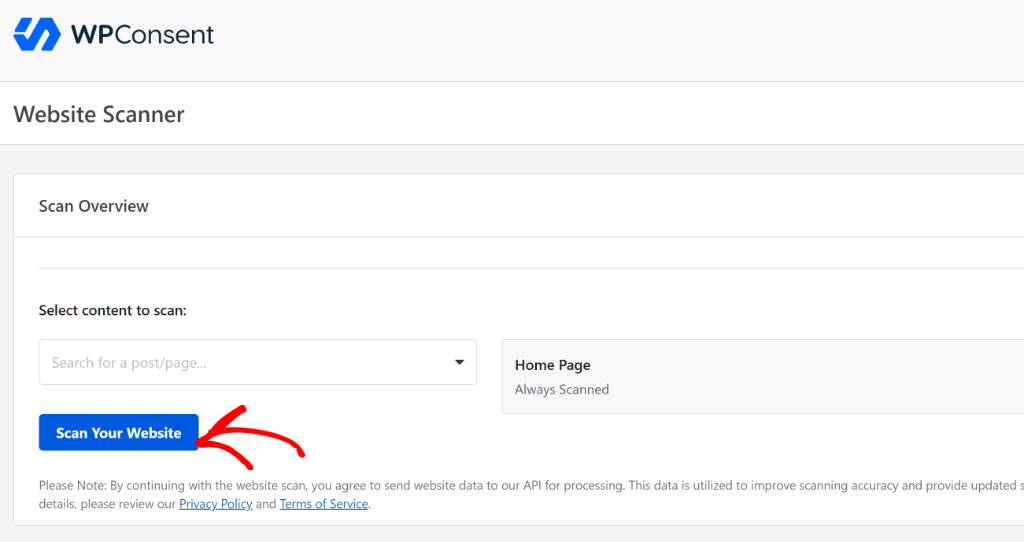
What I really liked about WPConsent is how easy it is to use. It removes the complexity of scanning your site for cookies and configuring them manually. The plugin automatically blocks scripts for Google Analytics, Facebook pixel, WooCommerce, Comments, and more.
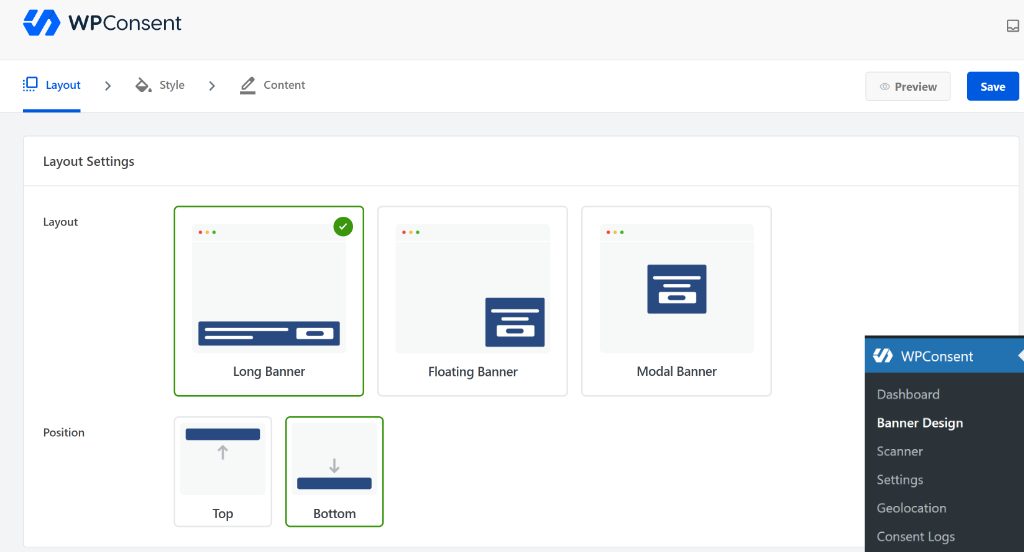
Another feature that sets WPConsent apart from the rest is its customizable cookie consent banners.
You can choose from prebuilt layouts, choose its position, edit the look and feel, and change the message shown in the banner.
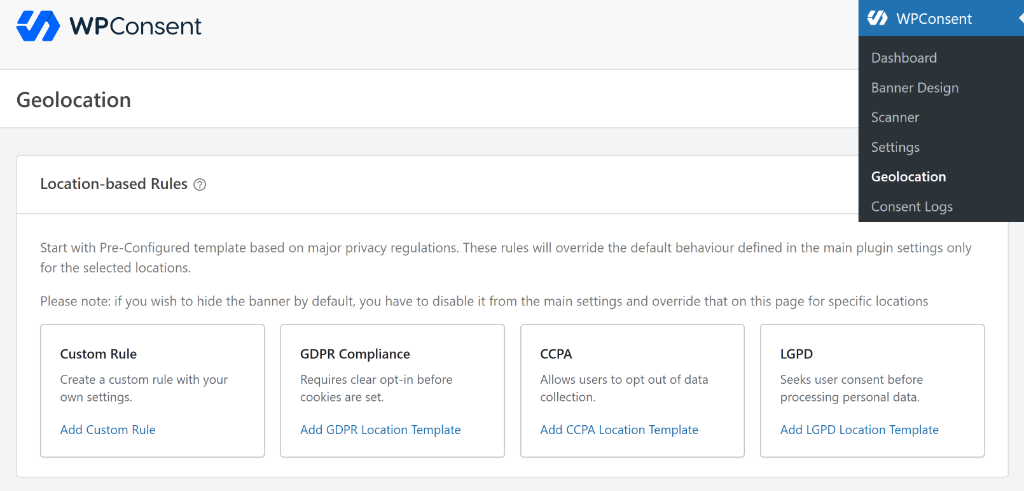
Besides that, WPConsent offers geolocation rules for your cookie banner, with built-in templates for major privacy laws like GDPR, CCPA, and LGPD.
You can also create custom rules for different regions, select whether to set up an opt-in or opt-out, edit the text in the cookie banner, and more.
Another factor that puts WPConsent above other plugins on this list is its AI-powered auto translations. The plugin supports over 70 different languages, which allows you to show cookie banner text in your visitors’ native language.
The best part is that this intelligent translation happens in the background while you simply navigate through your website settings. Unlike other solutions that force you to manually translate every single field, the AI does all the heavy lifting for you.
Why We Recommend It: Most cookie consent plugins use a SaaS model where your visitor consent data is stored on their servers. WPConsent takes a different approach, as everything stays on your WordPress installation. This means better privacy for your visitors, no dependency on external services, and no pageview limits forcing you into expensive upgrades. Learn more about why self-hosted GDPR plugins are better.
Key Features:
- Customizable cookie banners with multiple layouts and positions
- Automatic script blocking for Google Analytics, Facebook Pixel, and more
- Built-in compliance scanner that detects cookies and services on your site
- AI-powered automatic translations (70+ languages supported)
- Google Consent Mode v2 support for accurate analytics
- Smart content blocking for YouTube, Vimeo, and Google Maps embeds
- IAB TCF verified for advertising compliance
- Geolocation-based banner display with built-in rules
- Block custom scripts and iframes
Ratings: WPConsent has a 4.8/5 rating on WordPress.org with over 100,000 active installations. Users consistently praise its WordPress native approach and the credibility of having the WPBeginner team behind it.
Pros:
- Self-hosted – consent data never leaves your server
- No pageview limits or surprise pricing
- WordPress-native design (not a generic SaaS widget)
- Backed by the trusted WPBeginner team
- IAB TCF verified
- Robust free version
Cons:
- Requires WordPress (not for non-WP sites)
Pricing: Free version includes all essential features. Pro version available for advanced customization and priority support, with prices starting from $49.50/year.
Best For: WordPress site owners who want complete control over their consent data and prefer a self-hosted solution over SaaS dependencies. Plus, its geolocation rules and AI-powered translation make it the best solution for cookie consent.
Get Started with WPConsent → Free version available, no credit card required.
2. CookieYes – Best for Multilingual Sites
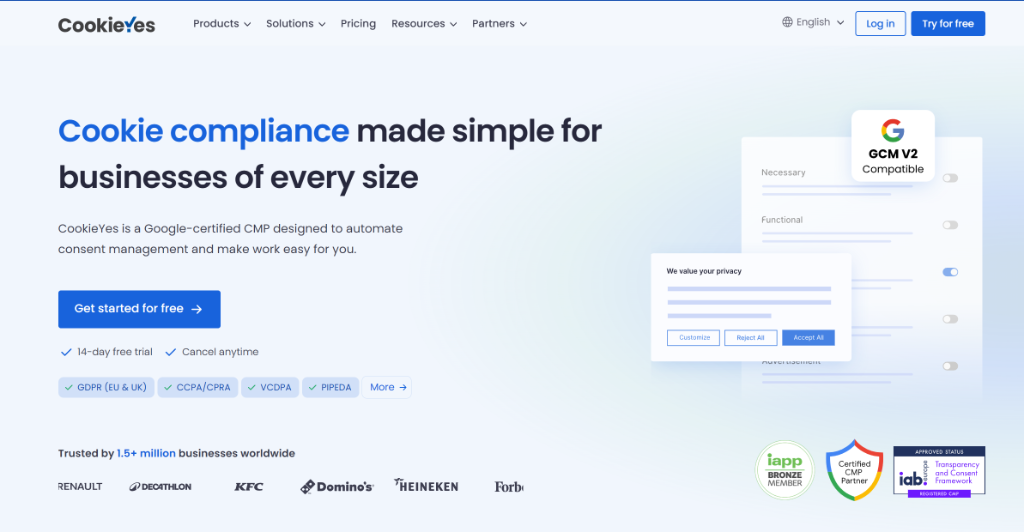
CookieYes is one of the most popular cookie consent plugins for WordPress, with over 1.5 million active installations. It uses a SaaS model with cloud-based consent storage and offers extensive language support.
While testing, I was really impressed with its multilingual support. You can choose from over 40 different languages and use the auto-translate feature to convert the text in the cookie consent banner to your visitors’ native language.
Besides that, I found that it offers pre-built templates for the cookie consent banner. You can also customize different sections of the banner, like the cookie notice appearance or preference center details.
Why It’s a Good Option: If you serve visitors in many different languages, CookieYes auto-translates your cookie banner into 40+ languages. This saves significant time compared to manually translating consent text.
Key Features:
- Automatic cookie scanning and categorization
- Google Consent Mode v2 integration
- 40+ language auto-translations
- Preference center for granular consent
- WCAG/ADA accessibility compliance
- Built-in cookie and privacy policy generators
- Revisit the consent button
Ratings: CookieYes maintains a 4.8/5 rating from over 3,181 reviews on WordPress.org and 4.8/5 from 273 reviews on Trustpilot. Users praise its customer support and ease of setup.
Pros:
- Massive user base proves reliability
- Excellent multilingual support (40+ languages)
- Strong accessibility compliance
- Good free tier for small sites
- Fast, responsive support
Cons:
- SaaS model means data is stored externally
- Pageview limits on free and lower tiers
- Premium features require a subscription
Pricing: Free version available with limits. Premium starts at $10/month/domain.
Best For: Multilingual websites that need automatic translation of consent banners.
3. Complianz – Best for Multi-Region Compliance
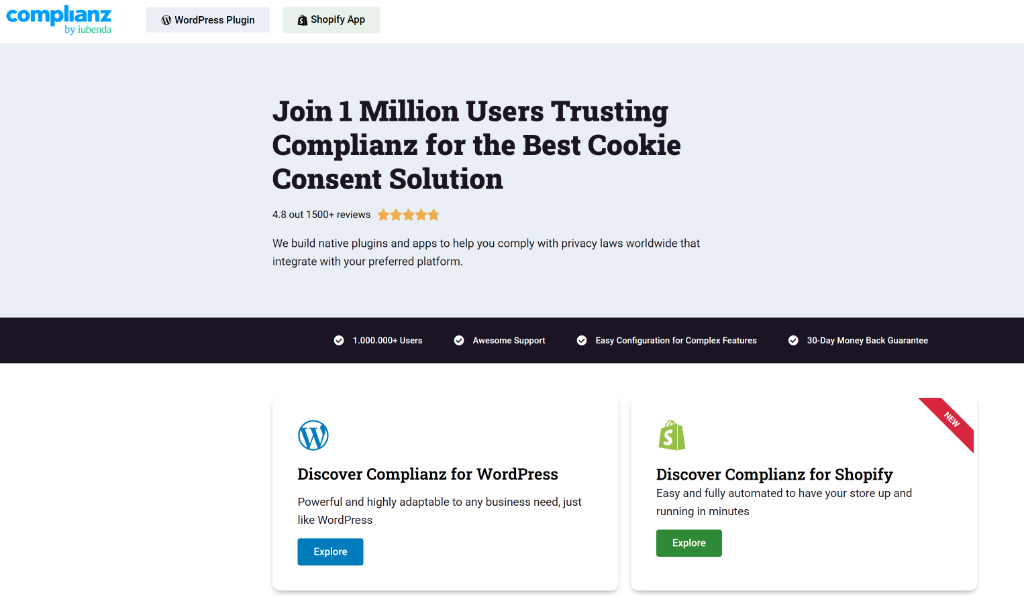
Complianz is a comprehensive WordPress cookie consent plugin with over 1 million downloads. It’s known for its wizard-based setup and extensive coverage of privacy regulations across different regions.
During the setup process, I liked the question-answer-based setup process. The plugin also automatically changes the questions and settings based on the default privacy law setting you use for your site. However, it can be complicated and overwhelming for beginners, who need to answer different privacy based question.
Another feature that caught our eye was document creation capabilities. Besides a cookie policy, Complianz also allows you to add a privacy statement, imprint, and a disclaimer across your website.
Why It’s a Good Option: If you serve visitors from multiple countries, create different privacy documents, and need to comply with different regional laws (GDPR in the EU, CCPA in California, LGPD in Brazil), Complianz handles this automatically with geolocation detection.
Key Features:
- Region-specific consent notices (EU, UK, US, Canada, Australia, Brazil, South Africa)
- Automatic visitor location detection
- Wizard-based Cookie Policy generator
- Script Center for granular cookie control
- Third-party blocking for Google Maps, Facebook, and YouTube
- WCAG Level AA and ADA compliant
- Integrations with WooCommerce, Elementor, WPForms
Ratings: Complianz has a 4.8/5 rating from 1,590 reviews on WordPress.org. Users appreciate the detailed wizard that guides them through setup.
Pros:
- Comprehensive multi-region coverage
- Wizard walks you through the setup
- Automatic geolocation-based banners
- Strong integration ecosystem
- Active development
Cons:
- Can feel complex for simple sites
- Many settings to configure
- Premium required for A/B testing and some geo features
Pricing: Free version available. Premium starts at $59/year.
Best For: International websites serving visitors from multiple countries with different privacy laws and privacy document creation.
4. Cookie Notice & Compliance – Best for Simple Setup

Cookie Notice & Compliance for GDPR/CCPA is one of the oldest cookie plugins, with over 1 million downloads. It offers a straightforward approach to adding a cookie consent banner in WordPress.
Unlike other plugins on our list, Cookie Notice doesn’t offer pre-built layouts to choose from. You can simply change the message in the cookie notice, edit the button text, enable privacy policy, and select the position, animation, and color of the banner.
One thing I noticed while testing the plugin is that it also offers a fully featured Consent Management Platform (CMP) called Cookie Compliance. It offers advanced features like automatic script blocking, Google Consent Mode, and a default configuration for GDPR and CCPA. However, it is included in its paid plans.
Why It’s a Good Option: If you want a simple, no-fuss cookie banner that just works, Cookie Notice delivers. It’s been around since 2013 and has a proven track record.
Key Features:
- Customizable consent banner message
- Multiple consent triggers (click, scroll, close)
- Privacy Policy page linking
- WPML and Polylang compatible
- Consent per category (with compliance add-on)
- Google and Facebook Consent Mode
- 31 languages supported
Ratings: Cookie Notice has a 4.8/5 rating from 3,020 reviews on WordPress.org.
Pros:
- Very simple to set up
- Lightweight performance
- Long track record (since 2013)
- Large user community
- Good free version
Cons:
- Advanced features require a separate compliance add-on
- Dashboard notifications can be excessive
- Some plugin compatibility issues have been reported
Pricing: Free cookie consent plugin with optional Cookie Compliance web app for advanced features.
Best For: Simple WordPress sites that need a basic, reliable cookie banner without complexity.
5. GDPR Cookie Compliance – Best for Local Data Storage
GDPR Cookie Compliance by Moove Agency is a privacy-focused plugin that stores all consent data locally on your WordPress installation, similar to WPConsent’s approach.
I really liked how easy to use the plugin was while testing. Although it doesn’t offer advanced customization features or automatic script blocking, the free plugin is great for setting up a basic cookie banner.
Why It’s a Good Option: Like WPConsent, this plugin keeps all user data on your server rather than sending it to external services. If local data storage is a priority, but you want an alternative option, this is worth considering.
Key Features:
- Local data storage (no external servers)
- Google Consent Mode v2 support
- 22 languages included
- WCAG & ADA compliant
- GTM, Google Analytics, and Meta Pixel integration
- Compatible with all major caching plugins
- Customizable design (logo, colors, fonts)
Ratings: GDPR Cookie Compliance has a 4.6/5 rating from 204 reviews.
Pros:
- Local data storage
- Simple, quick setup
- Good free version
- Works with major caching plugins
- Developer-friendly
Cons:
- Smaller user base than competitors
- Fewer reviews to reference
- Less comprehensive than some alternatives
Pricing: Free version with optional premium add-on.
Best For: Users who want local data storage but are looking for alternatives to WPConsent.
6. Real Cookie Banner – Best for German Market

Real Cookie Banner is a German-developed plugin with a strong focus on DSGVO (German GDPR) compliance. It has the highest rating of any cookie plugin on WordPress.org at 4.9/5.
While testing, I found that it offers an automatic cookie scanner. This was interesting because most SaaS based tools on our list included this feature in their premium plans.
On the downside, the plugin has a lot of settings, but it can be overwhelming for beginners. I experienced this while using the Real Cookie Banner plugin to configure cookies on my test site. Once the plugin had scanned for all the scripts, I had to individually set them up and ensure the information about the service was accurate. This was a time-consuming and complicated process.
Why It’s a Good Option: If your primary audience is in Germany or German-speaking countries, Real Cookie Banner is built specifically with DSGVO compliance in mind. It’s also excellent for developers with its comprehensive API.
Key Features:
- 160+ service templates (PRO)
- Content blocker for scripts and embeds
- 200+ design customization options
- WCAG 2.2 Level AA compliant
- Automatic service scanner
- 17+ EU languages with human translations
- TCF support (PRO)
- Developer-friendly API
Ratings: Real Cookie Banner has an impressive 4.9/5 rating from 480 reviews.
Pros:
- Highest rated cookie plugin (4.9/5)
- Excellent German/DSGVO compliance
- Great documentation
- Developer-friendly with full API
- Fast, competent support
Cons:
- German market focus may not suit all users
- Best features require the PRO version
- Smaller English-speaking community
- Complicated and time-consuming configuration process
Pricing: Free version available. PRO for advanced features.
Best For: German websites or developers who need extensive customization via API.
Our Recommendation – Best Cookie Consent Plugin
After testing and comparing multiple plugins, the best WordPress cookie consent plugin is WPConsent.
Here’s why I recommend it over the other options:
- Self-hosted data storage – Your consent data stays on your server, not external SaaS platforms
- No pageview limits – Unlike CookieYes and other SaaS options, you won’t face surprise upgrade requirements
- Transparent pricing – No hidden fees or sudden price increases
- WordPress-native – Built specifically for WordPress, not a generic widget
- Robust free version – More features in free tier than most competitors’ paid plans
- Trusted team – Backed by WPBeginner, a name millions of WordPress users trust
- IAB TCF verified – Advertising compliance built in
Other Options Worth Considering
If WPConsent isn’t the right fit for your specific situation, then here are some options worth considering:
- Complianz – A solid choice if you need extensive multi-region compliance with automatic geolocation detection across many countries, and need help creating privacy documents.
- CookieYes – Worth considering if you need auto-translation into 40+ languages and don’t mind the SaaS model.
FAQs About Cookie Consent Plugins
1. What is a cookie consent plugin?
A cookie consent plugin displays a banner or pop-up on your WordPress site asking visitors for permission before you track them with cookies. This is required by privacy laws like GDPR (Europe), CCPA (California), and others. The plugin typically blocks tracking scripts until the visitor consents.
2. Do I need a cookie consent plugin?
If your website uses cookies for analytics, advertising, or any tracking, and you have visitors from Europe, California, or other regions with privacy laws, then yes, you legally need cookie consent. Even if you only use Google Analytics, you need consent from EU visitors under GDPR.
3. What’s the best free WordPress cookie consent plugin?
WPConsent offers the best free cookie consent plugin for WordPress. Unlike other “freemium” options that limit pageviews or lock essential features behind paywalls, WPConsent’s free version includes self-hosted data storage, automatic script blocking, Google Consent Mode v2, and a compliance scanner, all with no pageview limits.
4. Is cookie consent required by law?
Yes, in many regions. GDPR requires consent for non-essential cookies in the EU and UK. CCPA requires disclosure and opt-out options in California. Similar laws exist in Brazil (LGPD), Canada (PIPEDA), and many other countries. The specific requirements vary by region, which is why geolocation features are valuable.
5. What’s the difference between self-hosted and SaaS cookie consent?
Self-hosted plugins like WPConsent store consent data on your own WordPress server. You have full control, no external dependencies, and better privacy for visitors.
SaaS plugins like CookieYes store consent data on the provider’s servers. Setup may be easier, but your data leaves your server, you may face pageview limits, and you depend on their service availability.
6. How do I set up a cookie consent plugin?
- Install and activate the plugin from your WordPress dashboard
- Configure your banner design and message
- Set up cookie categories (necessary, analytics, marketing, etc.)
- Add scripts to the appropriate categories for blocking
- Test that scripts are blocked until consent is given
- Publish and monitor compliance
Most plugins like WPConsent include a setup wizard that walks you through these steps.
I hope this article helped you learn about the WordPress cookie consent plugins. You may also want to see our guides on how to set up Microsoft Clarity consent mode in WordPress and how to allow users to manage consent by services in WordPress.
If you liked this article, then please follow us on X (formerly known as Twitter). You can also leave a comment below if you need any assistance.