If you own a website today, then you know that data privacy regulations like GDPR, CCPA, and ePrivacy are not optional. They are a fundamental part of doing business online. Every site owner needs a strategy to handle user consent transparently and legally.
However, when it comes to implementing that necessary cookie consent banner, many WordPress users default to the first cloud-based SaaS (Software as a Service) platform they find.
While these external tools might seem convenient at first glance, they often come with hidden downsides regarding data ownership and reliance on third-party servers. Not to mention the unpredictable pricing models, where you’re charged based on pageviews or sessions.
In this post, I will explore why to use a self-hosted GDPR plugin for WordPress and why it is the superior choice for website owners who value data sovereignty and total control.
Self-Hosted Plugin vs. SaaS: What is the Difference?
Before diving into the specific benefits, it is crucial to understand the difference between these two types of solutions. While they both result in a cookie banner appearing on your WordPress website, what happens ‘under the hood’ is very different.
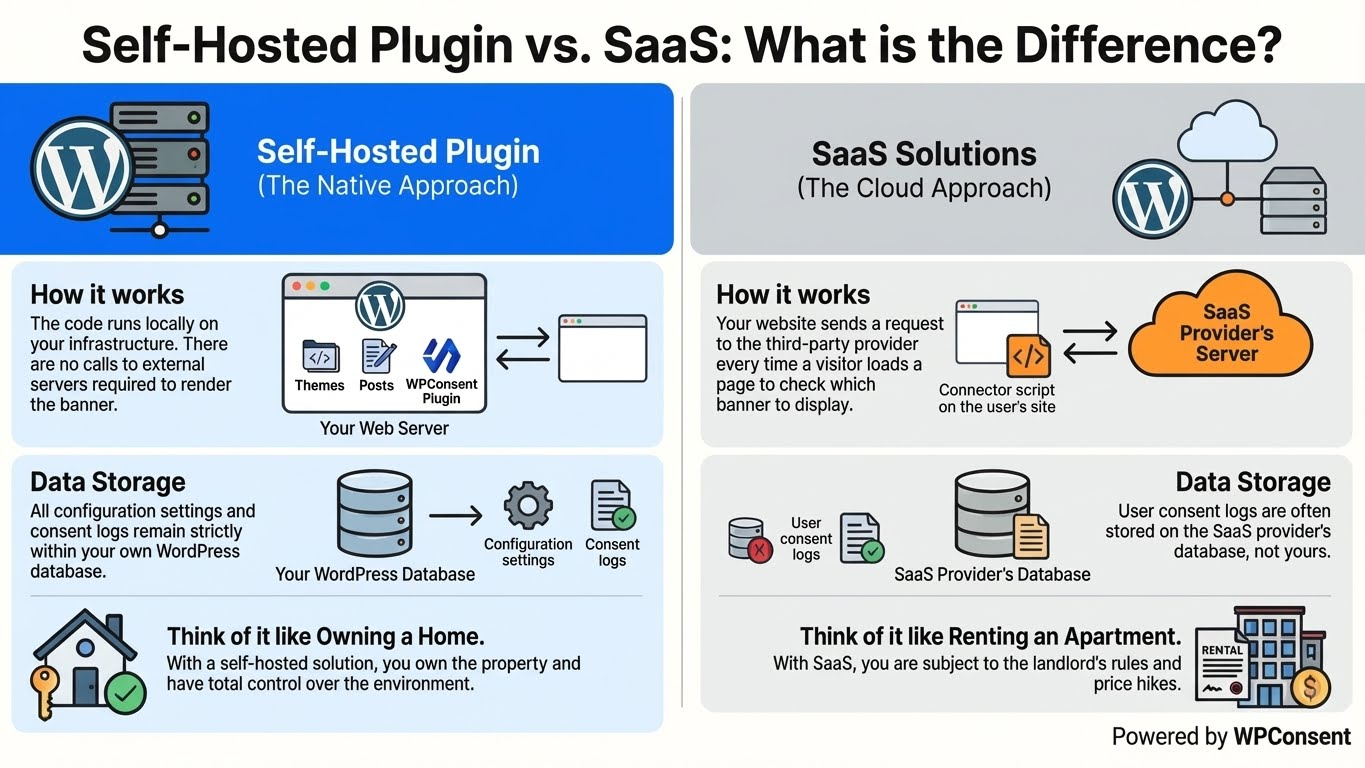
Self-Hosted Plugin (The Native Approach): A self-hosted plugin, operates entirely within your WordPress installation. It is a plugin that lives on your WordPress database alongside your themes and posts. This helps keep your sensitive data safe and removes the risk of relying on a third-party provider.
- How it works: The code runs locally on your infrastructure. There are no calls to external servers required to render the banner.
- Data Storage: All configuration settings and consent logs remain strictly within your own WordPress database.
SaaS Solutions (The Cloud Approach): When you use a SaaS (Software as a Service) platform, you are essentially renting the functionality. You install a small connector plugin or add a script to your site, but the actual consent management logic lives on the provider’s external servers (the cloud).
- How it works: Your website sends a request to the third-party provider every time a visitor loads a page to check which banner to display.
- Data Storage: User consent logs are often stored on the SaaS provider’s database, not yours.
Think of it like the difference between renting an apartment and owning a home. With SaaS, you are subject to the landlord’s rules and price hikes. With a self-hosted solution, you own the property and have total control over the environment.
Benefits of Using a Self-Hosted GDPR Plugin
Once you understand the difference in architecture, the benefits of keeping your compliance solution “in-house” become clear.
Here are the three most compelling reasons to switch to a self-hosted WordPress plugin:
1. Total Data Control and Privacy
The irony of many GDPR solutions is that to comply with data privacy laws, they require you to share your visitors’ data with yet another third-party vendor.
When you use a SaaS platform, your compliance data (who consented, when, and from what IP) is often transmitted to and stored on their cloud servers.
With a self-hosted plugin, you achieve ‘Data Sovereignty.’
- Zero Data Leakage: Consent logs never leave your server.
- Reduced Liability: You don’t have to worry about the security protocols of a third-party vendor or where in the world their servers are located.
- Full Ownership: You are the sole custodian of your users’ choices.
2. Cost-Effectiveness and Predictability
One of the biggest frustrations with SaaS compliance tools is their pricing model.
Most charge based on page views, sessions, or the number of sub-pages scanned. This creates a tax on success, as your traffic grows, your compliance bill skyrockets.
Self-hosted WordPress plugins typically operate on a flat yearly license fee.
This predictability allows you to scale your marketing and traffic without worrying about hitting a hidden tier limit on your cookie banner subscription.
3. Reliability and Independence
SaaS platforms are generally reliable, but they are not immune to outages. If your third-party provider experiences a server crash or a DNS issue, your cookie banner could fail to load. This leaves your site vulnerable to non-compliance exactly when you have visitors.
A self-hosted plugin is strictly tied to your WordPress installation.
- No External Dependencies: You are not relying on an outside API to keep your site legal.
- Uptime Consistency: As long as your website is online, your compliance tools are online.
That said, let’s look at the best self-hosted GDPR plugin for WordPress you can use for your website.
Which Self-Hosted GDPR Plugin is the Best?
Now that we have established why self-hosting is the smarter choice, the question remains: which plugin should you trust?
And the simple answer is: WPConsent.
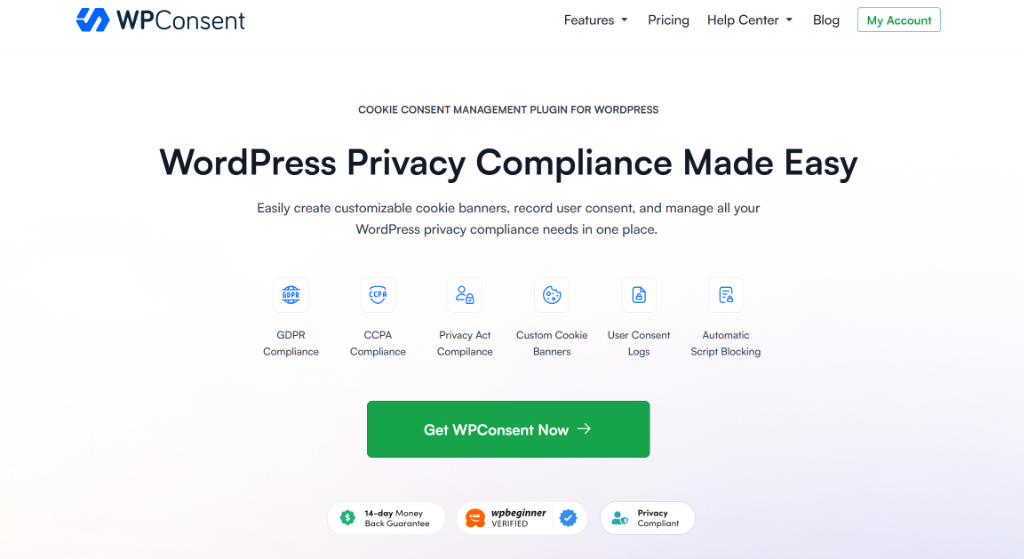
It is the best WordPress cookie consent management plugin that is beginner-friendly to use and offers powerful features. With WPConsent, you can create customizable cookie banners, manage user consent records, handle Do Not Track requests, add a cookie policy, and more.
And the best part, it is a complete self-hosted solution that gives you complete control over managing cookie consent on your site. When you install the plugin, it is self-hosting on your site. This makes it a complete privacy compliant solution.
Here’s why over 100,000 websites trust WPConsent with cookie compliance for their WordPress site.
1. Automatic Script Blocking
What makes WPConsent so powerful is that it automatically scans your site for popular and known scripts that are adding cookies to your website and prevents them from loading before consent. For example, these might include Google Analytics, WooCommerce, WordPress comments, and more.
If you were to manually do this, then it would a lot of time and effort. But with WPConsent, you can see which services are adding cookies in just a few seconds.
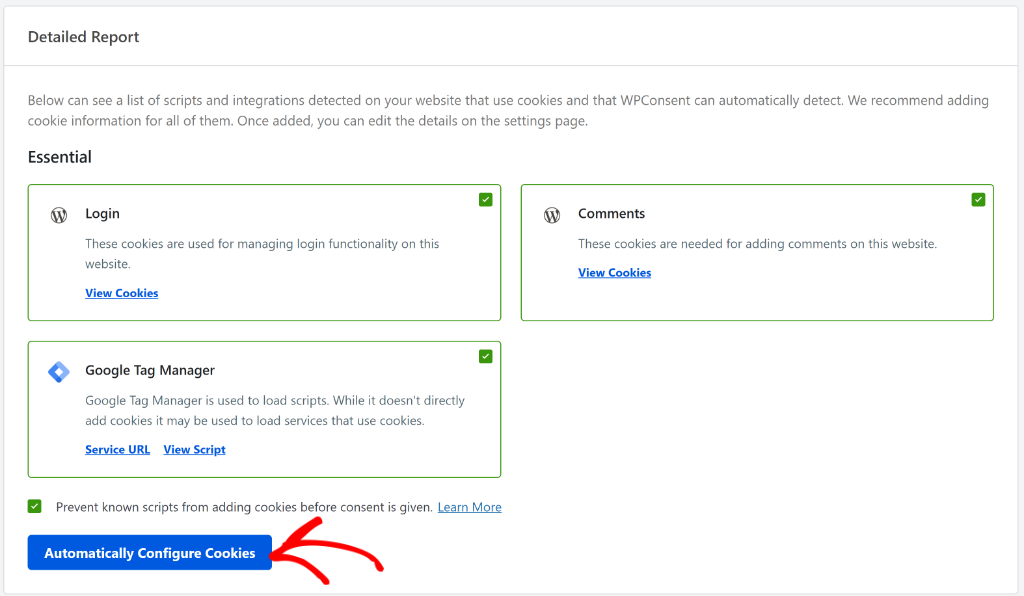
WPConsent also makes it super easy to configure cookie information on your site. You can find all the details in our tutorial on how to block third-party cookies in WordPress.
2. Pre-configured Location Based Rules
With WPConsent, you get a geolocation feature that offers templates for popular privacy regulations, including GDPR.
By simply selecting a template, you get to set up location-based cookie consent settings and show a customized banner to visitors from different locations.
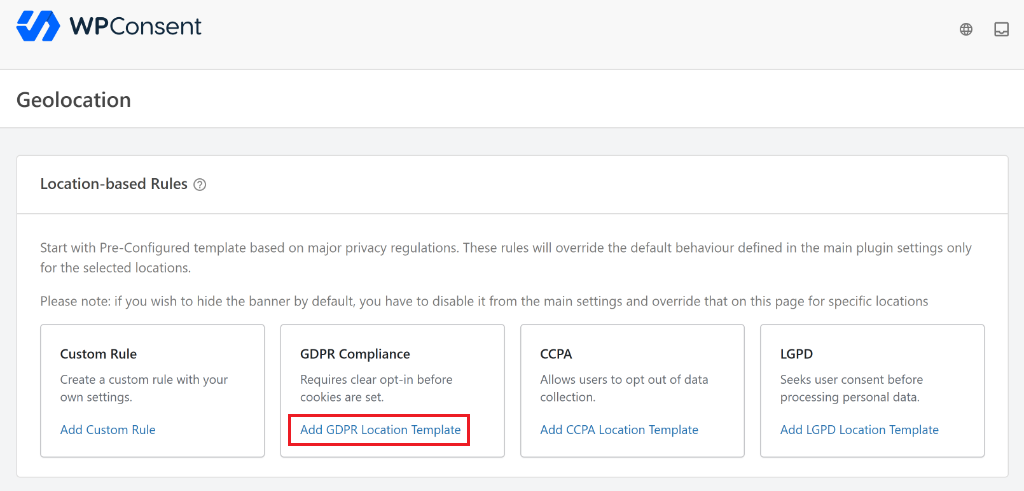
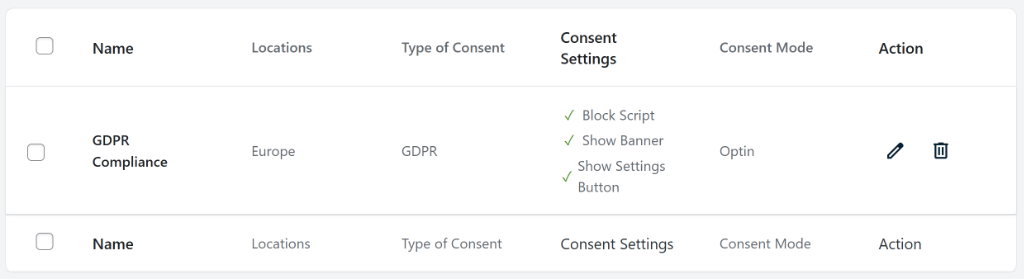
Once you select a template, you’ll see the location based rule added to your site.
For instance, WPConsent will add the location, type of content, consent settings, and consent mode for the template. In this case, the location will be set to Europe for GDPR and consent mode set to ‘Optin’ for the required privacy law.
You can find more details by following our guide on how to set up location-based cookie consent in WordPress.
3. Secure Compliance Logging
All WPConsent data is stored right on your own servers, guaranteeing you maximum privacy and data security.
Plus, you can also easily access consent logs from your WordPress dashboard using WPConsent.
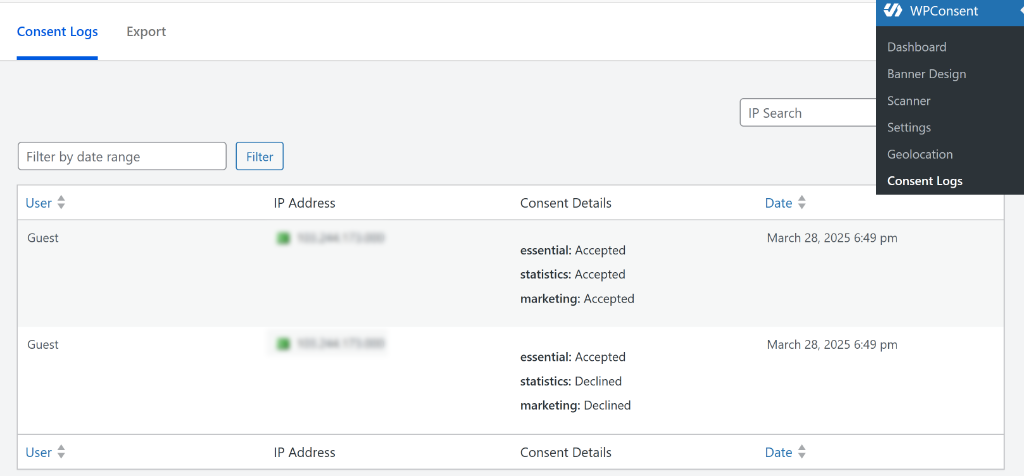
If you are ever audited, you have immediate access to your records without needing to request data exports from a third-party vendor.
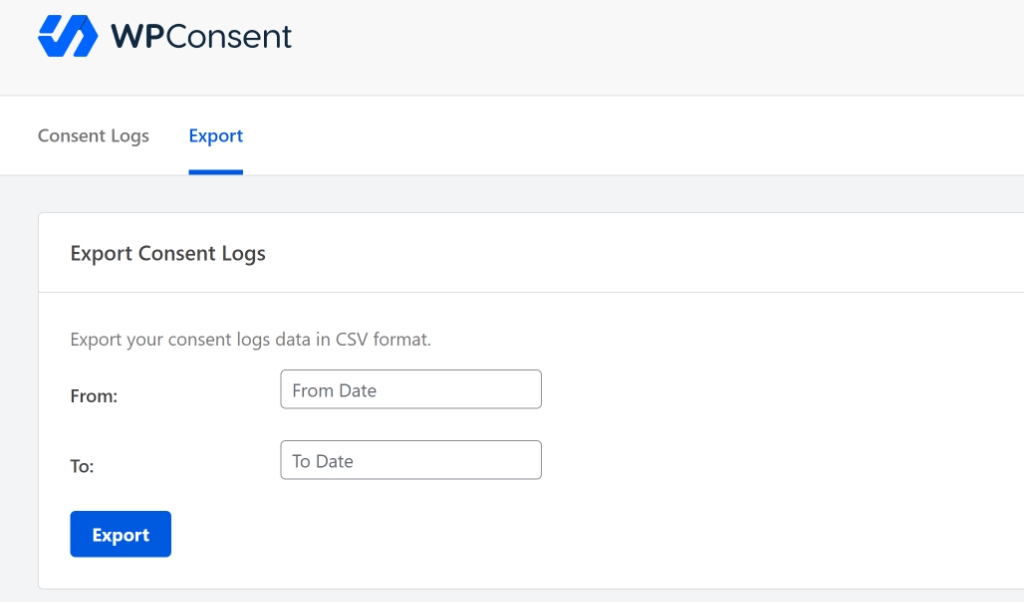
WPConsent also makes it super easy to export the consent logs. Simply select a date range and export the logs as a CSV file.
To learn more, please see our guide on how to manage cookie consent data in WordPress.
4. Customize Cookie Consent Banner
WPConsent comes with pre-built cookie consent banner templates. This gives you the flexibility to create a long banner, floating banner, or a popup banner for your site.
Depending on the banner layout you choose, WPConsent also lets you change its position.
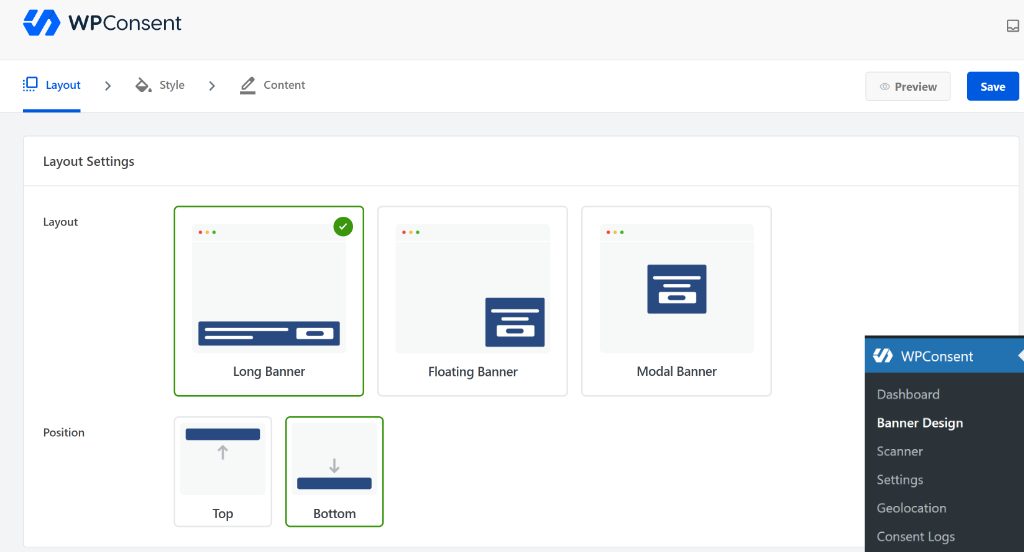
Besides that, you get complete control over the style and appearance of your cookie consent banner.
You can change its background color, text color, button style, and more. Plus, WPConsent lets you edit the banner text that will appear for your visitors.
By default, it will already come with content, but you can change that without the hassle of editing your theme files.
For more information, please see our guide on how to easily add a cookie consent banner to your WordPress website.
5. No Pay Per Pageviews or Sessions
Consistent with the self-hosted philosophy, WPConsent does not penalize you for growth.
You get full functionality regardless of how many page views or unique visitors your site generates.
Usually, a SaaS platform will charge you a fee based on the number of pageviews or sessions you get on your site. This can be costly, especially for small businesses.
However, with WPConsent, you don’t have to worry about that at all. WPConsent offers powerful features at fixed prices that’s billed annually. Plus, you get to choose from 4 different pricing plans, so you can select the best plan for your website.
And to top it off, there is also a WPConsent Lite version available for free. It helps you get started by setting up a cookie consent banner, scanning for third party scripts, and more.
FAQs About Self-Hosted GDPR Plugin
1. What are the main differences between self-hosted GDPR plugins and SaaS solutions for WordPress cookie compliance?
Self-hosted GDPR plugins operate entirely within your WordPress installation, storing data locally on your server, which provides greater control and privacy. In contrast, SaaS solutions rely on external servers, with the compliance logic and data stored in the cloud, leading to dependency on third-party providers.
2. Why should I choose a self-hosted GDPR plugin over a SaaS platform for my WordPress site?
A self-hosted GDPR plugin offers increased data control and privacy, cost predictability, and greater reliability since it depends solely on your website’s infrastructure, reducing risks related to data leaks, unexpected costs, and third-party outages.
3. What are the key benefits of using WPConsent as a self-hosted GDPR plugin?
WPConsent provides automatic script blocking, location-based cookie consent rules, secure compliance logging, customizable banners, and no pay-per-pageview charges, giving full control over data privacy, compliance, and site appearance, all hosted on your own server.
I hope this article helped you learn why use a self-hosted GDPR plugin for WordPress. You may also want to see our guides on how to set up Google Consent V2 Mode in WordPress and a guide to LGPD compliance for WordPress sites.
If you liked this article, then please follow us on X (formerly known as Twitter). You can also leave a comment below if you need any assistance.