For the past few months, our team has gotten emails from WordPress users asking about the ePrivacy Directive.
Most people know about GDPR at this point, but the ePrivacy Directive is the regulation that specifically tells you what to do about cookies.
The confusion is understandable. There are multiple EU privacy laws that all seem to overlap, and the names don’t help.
But here’s what you need to know: if you have visitors from Europe and you use any kind of tracking on your site, the ePrivacy Directive applies to you. And understanding what it requires isn’t as complicated as the legal jargon makes it sound.
In this article, I’ll show you what the ePrivacy Directive is and what WordPress owners need to know. You can use the links below to jump ahead to your preferred section.
Disclaimer: Please note that this guide is for informational purposes only. Nothing on this website should be taken as legal advice.
What is the ePrivacy Directive?
The ePrivacy Directive is an EU law from 2002, updated in 2009, that specifically governs electronic communications. While GDPR covers personal data broadly, ePrivacy focuses on things like cookies, email marketing, and the confidentiality of communications.
When people talk about “the cookie law,” this is what they mean. The ePrivacy Directive is the regulation that says you can’t just drop tracking cookies on someone’s browser without asking first. It’s why every website you visit now has a cookie banner.
The reason both GDPR and ePrivacy apply to cookies is that they approach the same issue from different angles. GDPR says you need a legal basis to process personal data, and tracking cookies collect personal data.
ePrivacy says you need consent before storing or accessing information on someone’s device, which is exactly what cookies do. So both laws apply, and complying with one doesn’t automatically mean you’re compliant with the other.
Now, let’s look at the difference between the ePrivacy Directive and GDPR.
How the ePrivacy Directive Differs from GDPR
The relationship between these two laws is confusing to many people, so let’s clarify.
GDPR is a regulation, which means it applies directly across all EU member states in the same way. ePrivacy is a directive, which means each EU country implements it through its own national law.
That’s why you might hear about CNIL in France, TTDSG in Germany, or the Garante in Italy. They’re all implementing the ePrivacy Directive, but with some local variations.
The practical result is that while the core requirement, consent before non-essential cookies, is the same everywhere, enforcement and specific interpretations vary by country.
France has been particularly aggressive about enforcing cookie rules. Germany requires very explicit consent. The Netherlands has strong enforcement. If your site has visitors from multiple EU countries, aiming for the strictest interpretation keeps you safe everywhere.
What the ePrivacy Directive Requires for Your Website
The core requirement is straightforward: before you set any non-essential cookies on a visitor’s device, you need their consent.
And consent under ePrivacy means the same thing it means under GDPR. Someone has to actively agree. They have to know what they’re agreeing to. And they have to be able to change their mind later.
This means a few things that you’ll need on your site:
- Does Your Site use Cookies? You need to show visitors a clear explanation of what cookies you use and why. This is where displaying a cookie policy comes in handy.
- Can Users Accept/Reject Cookies? You need to give them a real choice, where accepting and rejecting are equally easy.
- Can You Block Non-essential Cookies Before Consent? This is the part many sites get wrong. You need to actually block non-essential cookies from running until someone consents. Just showing a banner while your analytics and marketing tools are already tracking isn’t compliant.
On the other hand, there are exceptions. Strictly necessary cookies don’t require consent because your site can’t function without them. If someone puts something in a shopping cart, you need a cookie to remember that.
Similarly, if someone logs in, you need a cookie to keep them logged in. These essential cookies are fine without consent. But the moment you add Google Analytics, Facebook Pixel, or any third-party tracking, those require consent before they can run.
Now, let’s look at how you can comply with the ePrivacy Directive in WordPress.
Make Your Site Comply with the ePrivacy Directive
If you’re running a WordPress site with EU visitors, here’s what you need to do.
You need some kind of cookie consent system in place. That means a banner or popup that appears when someone first visits, explaining that you use cookies and giving them a genuine choice to accept or reject. You also need to block your tracking scripts until consent is given.
Next, you need to let visitors change their minds. Usually, this means a link in your footer to access cookie preferences. If someone accepted cookies last week and now wants to withdraw that consent, they should be able to do so easily.
And you should keep records of consent. If a regulator ever asks how you’re handling consent, having documentation helps. Most consent tools handle this automatically.
Here’s how you can implement all this on your WordPress website.
1. Use a WordPress Cookie Management Plugin
The ePrivacy Directive requires that you give visitors clear information about cookies and obtain their consent before any non-essential cookies are placed. Managing this manually is error-prone, so you’ll want a plugin that handles the technical side automatically.
That’s why I recommend using WPConsent for this process. It is the best cookie consent management plugin for WordPress, handling consent management, cookie blocking, consent banners, consent logs, and more, all of which directly map to ePrivacy Directive requirements.
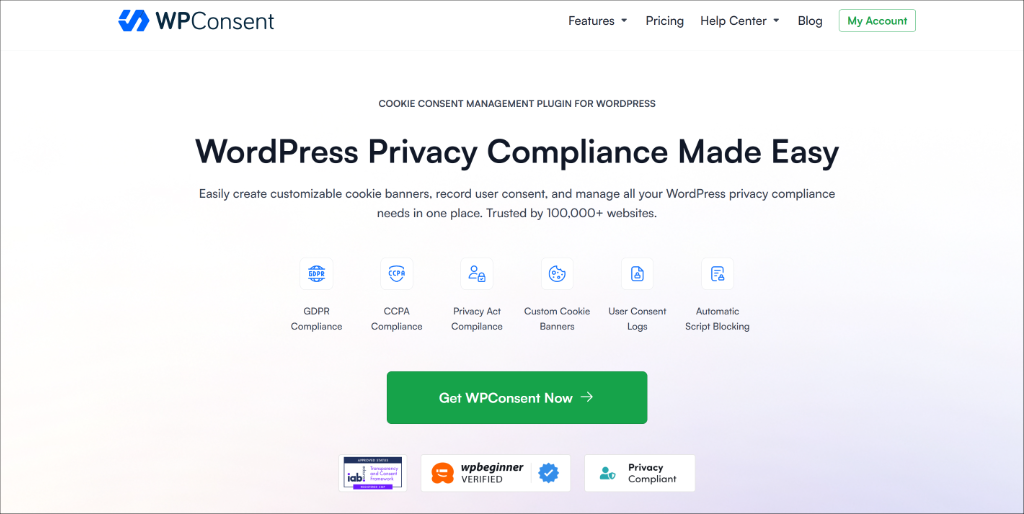
What makes WPConsent different from other SaaS cookie notice solutions is that it is a self-hosted WordPress cookie consent plugin. This means you keep full control over your data and can run it on unlimited pages or pageviews, unlike other cookie software that charges based on traffic volume.
The plugin is very easy to set up and use, offering a setup wizard that guides you through every step of configuration.
You can get started with WPConsent Pro, which includes advanced features like a pre-built service library, multilingual support, geolocation rules, and a Do Not Sell add-on. There is also a free WPConsent Lite version available.
2. Scan Your Site for Cookies and Tracking Scripts
Before you can comply with the ePrivacy Directive, you need to know exactly which cookies your site is setting. The Directive requires that you disclose this information to users before they consent, so an accurate cookie audit is a critical first step.
WPConsent includes a built-in scanner that automatically detects cookies and tracking scripts across your site. During the setup wizard, WPConsent will perform an initial scan. You can also run it manually by going to WPConsent » Scanner in your WordPress dashboard and clicking Scan Your Website.
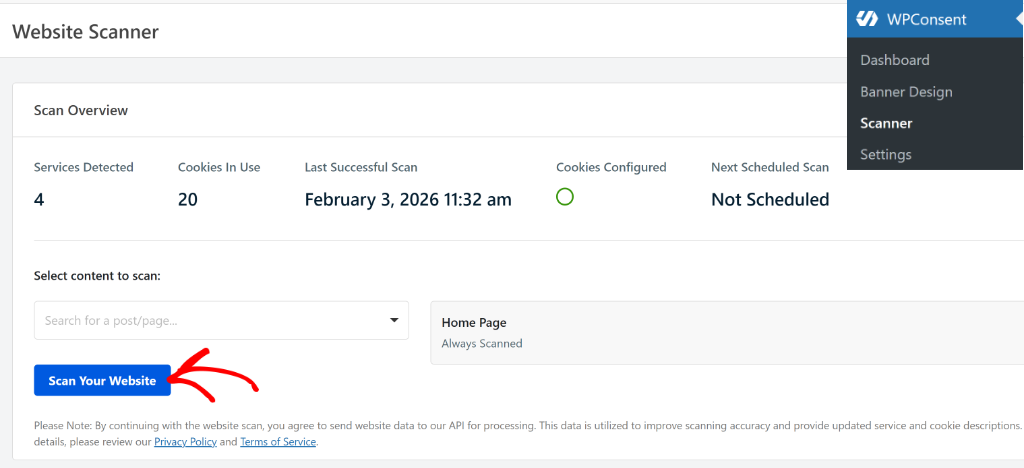
By default, the plugin scans your homepage, but you can select additional pages, such as your checkout page, contact page, or shopping cart, to make sure no cookies are missed.
Once the scan completes, you’ll see a detailed report with cookies organized by category. Under the ePrivacy Directive, this categorization is especially important:
- Essential Cookies — these are exempt from consent requirements, as they are essential for the site to function (like session cookies, shopping cart cookies).
- Statistics cookies — these require prior consent before being set (such as Google Analytics).
- Marketing cookies — these require prior, explicit consent before being set (like Facebook Pixel).
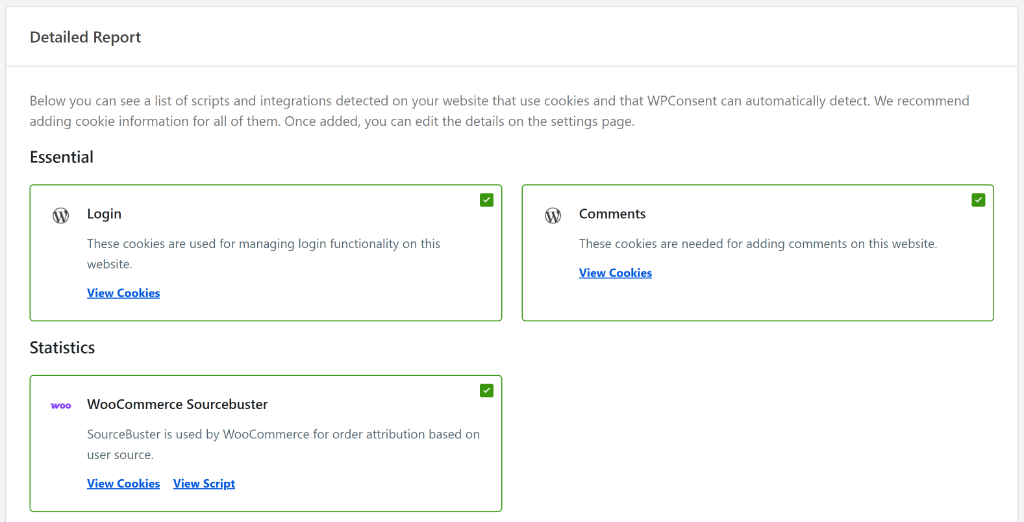
WPConsent automatically categorizes detected cookies into these groups, making it easy to see at a glance what requires consent.
3. Block Non-Essential Cookies From Loading Before Consent
This is the most critical technical requirement of the ePrivacy Directive: non-essential cookies must not be placed on a visitor’s device until they have actively given consent.
Pre-ticked boxes or implied consent are not sufficient. User consent must be a clear, affirmative action. WPConsent handles this automatically through its script blocking feature, which prevents non-essential scripts from loading until the visitor has explicitly consented.
Automatically Configure Cookie Blocking
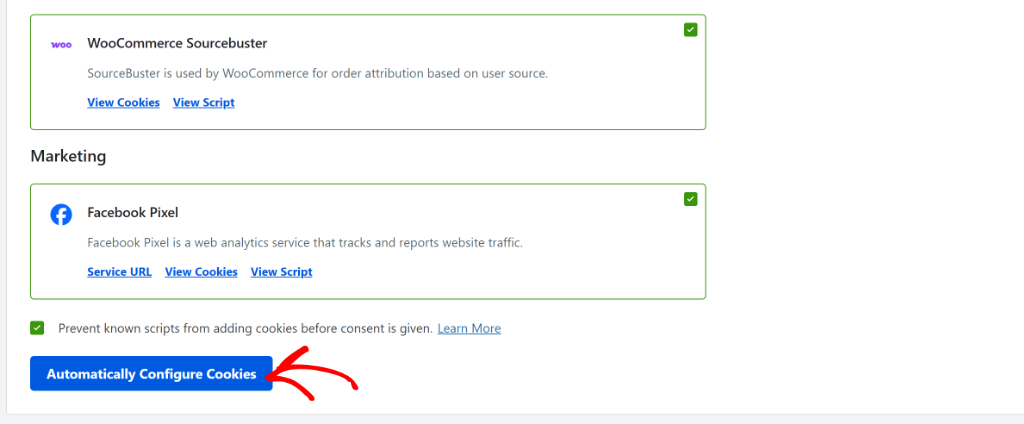
In the Detailed Report section, scroll to the bottom and make sure the “Prevent known scripts from adding cookies before consent is given” checkbox is ticked.
Then click the Automatically Configure Cookies button. This ensures that analytics, advertising, and other non-essential scripts are held back until consent is granted.
For more details, please see our guide on how to block third-party cookies in WordPress.
Block Embedded Content Before Consent
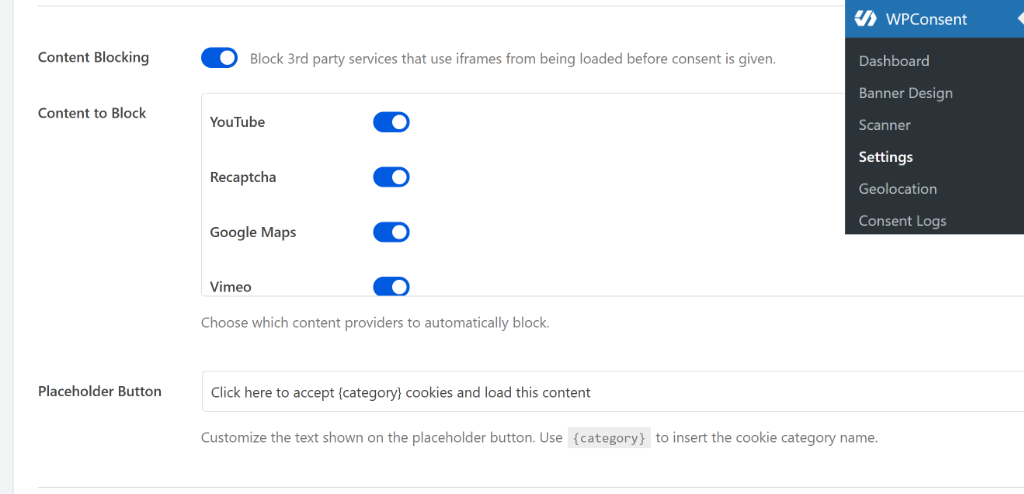
The ePrivacy Directive also applies to embedded third-party content such as YouTube videos, Google Maps, and reCAPTCHA, all of which can set cookies the moment they load.
WPConsent’s Content Blocking feature prevents these iframes from loading until a visitor gives consent. For example, a YouTube video will display a placeholder instead of loading, and will only play once the visitor clicks to accept or consents via the cookie banner.
4. Set Up a Cookie Consent Banner
- Consent must be freely given — refusing cookies must be just as easy as accepting them.
- Consent must be informed — visitors must know what they’re consenting to before agreeing.
- Consent must be specific — users should be able to accept or decline different categories of cookies separately.
- Consent must be a clear affirmative action — pre-ticked boxes or “consent by scrolling” are not valid.
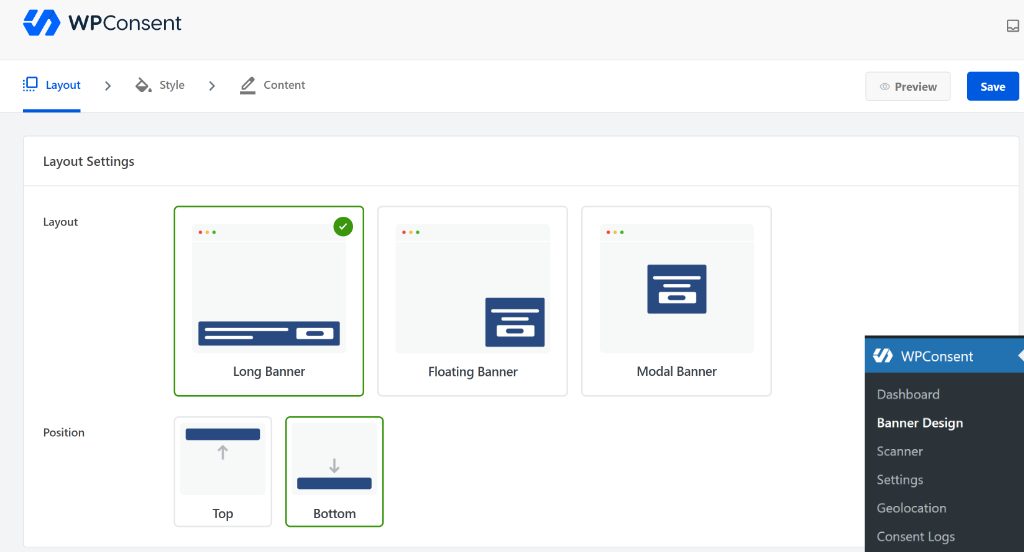
WPConsent makes it straightforward to build a banner that satisfies all of these requirements. It offers several pre-designed templates (long banner, floating banner, and modal banner) that you can position at the top or bottom of the page.
Critically, make sure your banner includes:
- A clear Accept button for all non-essential cookies.
- An equally prominent Reject or Decline button. This is a key ePrivacy requirement that many sites get wrong.
- A Manage Preferences option so visitors can consent to some cookie categories but not others.
You can customize the banner’s background color, text color, button styling, and messaging to match your site’s branding.
To learn more, please see our detailed guide on how to create a cookie consent banner in WordPress.
WPConsent also supports multi-language banners, which are especially useful if your site serves visitors from multiple countries. You can use the AI-powered auto translate feature to show the cookie banner and settings in your visitors’ native language.
5. Add a Cookie Policy Page
The ePrivacy Directive requires that you provide users with clear, accessible information about the cookies your site uses before they consent. A dedicated cookie policy page satisfies this requirement.
Your cookie policy should cover:
- What cookies your site uses and their names.
- The purpose of each cookie (strictly necessary, analytics, marketing, etc.).
- Whether the cookies are first-party or third-party.
- How long each cookie lasts (session vs. persistent).
- How users can withdraw their consent at any time.
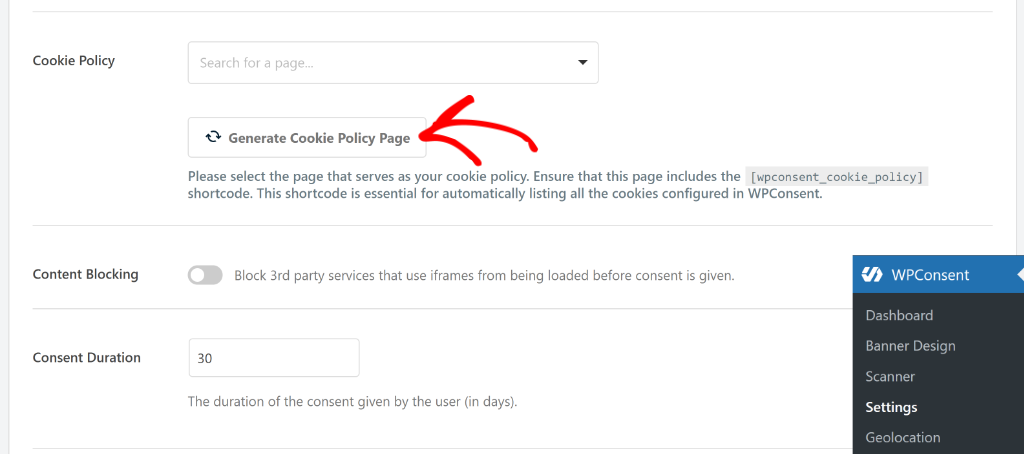
WPConsent makes this easy. Go to WPConsent » Settings, scroll to the Cookie Policy section, and click Generate Cookie Policy Page. The plugin will automatically create a page listing all cookies detected during the scan, saving you significant time.
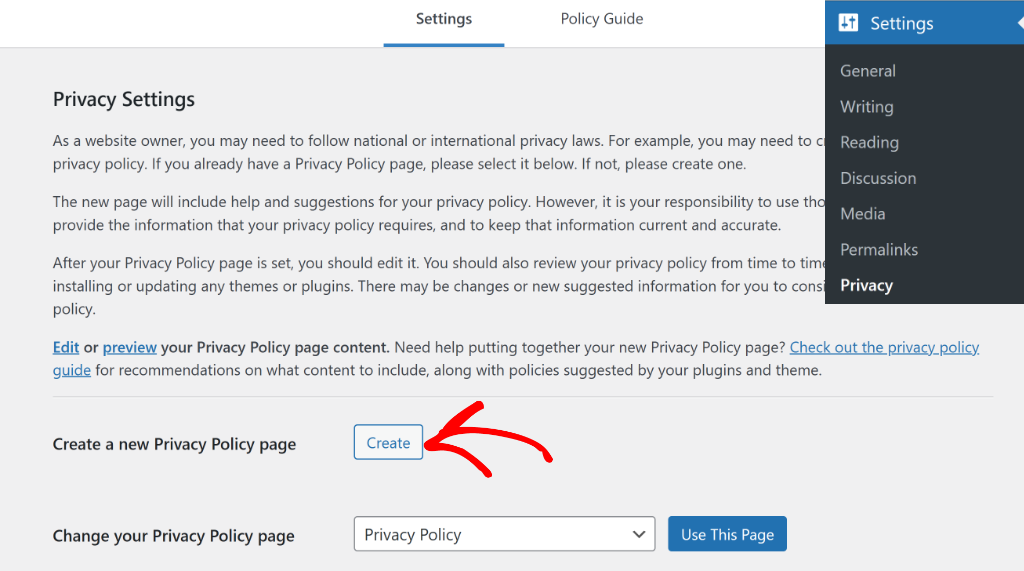
You should also make sure your existing Privacy Policy references your use of cookies and links to the cookie policy.
WordPress includes a built-in privacy policy tool under Settings » Privacy that provides a starter template you can customize.
6. Keep Records of User Consent
While record-keeping of consent is more explicitly emphasized under GDPR, it is also considered best practice under the ePrivacy Directive. And in many jurisdictions, regulators expect you to be able to demonstrate that valid consent was collected if challenged.
WPConsent automatically handles this through its consent logging system. You’ll first need to enable it by going to the Settings page.
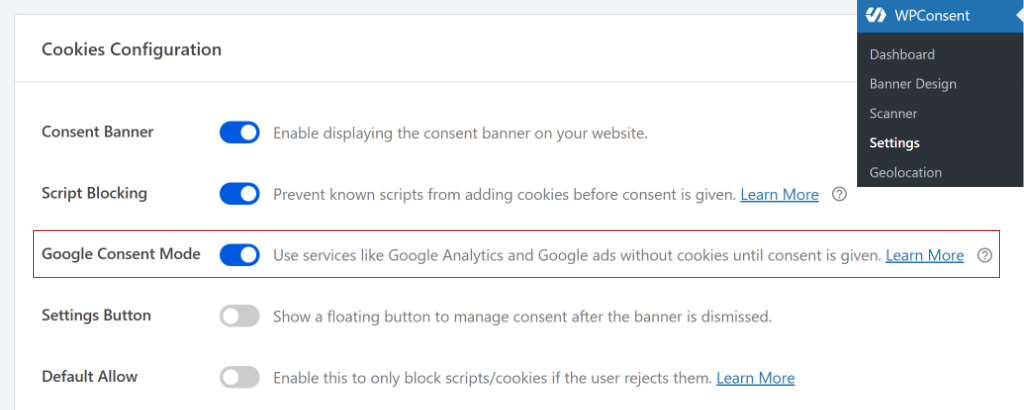
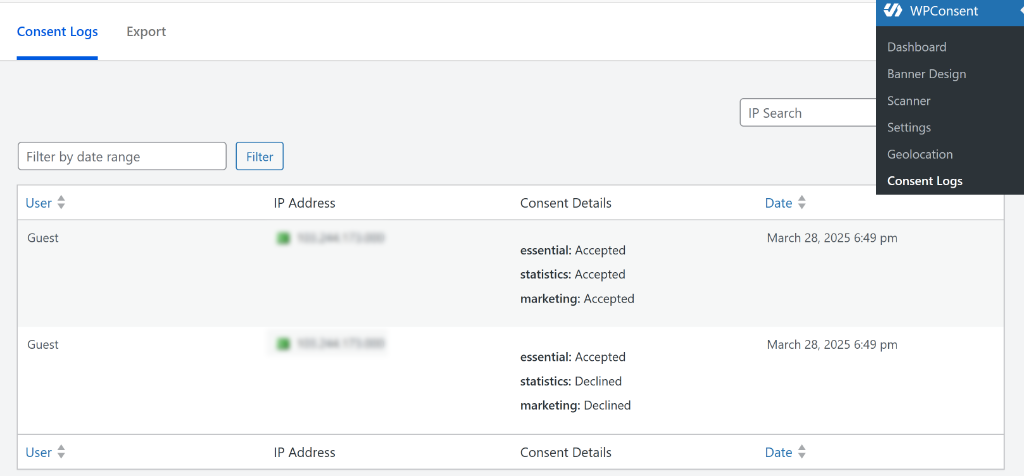
Once that’s done, go to WPConsent » Consent Logs in your WordPress dashboard to view all consent data collected since activation, including timestamps and the specific choices each visitor made.
You can also export consent records as CSV files for compliance reporting or in response to any regulatory inquiry. This gives you a reliable audit trail showing that non-essential cookies were not placed without prior consent — the core obligation of the ePrivacy Directive.
Common Cookies That Need Consent
Google Analytics is probably the most common one. The _ga and _gid cookies it sets track visitor behavior, and that requires consent under ePrivacy. The same goes for Facebook Pixel with its _fbp cookie, Google Ads tracking, and any other analytics or advertising tools.
Third-party embeds often set cookies too. If you’ve embedded a YouTube, Dailymotion, or Vimeo video on your site, they may track that visitor.
Same with social media buttons, chat widgets, and embedded maps. These generally require consent because they’re from third parties, and they’re not strictly necessary for your site to function.
The cookies that don’t need consent are the ones truly essential for your site to work. Shopping cart cookies in WooCommerce, login session cookies, security cookies, and first-party cookies that remember user preferences like language settings. These are considered strictly necessary and can be set without consent.
The ePrivacy Regulation: What’s Coming
The EU has been working on an ePrivacy Regulation to replace the Directive. If it passes, it would be directly applicable across all EU countries like GDPR, with stricter requirements and GDPR-level penalties. It’s been delayed for years and may continue to be, but the direction is toward stricter enforcement, not looser.
What this means practically is that if you’re compliant now with proper opt-in consent, you’re in good shape. If you’re cutting corners, future regulations will likely catch up with you.
FAQs about the ePrivacy Directive
Here are some common questions about the ePrivacy Directive.
1. Is ePrivacy the same as GDPR?
No, they’re different laws. GDPR covers all personal data processing. ePrivacy specifically covers electronic communications, including cookies. Both apply to cookies, but from different angles. Complying with one doesn’t automatically mean you’re compliant with the other.
2. Do I need consent for all cookies?
No. Strictly necessary cookies that are essential for your website to function don’t require consent. Analytics and marketing cookies do require consent.
3. What happens if I don’t comply?
You risk fines from the data protection authority in whichever EU country takes action. Violations of ePrivacy often also count as GDPR violations, which can bring penalties up to €20 million or 4% of global revenue.
4. Does ePrivacy apply if I’m not in the EU?
ePrivacy applies if you’re targeting EU visitors or you’re established in the EU. If your site has visitors from Europe, you should comply regardless of where you’re located.
5. What’s the difference between ePrivacy Directive and ePrivacy Regulation?
The Directive is the current law, implemented through national legislation in each EU country. The Regulation is a proposed replacement that would apply directly across all EU countries with stricter requirements. The Regulation has been delayed, but is still expected eventually.
I hope this article helped you learn about the ePrivacy Directive and what WordPress site owners need to know. You may also want to see our guides on WordPress and CCPA compliance, and LGPD compliance for WordPress sites.
If you liked this article, then please follow us on X (formerly known as Twitter). You can also leave a comment below if you need any assistance.