

TL;DR:
Tracking cookies are small files your site (or something embedded in it) uses to follow a visitor’s activity, often across other sites too, building a picture of their behavior for ads, analytics, or personalization. First-party tracking cookies come from your own site. Third-party ones come from embedded tools like a YouTube video. Most privacy laws require consent before they load. WPConsent scans your site for known tracking scripts and blocks them until a visitor agrees.
Tracking cookies are more common than most WordPress website owners realize.
You don’t have to install an advertising platform for them to appear. Google Analytics, embedded YouTube videos, live chat tools, Meta Pixel, and countless WordPress plugins can all set tracking cookies automatically.
That makes it surprisingly easy to lose track of what’s running on your website. Before you can decide what needs consent, you first need to know which cookies are actually being set.
By the end of this guide, you’ll understand what tracking cookies are, how to identify the tracking scripts running on your site, and how to get consent for them without touching a line of code.
Key Takeaways
- A tracking cookie is different from a regular (functional) cookie because it exists to build a behavior profile, not to make your site work
- First-party tracking cookies come from your own domain. Third-party ones come from embedded tools and can follow visitors across other sites too
- In 2026, Chrome still allows third-party cookies by default. Safari and Firefox already block them. About one in five users are already cookieless before your site does anything
- Consent is a legal requirement in many jurisdictions now, not just the EU. The list is still growing
- WPConsent’s Scanner checks your site against a list of known tracking scripts and flags what it finds, no code reading required. Run it free as a standalone tool or right inside the plugin.
Use the table of contents below to navigate the article. You can click on any link below to skip to that section.
- What Is a Tracking Cookie?
- How Tracking Cookies Work: First-Party vs Third-Party
- Common Tracking Cookies You'll Actually See
- Types of Tracking Cookies
- Are Tracking Cookies Dangerous?
- Tracking Cookies in 2026: What Actually Changed
- What the Law Says About Tracking Cookies
- Does Your WordPress Site Use Tracking Cookies?
- How to Get Consent for Tracking Cookies on Your Site
- Tracking Cookie vs Regular Cookie vs Cookie Policy vs Consent Banner
- Common Tracking Cookie Mistakes We See on WordPress Sites
- FAQs: What Are Tracking Cookies?
- Give Visitors Control Over Tracking Cookies
What Is a Tracking Cookie?
A tracking cookie is a small text file your site, or something embedded in it, stores in a visitor’s browser to record their behavior over time.
That includes which pages they viewed, what they clicked, sometimes what they searched for.
Your analytics tool, ad network, or embedded video player uses that data to build a profile and show that visitor relevant ads or content later, on your site or somewhere else entirely.
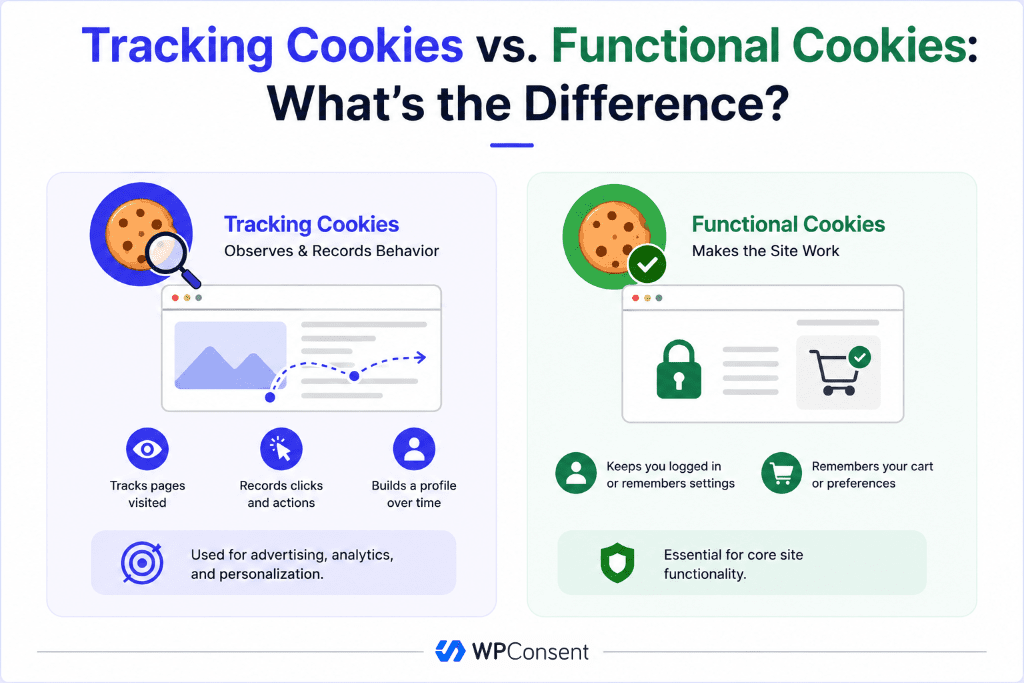
Tracking Cookies vs. Functional Cookies: What’s the Difference?
Not every cookie on your site is tracking anyone.
A cookie that keeps someone logged in or remembers what’s in their cart isn’t collecting behavior data; it’s just doing its job so your site works. We call these functional cookies.
What Tracking Cookies Do for Your Site
Tracking cookies do real work for you as a site owner. Here’s what they help you do:
- Understanding what content works. Analytics cookies help piece together which pages people read, how long they stay, and where they drop off, so you know what to write more of.
- Showing relevant ads instead of random ones. Retargeting cookies are why someone who views a product on your site sees an ad related to the product later, instead of an unrelated one.
- Measuring whether marketing spend is working. Without tracking, there’s no way to connect an ad click to an actual sale or signup days later.
- Personalizing what a returning user sees. Some sites use tracking data to adjust recommendations or content based on past behavior.
You don’t have to hide any of this.
Disclose it clearly and get consent before it loads. Most businesses actually need some of this data to run properly. The problem isn’t the cookie. It’s a cookie that loads before anyone’s said yes.
How Tracking Cookies Work: First-Party vs Third-Party
Every tracking cookie falls into one of two categories, and the difference matters for compliance.
What are First-party Tracking Cookies?
These are set by your own website.
For example, if you run Google Analytics directly on your site, the cookie it drops comes from your domain. It remembers someone’s activity across their sessions on your site alone. It doesn’t follow them anywhere else.
What are Third-Party Tracking Cookies?
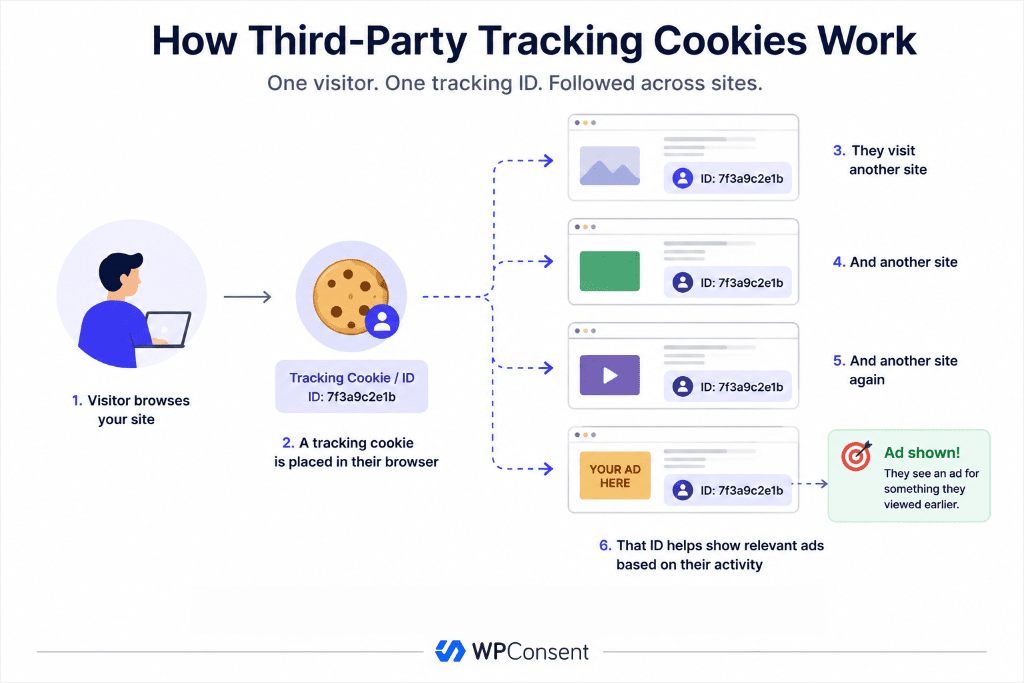
These are set by a domain that isn’t yours.
For example, embed an embedded Instagram feed, or run a display ad network, and that tool drops its own cookie.
Because the same tool is embedded on thousands of other sites, it can follow the same person across all of them and build a profile that has nothing to do with your site specifically.
Our guide on how to block third-party cookies on WordPress walks through stopping these before they load.
Which One Carries More Risk? First-Party or Third-Party Cookies
Third-party tracking cookies.
They’re the ones regulators, browsers, and privacy-conscious people are worried about.
First-party analytics still needs consent in most cases. But third-party ad and retargeting cookies are the ones that trigger the stricter rules.
Session Cookies vs. Persistent Cookies
There’s a second split worth knowing, and it’s separate from first-party and third-party.
- Session tracking cookies disappear the moment a user closes their browser. They only exist to track behavior within that one visit, like which pages someone scrolled through before leaving.
- Persistent tracking cookies stick around for weeks or months, sometimes years. That lets a business recognize the same visitor across return trips.
Persistent cookies are the ones that build the long-term profile. They’re also the ones privacy laws scrutinize most closely.
As you can see, a tracking cookie isn’t just first-party or third-party. It’s also either session or persistent. Every cookie you’ll actually run into is a combination of both.
Putting It Together: First-Party vs Third-Party, Session vs Persistent
Those two splits combine into four real-world patterns. Here’s what each one actually looks like on a typical WordPress site.
| Combination | Example | Why It Matters |
|---|---|---|
| First-party + Session | Cart-abandonment cookie | Only tracks the current visit, gone when the browser closes |
| First-party + Persistent | _ga, _fbp (Google Analytics, Meta Pixel) | From your domain, but sticks around ~2 years / ~90 days |
| Third-party + Session | Live-chat widget or heatmap tool | Logs just the current visit from an embedded domain |
| Third-party + Persistent | VISITOR_INFO1_LIVE (embedded YouTube), IDE (Google/DoubleClick) | Long-running, cross-site profile builders |
How Long Do Persistent Cookies Actually Last?
Google Analytics’ main tracking cookie, _ga, defaults to a two-year expiration that resets on every return visit, so it rarely actually expires for regular users. Meta’s _fbp typically lasts around 90 days.
Some ad-network cookies work the same rolling way, keeping the profile current indefinitely as long as someone keeps coming back.
This timeline is important for consent because a “yes” a visitor gave months ago doesn’t necessarily cover a cookie that’s still running today under a different lifespan than they realized.
It’s part of why most privacy laws expect consent to be reconfirmed periodically, not collected once and forgotten.
Common Tracking Cookies You’ll Actually See
The table above already named a few real cookies, _ga, _fbp, IDE. But let’s go deeper and list more cookie examples you’d actually find running a scan on a typical WordPress site.
| Cookie Name | Set By | What It Tracks |
|---|---|---|
_ga, _gid | Google Analytics | Distinguishes unique visitors and sessions for traffic reporting |
_fbp | Meta Pixel | Tracks user activity for Facebook and Instagram ad targeting |
IDE | Google/DoubleClick | Used for ad retargeting across sites in Google’s ad network |
YSC, VISITOR_INFO1_LIVE | Embedded YouTube videos | Tracks views and session data tied to embedded video content |
_clck, _clsk | Microsoft Clarity | Records session behavior for heatmaps and session replays |
This list isn’t here to alarm you. It’s here so you know exactly what to look for when you check your own site.
Types of Tracking Cookies
Not every tracking cookie does the same job. Here’s how the main types break down.
| Type | What It Does | Common Example | Needs Consent? |
|---|---|---|---|
| Advertising / Retargeting | Follows visitors across sites to show ads based on past behavior | Meta Pixel, Google Ads remarketing tag | Yes, in most jurisdictions |
| Analytics | Records pageviews, clicks, and session data to measure site performance | Google Analytics (GA4) | Yes, unless fully anonymized |
| Social Media | Tracks activity tied to embedded share buttons or social widgets | Facebook, X (Twitter), LinkedIn embeds | Yes |
| Session Tracking | Records behavior within a single visit, sometimes persists across visits | Heatmap and session-recording tools like Microsoft Clarity | Yes, if data ties back to an individual |
⚠ Note: A cookie doesn’t have to store a name or email address to count as tracking. If it can be used to build a behavior profile tied to a device or browser, most privacy laws treat it as personal data.
Are Tracking Cookies Dangerous?
Tracking cookies aren’t spyware.
They don’t damage your device, steal passwords, or run in the background without any trace. And as you will see below, you can delete them or block them in your browser settings whenever you want.
The real risk is exposure, not damage.
A tracking cookie can reveal what someone shopped for, what they read, where they’ve been online, and how often they come back.
On its own, one cookie tells a small story. Combined across dozens of sites, that story gets detailed enough to feel invasive.
Think about it from a visitor’s side for a second.
Someone reads an article about a medical condition on one site, then sees an ad related to it on a completely unrelated site three days later.
Nothing was stolen, and no device was compromised, but that user now knows a tracking cookie followed them somewhere they didn’t expect.
That reaction, more than any technical harm, is why regulators and browsers both started treating tracking cookies as something that needs someone’s permission first.
⚠ For a WordPress site owner: the risk isn’t the cookie itself. It’s running tracking cookies without consent. That’s the part that turns a normal analytics setup into a compliance gap.
The first step is understanding what’s actually running on your website. WPConsent’s Scanner checks for known tracking scripts and shows you the bigger picture in minutes, no code reading required.
Tracking Cookies in 2026: What Actually Changed
The biggest changes have come from how major browsers handle third-party cookies.
Chrome Changed Course
Third-party cookies were expected to disappear from Chrome by 2025. Instead, Google changed course and dropped its plan to remove them completely, so Chrome still supports third-party cookies today.
What Happened to Privacy Sandbox?
Google originally planned to replace third-party cookies with Privacy Sandbox, a new set of privacy-focused technologies. After limited adoption and regulatory scrutiny, Google retired the project in late 2025, leaving third-party cookies in place.
Consent Still Matters
Even though Chrome supports third-party cookies, that doesn’t mean visitors have agreed to them.
If privacy laws require consent, your site still needs to collect it before tracking cookies are set. That’s your website’s responsibility, not the browser’s.
Do Your Visitors Already Block Tracking Cookies?
Some of them, yes, and it depends entirely on which browser they’re using.
Safari and Firefox block third-party cookies by default. Any visitor arriving on one of those browsers already has that protection in place before your site does anything.
Chrome and Edge don’t block them by default. A visitor would have to turn that on manually, and most never do.
Privacy-focused browsers like Brave and DuckDuckGo’s browser go further, blocking known trackers automatically.
None of this changes what your site needs to do.
Browser-level blocking only protects the visitors who already have it turned on or are using a browser that ships with it.
Everyone else, likely most of your Chrome traffic, is only protected by whatever consent setup you’ve actually built.
Your website still needs to handle consent for everyone, not just the visitors whose browser already did the work.
What the Law Says About Tracking Cookies
GDPR Consent Requirements
Under GDPR, you need a user’s freely given, informed consent before a tracking cookie loads, not after.
A banner that only informs your audience cookies exist doesn’t meet that bar. It has to give them a real choice, including an equally easy way to reject.
In practice,
- “Freely given” means a visitor can’t be forced into accepting to use your site.
- “Informed” means they actually know what they’re agreeing to, not a vague “we use cookies” statement.
- “Specific” means consent for analytics doesn’t automatically cover advertising too.
- “Unambiguous” means a pre-checked box or a banner that treats scrolling as consent doesn’t count.
All four conditions have to be true at once for the consent to hold up.
To learn more, check out our beginner’s guide on WordPress and GDPR Compliance. Then also see why using a self-hosted GDPR plugin for WordPress could be the right move for you.
CCPA Consent Requirements
Under CCPA and similar US state laws, the requirement looks different.
Instead of consent-first, many US laws require a clear way for visitors to opt out of having their data sold or shared. In practice, this usually means an obvious “Do Not Sell or Share My Info” option.
For WordPress site owners, that means providing an easy way for your audience to submit their request without having to build the functionality themselves.
WPConsent’s Do Not Sell addon builds that opt-out page for you, so you’re not writing the form or the logic by hand.
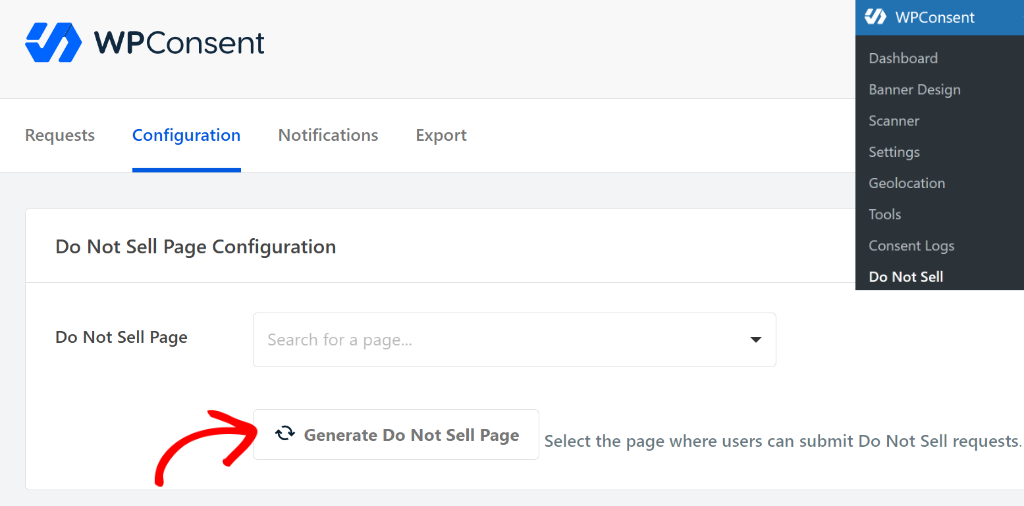
Our guide on creating a Do Not Sell page in WordPress walks through setting it up.
What If Your Users Are Outside the US or EU?
The US and EU aren’t the only places with privacy laws. Many other countries now have similar rules for tracking cookies and consent.
Brazil’s LGPD mirrors GDPR’s consent-first approach closely. Canada’s PIPEDA leans on “meaningful consent.” This means a user has to actually understand what they’re agreeing to, not just click through a wall of legal text.
The UK runs its own version of GDPR alongside PECR, its cookie-specific regulation, and has been updating both in 2026.
As you can see, consent requirements shift by country.
If you serve people from multiple regions, our guide to cookie consent walks through what a compliant banner needs to include, and our breakdown of cookie consent requirements by country covers the EU, UK, US, Canada, Brazil, and more individually.
💡 WPConsent Tip: You don’t need to memorize every regulation. WPConsent’s Location-based Rules can show the right banner and consent model automatically based on where a visitor is coming from.
You get ready made location-based templates to get started, which you can further customize. You can also use “Custom Rules” for regions without templates.
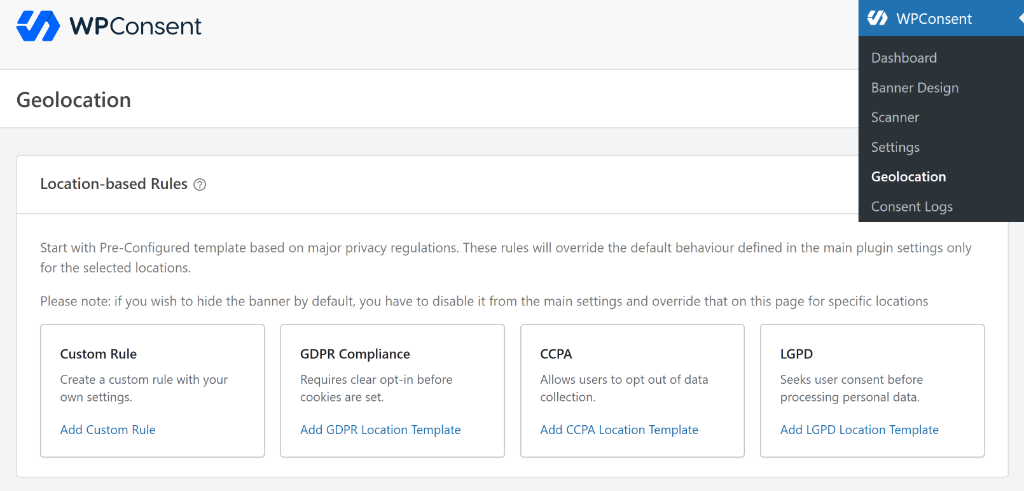
Check out our guide to setting up location-based cookie consent in WordPress for more information.
Does Your WordPress Site Use Tracking Cookies?
Between analytics plugins, embedded videos, ad network snippets, and theme-bundled scripts, tracking cookies show up in places you didn’t add them yourself.
Our step-by-step guide on finding which cookies your WordPress site is using covers this in more depth.
WPConsent’s Scanner, available both on the free and the premium versions, checks your live site.
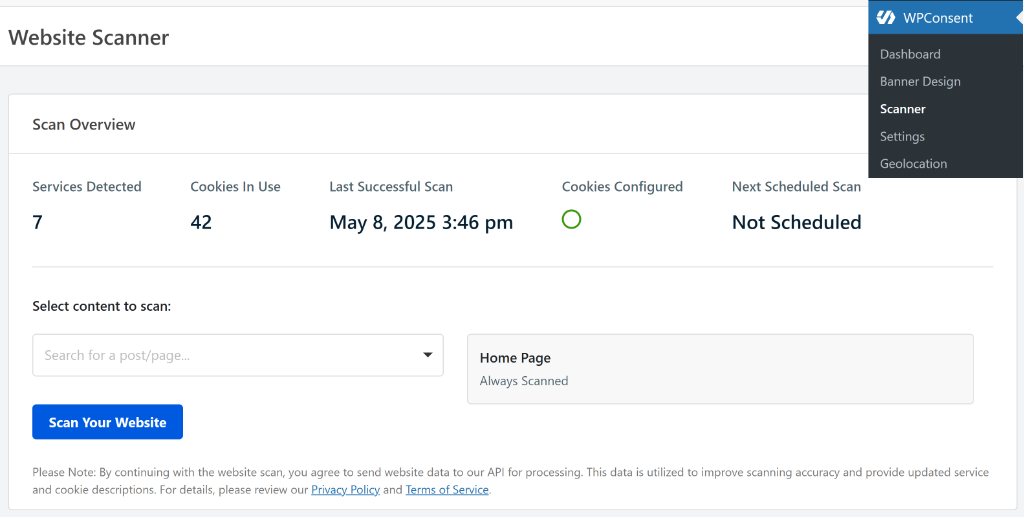
It flags the tracking scripts and services it recognizes from a known list, including what each one likely does and whether it needs consent.
This gives you the bigger picture.
You don’t have to read your theme’s code or check every plugin’s settings page to get the overview.
But if you want a more detailed report of every cookie a page sets, use your browser’s inspector tool instead.
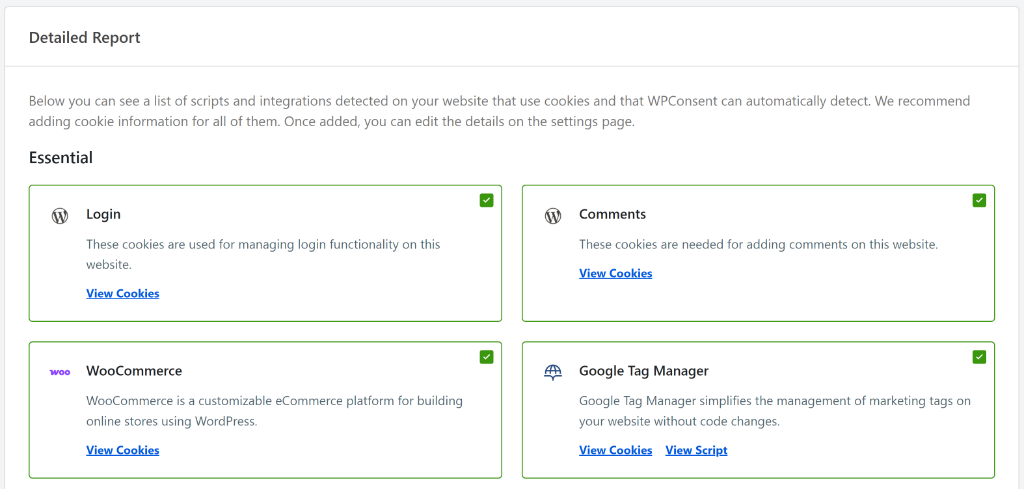
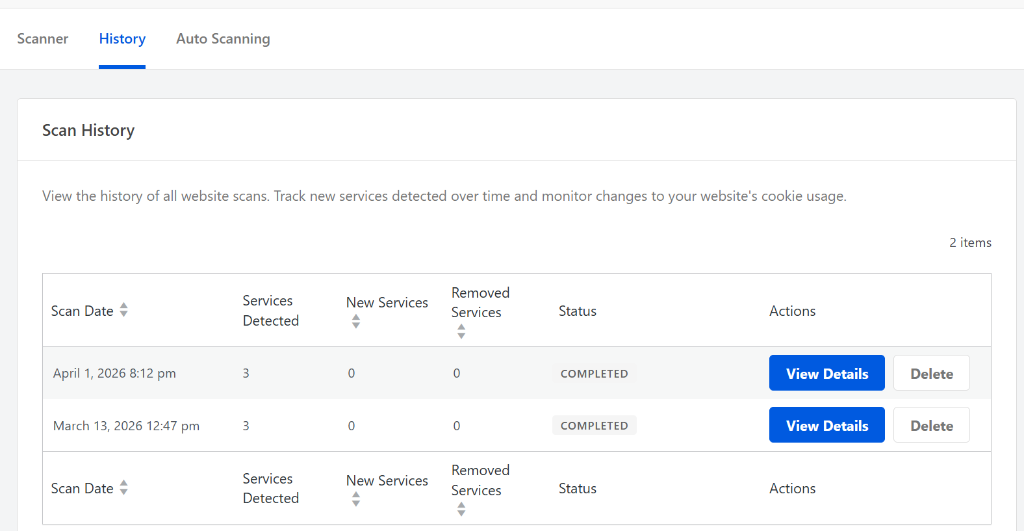
💡 WPConsent Tip: Run the scan again after adding any new plugin, embed, or ad network. WPConsent Pro can run this on a schedule automatically (Auto Scan), so you’re not the one who has to remember.
How to Get Consent for Tracking Cookies on Your Site
Once you know what tracking cookies are running, the next step is making sure none of them load before a visitor agrees. Our guide to adding a cookie consent banner walks through the full setup.
You can design the banner to fit your business so that it does not look out of place when your users view it.
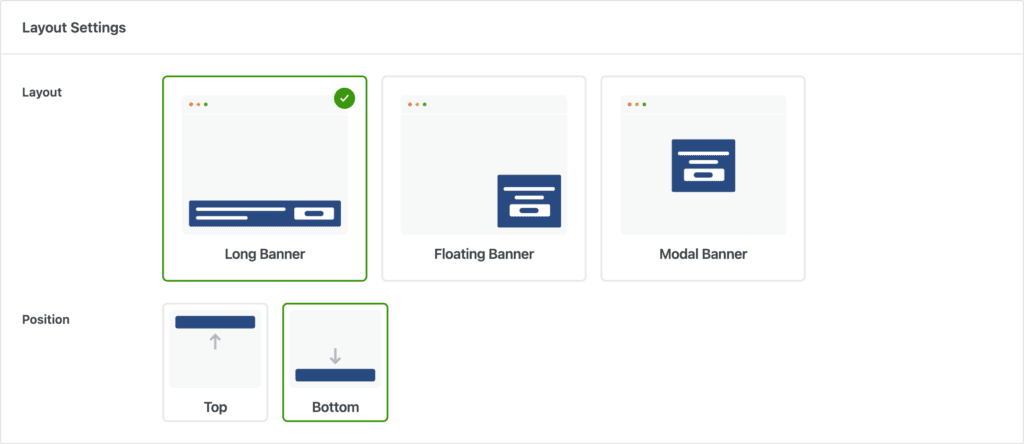
The banner itself is built from the categories the Scanner found, so you’re not manually listing out every tracking cookie by name.
Your audience sees clear categories, like Analytics or Advertising, with an equally easy way to accept or reject each one. That “equally easy to reject” part matters.
A banner that buries the reject option behind extra clicks doesn’t meet the GDPR standard for valid consent, even if it technically has a button.
Most importantly, WPConsent’s banner blocks tracking scripts automatically until someone makes a choice. Accept, and the scripts load. Reject, and they stay off.
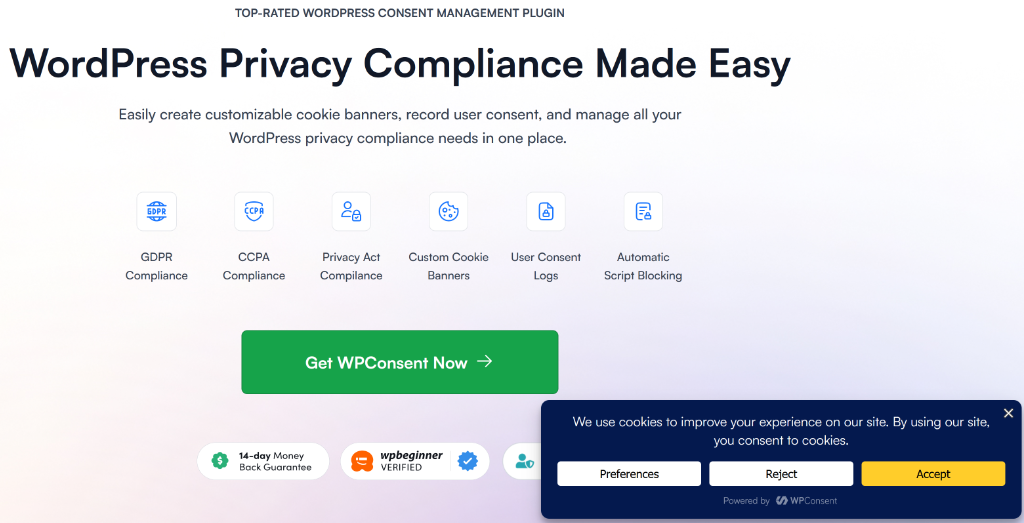
WPConsent is a self-hosted WordPress consent plugin.
So, every decision gets logged on your own server. If you’re ever asked to prove consent was collected or want to check your records, they are already available.
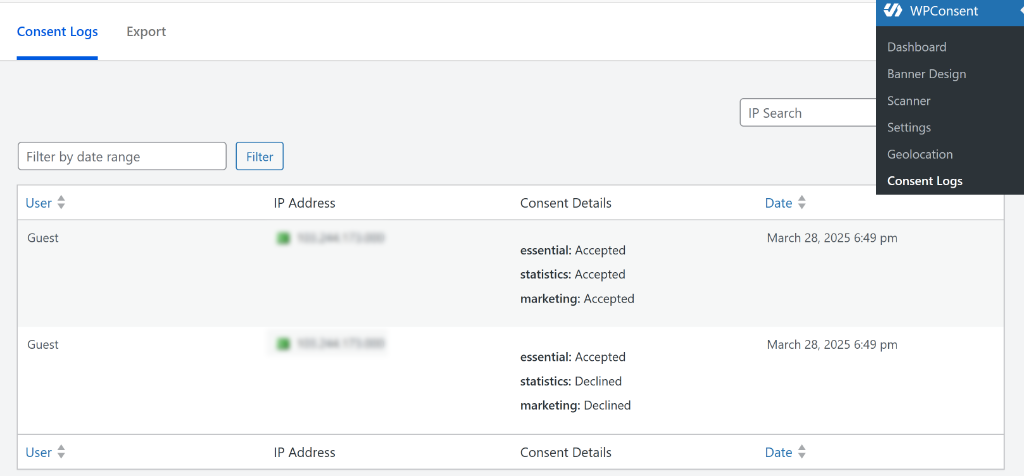
On top of that, you can export and automatically clean your logs on a schedule.

💡 WPConsent Tip: If you use Google Analytics or Google Ads, turn on Google Consent Mode v2 in WPConsent. Even when a user declines, you don’t lose them from your reporting entirely. Google can still account for their visit in a privacy-safe way. You get more accurate numbers, and your visitors still get the choice they made respected.
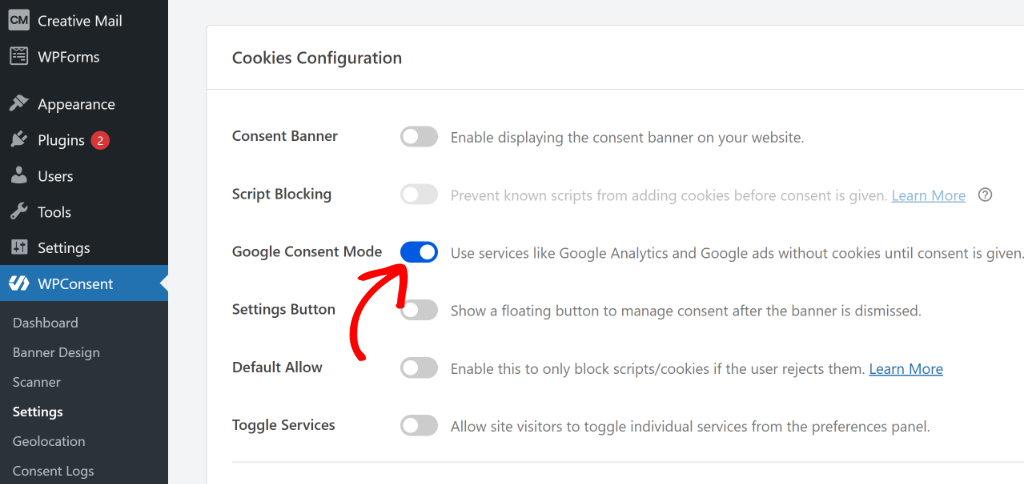
Check out our guide on how to set up Google Consent Mode V2 for Google Analytics in WordPress. You can also set up Google Consent Mode V2 through Google Tag Manager if you prefer.
Tracking Cookie vs Regular Cookie vs Cookie Policy vs Consent Banner
These four terms get used interchangeably, and mixing them up is the most common compliance mistake we see. Even though we have discussed some of these terms above in detail, let’s define them side by side for more clarity.
| Term | What It Actually Means |
|---|---|
| Regular (functional) cookie | Makes your site work: login sessions, shopping carts, language preference. No consent required. |
| Tracking cookie | Records user behavior for ads, analytics, or profiling. Consent required in most jurisdictions. |
| Cookie policy | A page that discloses what cookies your site uses and why. Required, but it doesn’t stop a cookie from loading. |
| Consent banner | The mechanism that actually blocks a tracking cookie until a visitor agrees. Disclosure alone isn’t enough without this. |
A cookie policy tells visitors what’s happening, while a consent banner is what actually stops a tracking cookie from firing before they’ve agreed to it. You need both.
A policy page with no banner is disclosure without control, and a banner with no policy page is missing the paper trail regulators ask for.
WPConsent generates both from the same scan.
Your cookie policy is built from the scan results, so it always reflects the same cookies your consent banner is managing.
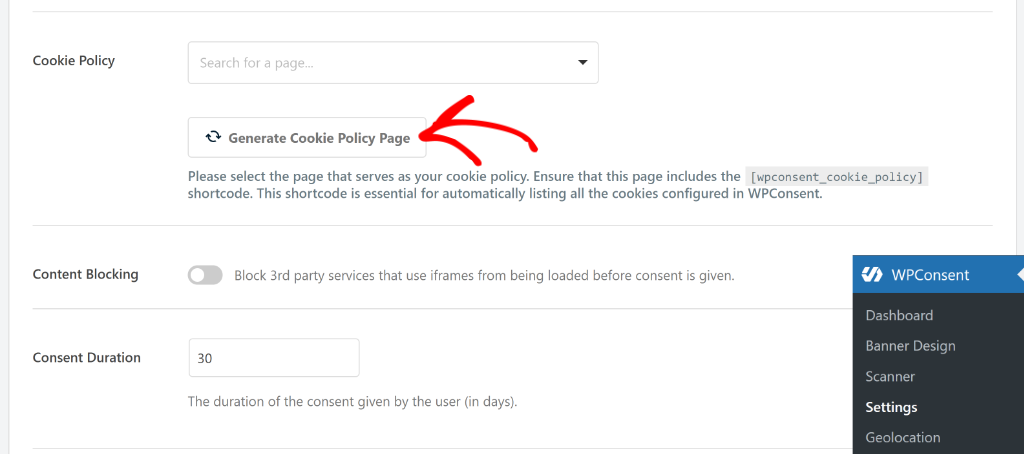
Our guide to creating a free cookie policy page in WordPress covers the disclosure side.
Common Tracking Cookie Mistakes We See on WordPress Sites
A few patterns show up again and again when we look at how WordPress sites handle tracking cookies, and most of them are easy to fix once you know what to look for.
- Loading scripts before consent, not after. Plenty of sites show a cookie banner, but the Google Analytics or Meta Pixel script was already added straight to the theme’s header and fires on page load regardless of what someone clicks.
- Treating “I agree” as the only option. A banner with just an Accept button, and no equally visible way to reject, doesn’t meet the consent standard most privacy laws set.
- Forgetting cookies from embeds. A YouTube video or an Instagram feed widget brings its own tracking cookies along with it. Site owners often account for their analytics tool and completely miss what their embedded content is doing.
- Never re-scanning after adding new plugins. A site that was compliant six months ago can quietly stop being compliant the moment a new plugin with its own tracking script gets installed.
- Assuming a cookie policy page is enough on its own. Disclosure without a working consent banner leaves the actual blocking mechanism missing, which is the part regulators care about most.
Each of these is a configuration gap, not a redesign. Running a scan and turning on a proper banner closes all five at once.
That’s it. You now have a better understanding of what tracking cookies are. If anything is unclear, check out the commonly asked questions below.
FAQs: What Are Tracking Cookies?
Are tracking cookies illegal?
No, tracking cookies aren’t illegal. Running them without a visitor’s consent, where consent is legally required, is what creates the risk. Most privacy laws, including GDPR and CCPA, regulate how tracking cookies are deployed and disclosed, not whether a business can use them at all.
Are tracking cookies dangerous?
No, they can’t damage your device, steal passwords, or install anything without your knowledge. The real concern is privacy exposure: a detailed record of someone’s browsing behavior, built up over time and often shared with third parties they never directly interacted with or agreed to share data with.
How do I block or remove tracking cookies from my site?
Install a consent management tool like WPConsent, which scans your site for tracking cookies and blocks the related scripts by default until a visitor agrees to them.
What’s the difference between tracking cookies and regular cookies?
Regular (functional) cookies keep your site working, things like login sessions, cart contents, or a saved language preference. They don’t need consent. Tracking cookies exist specifically to record behavior for advertising, analytics, or personalization, and are the ones privacy laws focus their consent requirements on.
What will replace third-party tracking cookies?
Nothing has fully replaced them yet. Google retired its planned cookie alternative, Privacy Sandbox, in late 2025 after low adoption. Chrome still supports third-party cookies with a visitor’s consent, while Safari and Firefox already rely on other, more restrictive default settings entirely. First-party data strategies are the most common fallback in the meantime.
Do I need consent for tracking cookies on my WordPress site?
In most cases, yes. If your site has visitors from the EU, UK, or several US states with active privacy laws, you’re required to get documented consent before tracking cookies load. WPConsent’s free Scanner checks your site for known tracking scripts and services that may need consent.
Give Visitors Control Over Tracking Cookies
You now know what’s actually running on your site, and what to do about it. The only thing left is putting that knowledge into action.
The next step is checking your own site.
If you just want to see what’s there first, run our free Online Cookie Scanner. No installation required, just enter your URL.
When you’re ready to take control, install WPConsent, run its built-in Cookie Scanner, and turn on the consent banner so tracking cookies don’t load until visitors have given consent.
Setup only takes a few minutes, and after that, WPConsent keeps your cookie banner and policy in sync automatically.
Additional Resources
These three guides go deeper into consent setup, country-specific rules, and connecting your analytics the right way.
- What Is Cookie Consent? A WordPress Beginner’s Guide: the full picture of what a compliant banner needs to include
- Cookie Consent Requirements by Country: jurisdiction-by-jurisdiction rules if you have visitors from more than one region
- How to Set Up Google Consent Mode v2 in WordPress: keep your GA4 and Google Ads tags working correctly after a visitor responds to your banner

[ Reduced due to character count restraints ]
Very useful article.
My main concern relates “or several US states” and ref’s to Canada’s PIPEDA and UK’s PECR.
The geolocation template for CCPA only supports CA. Why aren’t other states included? I don’t want to continuously track countries and states. Can’t something be set up to dynamically stay in compliance to keep up with countries and states?
1. Are there any plans for dynamic compliance and if yes, when can I expect to see this?
2. In the meantime, is there somewhere that you can point me to to know what US states need to be covered and under which compliance rule?
3. The article also mentions Canada’s PIPEDA and UK’s PECR. Are you going to provide a template for each of those? If yes, when?
Thanks.