Finding the right WordPress cookie consent plugin often feels like picking a needle out of a haystack. There are countless privacy plugins and tools on the market, and it can get overwhelming fast to pick the right one.
Among them are two popular contenders, WPConsent and Complianz. Both offer lots of features, help add a cookie banner to your site, scan for scripts, and more. But choosing between them can be tough.
That’s why I put both the plugins to the test and compared them for their ease of use, cookie scanning and blocking capabilities, cookie banner customization options, and overall compliance features.
In this guide, I share my personal experience using both plugins and compare WPConsent vs. Complianz to help you decide which one fits your needs better.
To get you started, here’s a quick comparison of the two plugins:
| Feature | WPConsent 🏅 | Complianz |
|---|---|---|
| Ease of Setup | Simple | Complex wizard |
| WordPress Rating | 4.8/5 | 4.8/5 |
| Active Installs | 100,000+ | 1,000,000+ |
| Data Storage | Self-hosted | Self-hosted |
| Google Consent Mode v2 | Yes | Yes |
| IAB TCF | Verified | Premium only |
| Free Version | Full-featured | Good, some limits |
| Premium Price | $49.50/year | $59.00/year |
| Backed By | WPBeginner | Really Simple Plugins |
To help you navigate this post, you can click the links below to jump ahead to any section:
1. Plugin Overview
Before diving into the comparison between WPConsent vs Complianz, here’s a quick introduction of the 2 plugins.
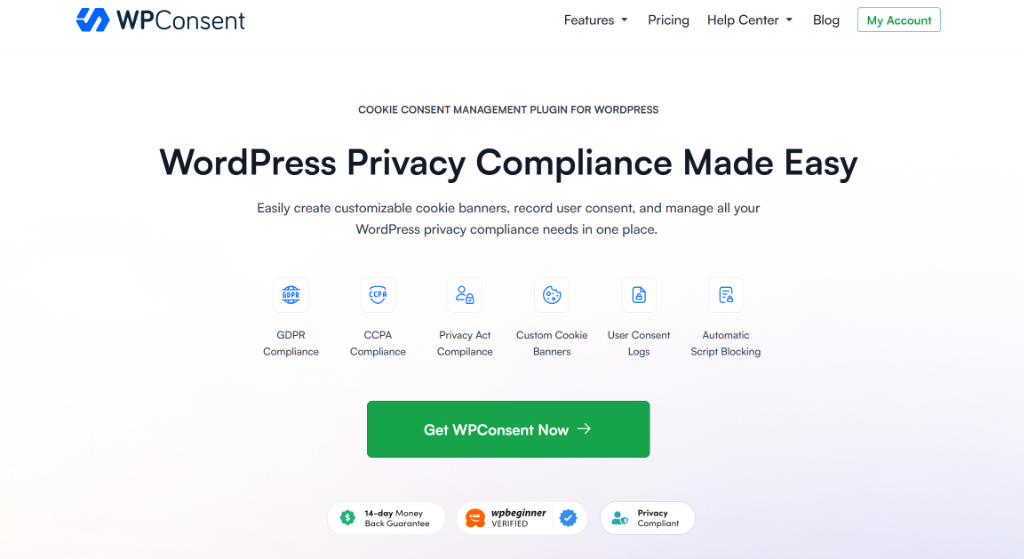
WPConsent is the best WordPress cookie consent management plugin on the market, created by the team behind WPBeginner. It is a self-hosted solution, which means it keeps your compliance data directly on your website server instead of sharing it externally.
With over 100,000 users trusting WPConsent with their website cookie management, the plugin is designed for speed and simplicity. Besides that, it is IAB TCF verified and offers powerful features.
WPConsent makes it simple to add a cookie banner to your WordPress site and keep track of user permissions. But it is more than just a pop-up. It acts as a complete cookie management solution for your website that scans for cookies and automatically blocks tracking scripts from loading until your visitor grants consent.
It comes with a library of services and cookies that get automatically configured when setting a cookie consent banner. This means that you don’t have to manually track down each script and then configure it before a user gives consent.
You also get advanced features like geolocation cookie consent rules for privacy laws like GDPR, CCPA, and LGPD. Besides that, you can block custom scripts and iframes, content embeds from YouTube, Google Maps, Vimeo, and more.
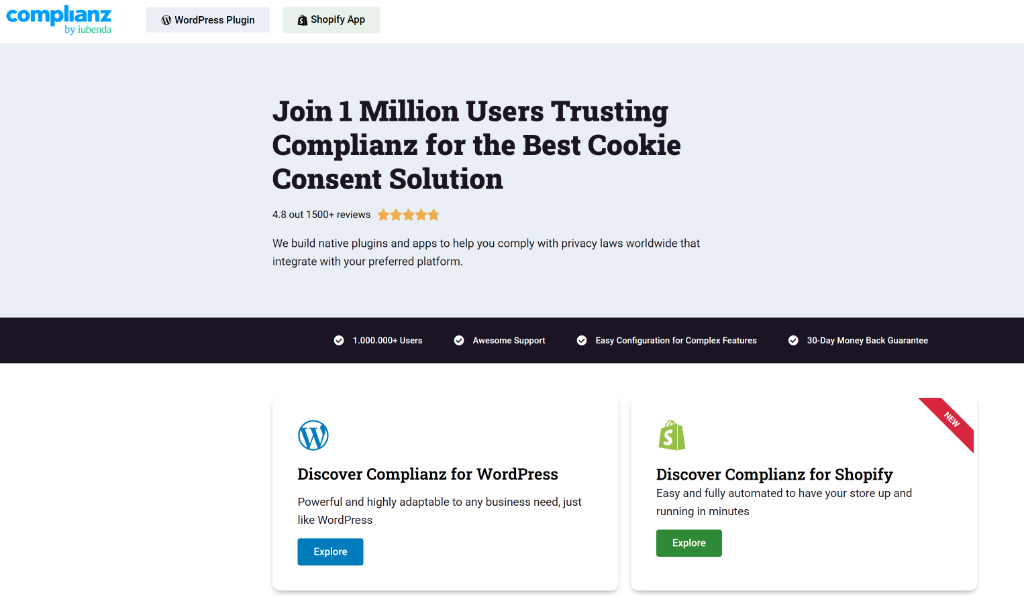
Complianz is known as a “Privacy Suite” because it handles both cookie banners and legal documents. It connects to an external service called CookieDatabase.org to automatically find and describe the cookies used on your site.
This plugin is a strong choice for websites that need detailed legal pages. It can generate a customized Cookie Policy, Privacy Policy, and other required documents based on your answers in the setup wizard. It also offers region-specific control, allowing you to show different banners to visitors from the EU, US, or UK.
Now, let’s look at a detailed comparison between the two plugins.
2. Ease of Use and Setup Process
Most cookie management plugins make you feel like you need a law degree just to add a simple banner. If you click the wrong button, you might accidentally block your own login page or break how your site looks.
Setting up a privacy plugin should be straightforward. You want a tool that configures the basics correctly without asking a hundred confusing questions.
I tested the setup process for both plugins to see which one is easier for a beginner to use.
WPConsent – Ease of Use
WPConsent is a beginner-friendly WordPress cookie consent management plugin. Managing cookies on your website and staying compliant with different data privacy laws can be overwhelming, especially for beginners.
This is where WPConsent shines, as it helps WordPress users to easily set up a cookie consent banner on their site, scan for scripts, keep track of consent logs, and build trust with their audience. And the best part is that you don’t have to touch a single line of code or hire a developer.
To show you how easy it is to use, as soon as I activated WPConsent, the setup wizard launched automatically. I really liked this because I didn’t have to hunt for settings menus to get started.
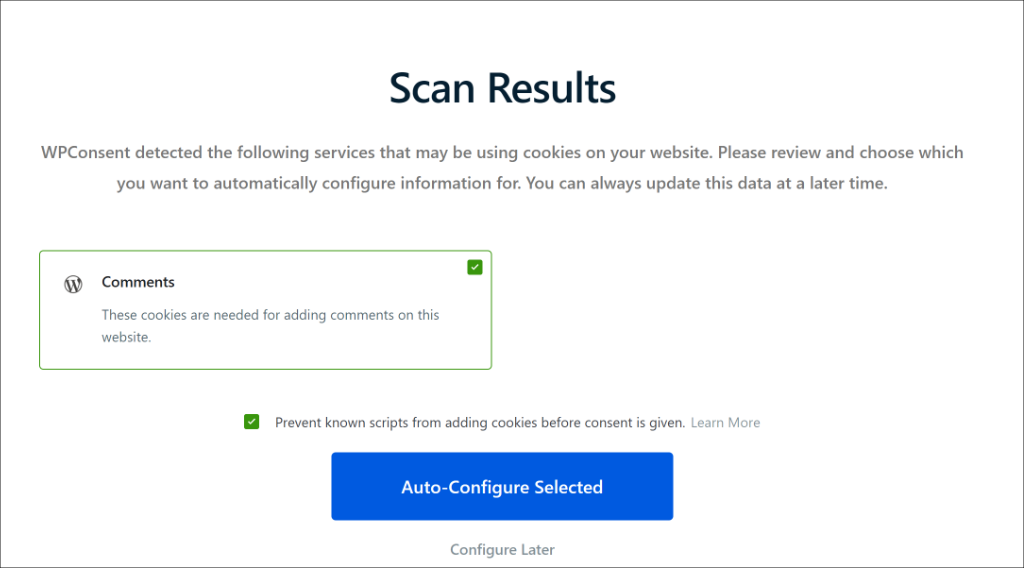
The wizard immediately offered to scan my website for cookies. I clicked one button, and it found the tracking scripts I was using, like Google Analytics, WordPress comments, and organized them into groups for me.
The best part was the ‘Auto-Configure Selected’ feature. Instead of making me choose technical settings, it automatically sets up the blocking rules based on what it found.
Besides that, the wizard also shows you a preview of the cookie consent banner on your site. This entire process takes just a few minutes, without any complicated setup.
Other than that, using WPConsent is a walk in the park. You can find all the settings and feature options with ease when using the plugin. It shows that the plugin was created with ease of use in mind and helps every website owner to manage their cookie consent without any hassle.
Complianz – Ease of Use
The Complianz wizard also opened right away, but it felt much different. It was very detailed and asked me a long list of specific legal questions.
I had to choose which privacy laws I wanted to follow and select the specific regions where my visitors live. It also asked complex questions about whether visitors have log-in access to restricted website areas.
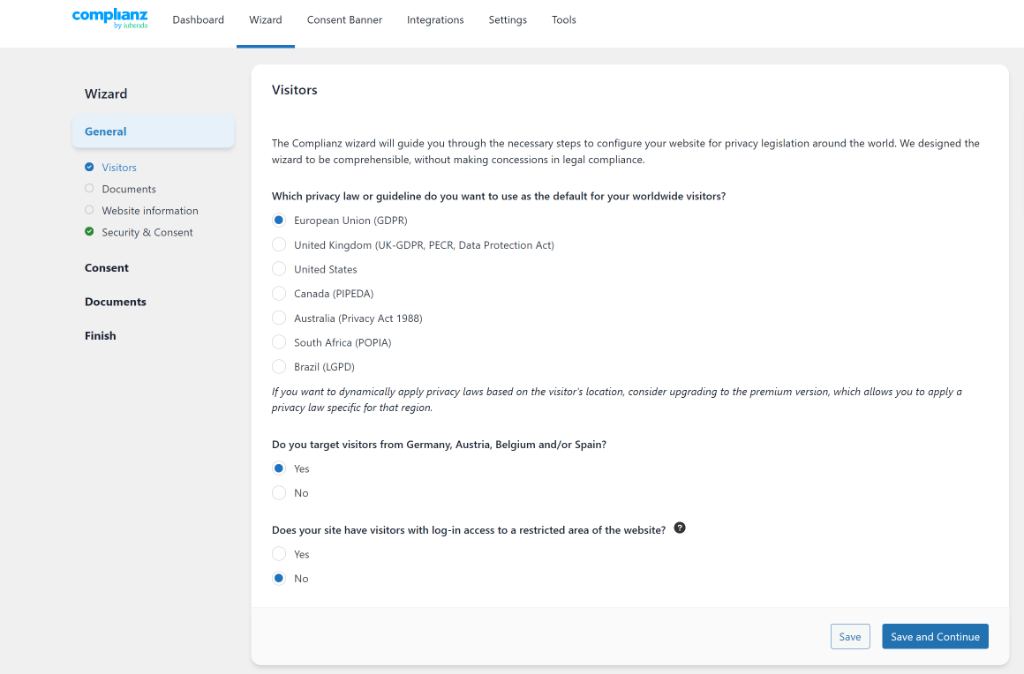
While this is very thorough, I felt a bit overwhelmed. It felt more like I was filling out a tax form than setting up a WordPress plugin.
It took me about 30 minutes to finish the wizard because I had to read every question carefully to make sure I didn’t make a legal mistake.
Our Verdict
Both plugins guide you through the process, but WPConsent is much faster. I loved that it handled the technical work for me so I could finish quickly.
Complianz is a powerful tool, but it requires you to know a lot more about privacy laws to answer its questions correctly. If you want a “set it and forget it” solution, then WPConsent is the better choice.
3. Cookie Scanning and Script Blocking
Finding cookies on your website is like looking for loose change in your couch. You know it is there, but you can’t always see it.
Both plugins offer scanners to find these hidden trackers, but they work quite differently. Let’s compare them in depth.
WPConsent – Automated Scanning
WPConsent offers a powerful scanner that looks for scripts on your site while keeping things simple. It comes with a library of services/cookies that you can automatically configure on your site.
To start, it would scan your website when you go through the setup wizard. However, there is also an option to scan your website for scripts that add cookies. To test this, I went to WPConsent » Scanner from the WordPress dashboard and clicked the ‘Scan Your Website’ button.
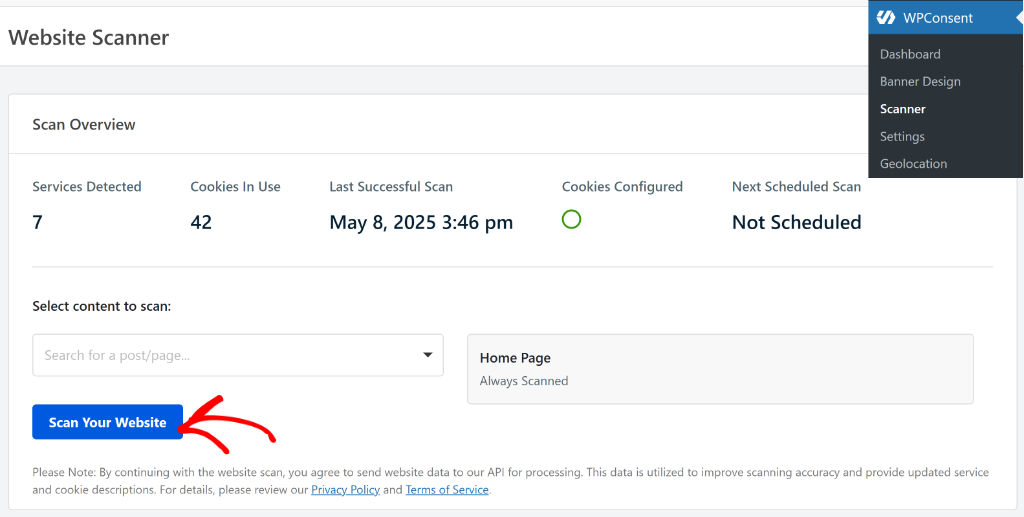
The scanner quickly found my cookies and sorted them into groups like Essential, Analytics, and Marketing.
It felt very fast because its scanner doesn’t drag down your server resources. You get a clear report showing exactly which services are adding cookies to your site.
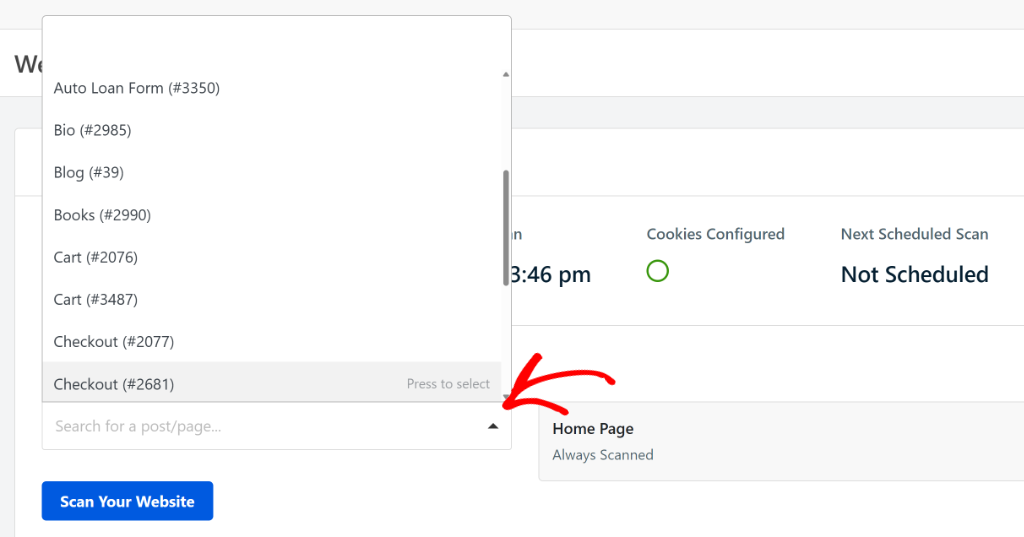
Another feature that sets WPConsent apart is that you can select which pages to include while scanning. By default, it will scan your homepage, but you can also specify other pages. For example, including pages like checkout or cart ensures that no services are missed during the scan.
Besides that, WPConsent also connects to the CookieLibrary.org website. It’s an open-source library of website cookies and helps discover which cookies are tracking you online. You can simply enter the name of a service and find out the type of cookies they add to a website.
Complianz – Automated Scanning
When I tested Complianz, it used a hybrid approach. It scans your site and then checks an external library called CookieDatabase.org.
This is really helpful because it automatically writes the descriptions for your cookies. You don’t have to manually type out what every single tracking file does.
Besides that, Complianz also offers a scanner that scans several pages of your site and looks for cookies and scripts.
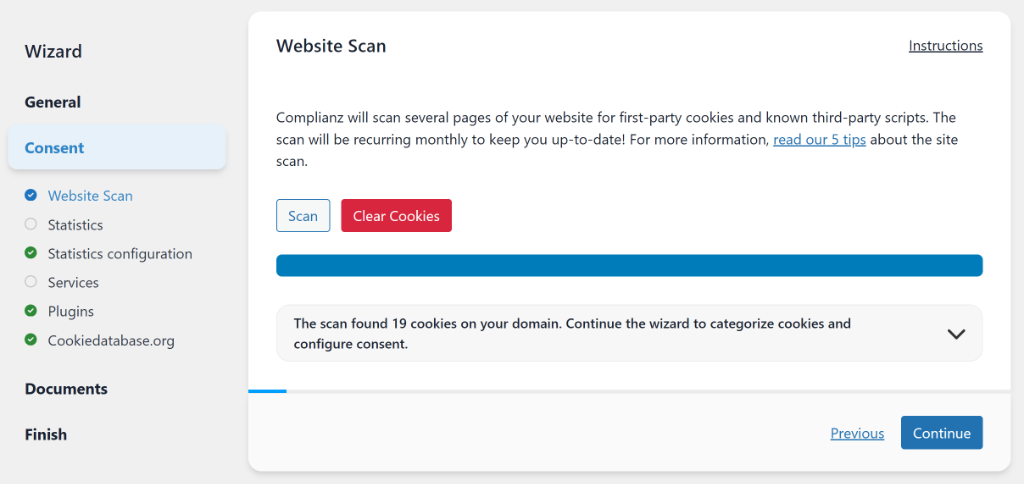
By following the steps in the wizard, I was able to automatically configure the cookies and third-party scripts.
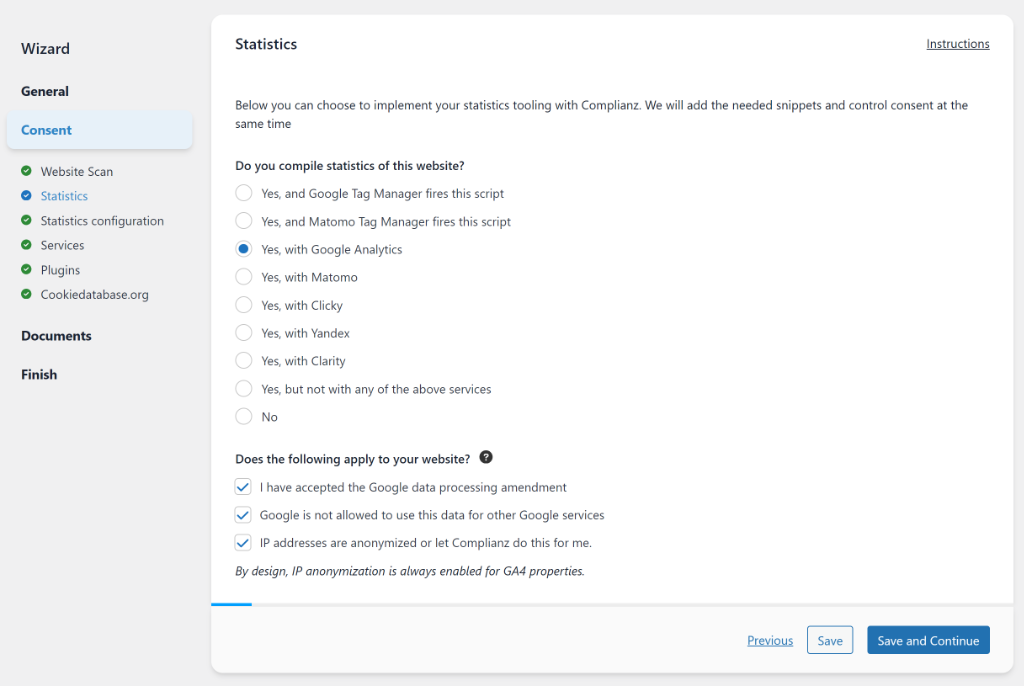
For example, for Statistics cookies, the plugin asks for the analytics and tracking tool you’re using and walks you through the wizard to configure them. Complianz will then add the correct snippets and handle consent automatically, so you don’t have to configure everything manually.
One of the features that caught my attention during the comparison was that it routinely scans your site and updates your documents with any new or modified cookies it discovers.
This is really great to have, as you don’t have to manually update all your privacy pages, like the cookie policy page.
WPConsent – Blocking Unwanted Scripts
Scanning is only half the battle. You also need to stop those scripts from running until a visitor says it is okay.
I was very impressed with how WPConsent handles this. It has an automatic script blocking feature that works right out of the box. During the setup, I simply enabled the option to ‘Prevent known scripts from adding cookies before consent is given’ and clicked the Automatically Configure Cookies button.
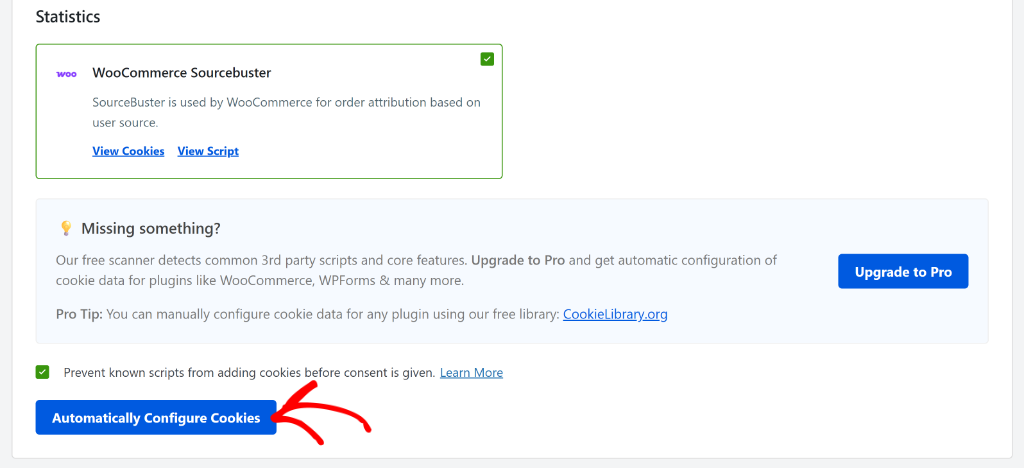
It automatically detected and blocked popular services like Google Analytics, WooCommerce, Facebook Pixel, and more without touching any code.
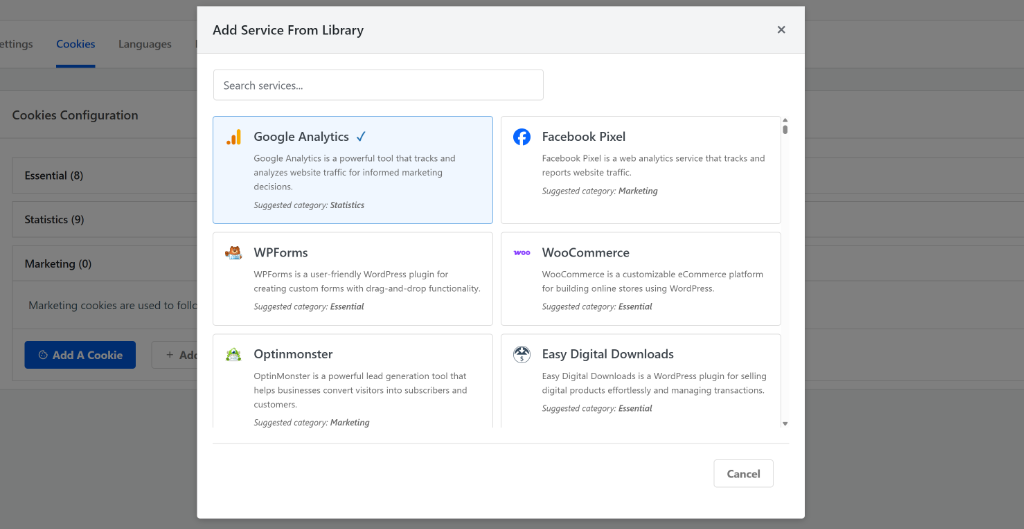
Besides that, WPConsent also allows you to add a service from its library and add pre-configured services that add cookies, which might not be caught by the scanner. Once you select the service, it will also add additional details like cookie name, ID, description, and duration.
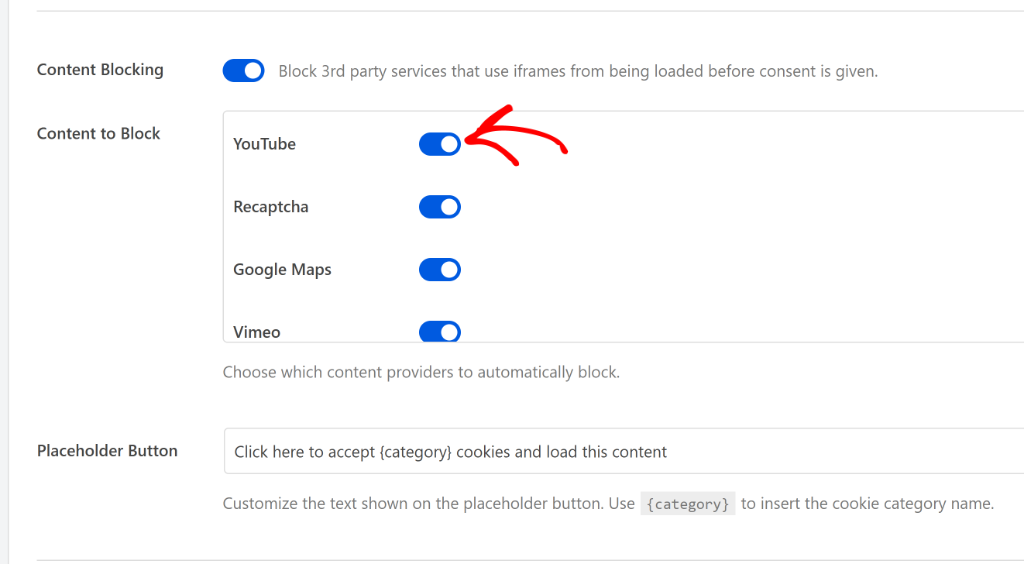
It also has a powerful Content Blocking feature that stops embedded content from loading until the user gives consent.
You can block embedded content from YouTube, ReCaptcha, Google Maps, Vimeo, and Dailymotion from loading before consent.
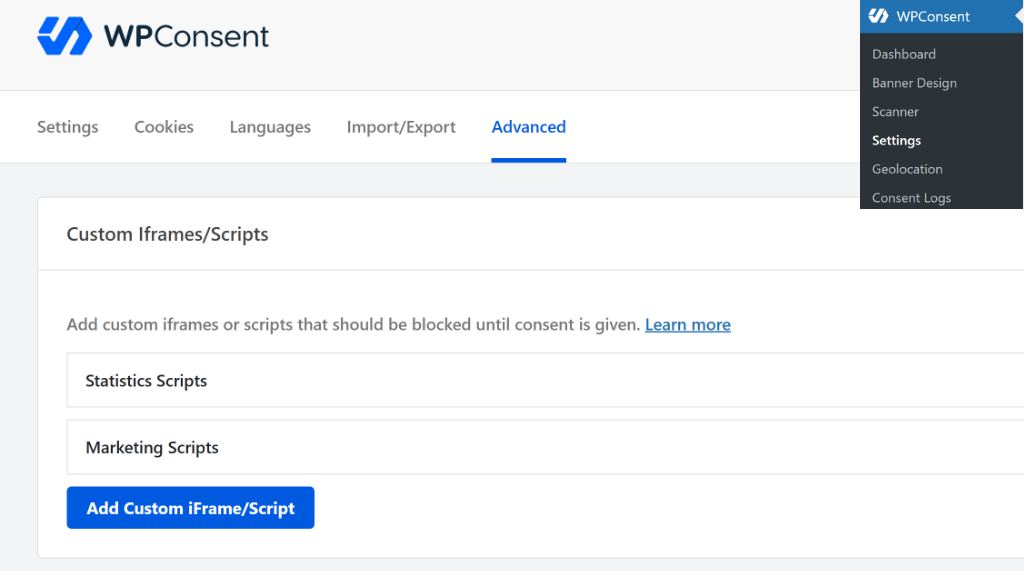
Besides that, another thing that makes WPConsent a top cookie management plugin is its custom script and iframe blocking.
This gives you the flexibility to prevent any custom script or an embedded iframe from loading before consent.
Complianz – Blocking Unwanted Scripts
Complianz also does a very good job at handling third-party unwanted scripts in WordPress.
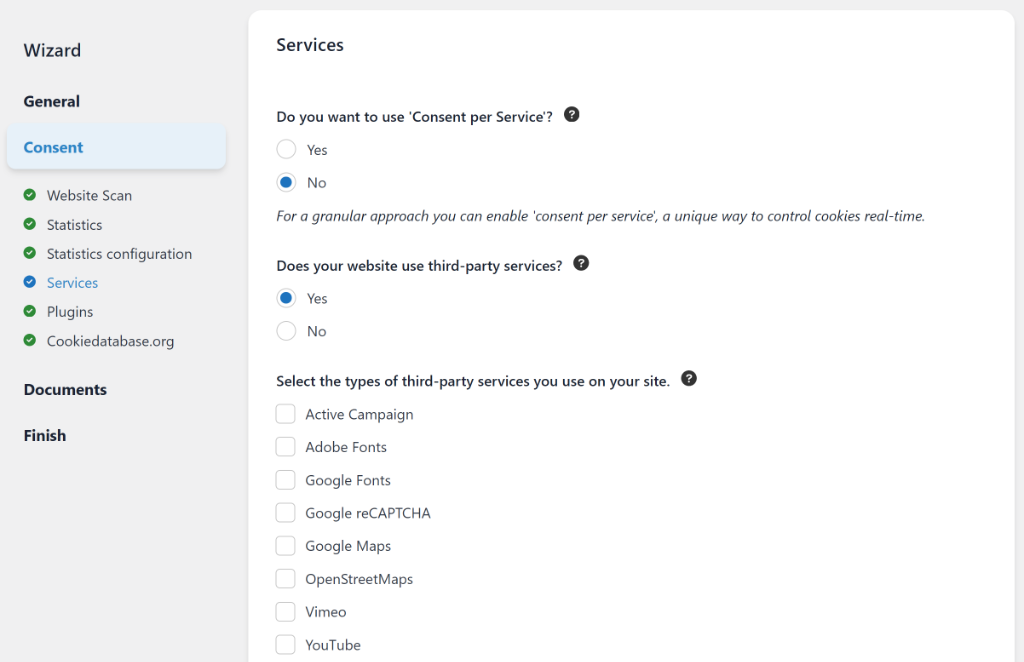
I tested the plugin to see which services it blocks by default. By answering the question in the wizard that your site uses third-party services, I was able to see a list of services. Some of these include Google Maps, Google Fonts, YouTube, Vimeo, Active Campaign, PayPal, Twitch, and more.
Other than that, Complianz also blocks social media pixels, buttons, and videos from Facebook, X (formerly Twitter), LinkedIn, TikTok, and more.
Complianz also handles script blocking through its “Script Center.” It is very powerful and gives you deep control over every script. It intercepts script tags and rewrites them so they don’t fire early.
While this is great for technical users, I found the Script Center a bit more complex to configure than WPConsent’s simple toggle. If you want a “one-click” solution to stop tracking scripts, WPConsent is the easier choice. If you need granular control over every single line of code, Complianz gives you that power.
Our Verdict
After testing both plugins extensively, for most WordPress users, WPConsent comes out on top. It strikes the perfect balance between being easy to use and keeping your site compliant by blocking scripts. I really appreciated how it handled script blocking automatically without asking me complex questions.
While Complianz is incredibly powerful, it often feels like overkill for a standard blog or business site. It gives you a granular Script Center that rewrites code, which is powerful but technical.
4. Compliance Features
Keeping up with privacy laws feels like walking through a minefield. You have strict rules like GDPR in Europe and entirely different rules like CCPA in California.
If you show a strict European banner to a visitor in Texas, you might annoy them unnecessarily. I looked at how both plugins handle these complex rules so you don’t have to guess.
WPConsent Compliance Tools
I found that WPConsent tries to automate the hard technical work for you. When I tested the Pro version, I went to WPConsent » Geolocation to handle visitors from different countries.
I saw pre-made templates for major laws like GDPR, CCPA, and LGPD. By simply clicking ‘Add GDPR Location Template,’ it automatically configured the strict “Opt-in” settings for my European visitors.
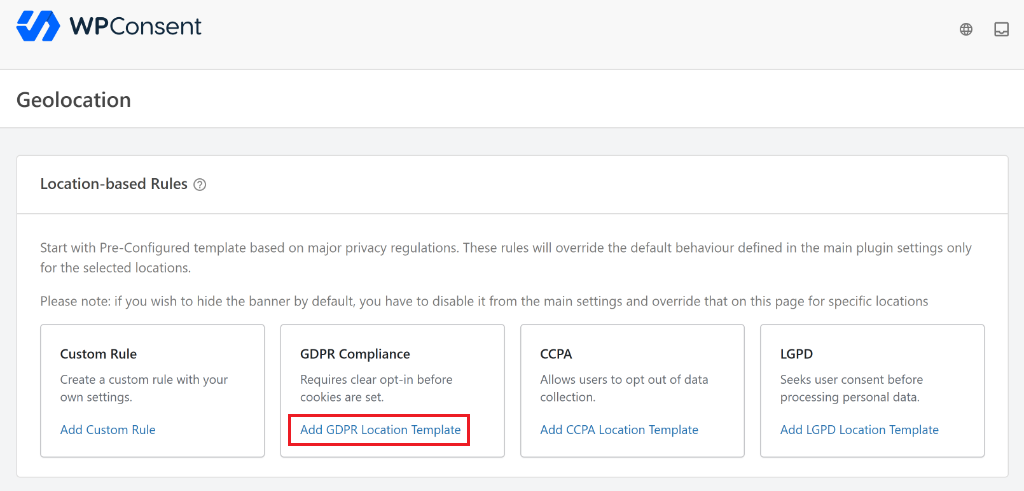
This made me feel safe because I didn’t have to manually figure out which legal box to check.
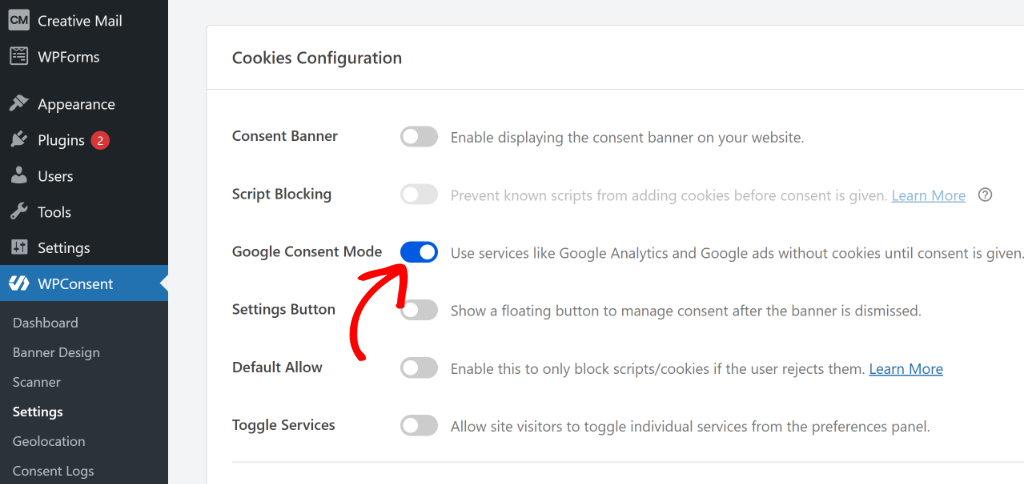
Another huge feature I tested was Google Consent Mode v2. This is absolutely required if you want your Google Ads and Analytics to keep working properly.
I went to WPConsent » Settings and was surprised to see it was already active by default. I didn’t have to touch a single line of code to get it running, which is a big relief.
For legal documents, WPConsent focuses specifically on your cookies. I clicked a button to ‘Generate Cookie Policy Page,’ and it created a list of all the tracking files my scan had found.
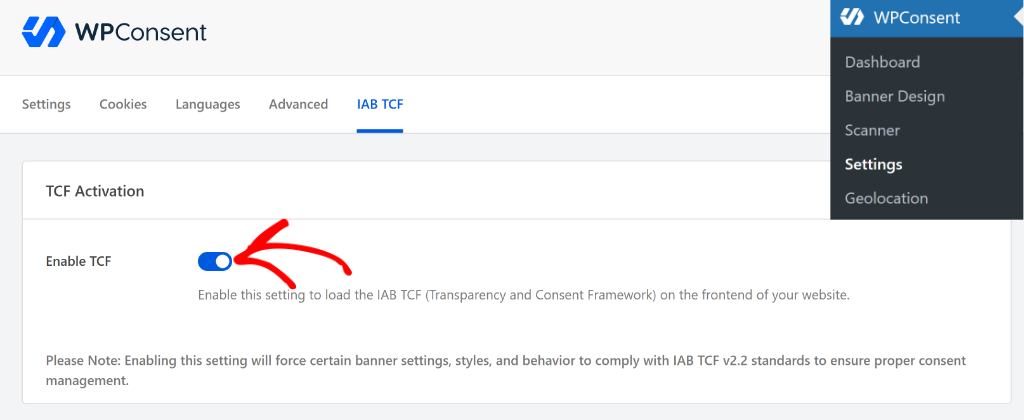
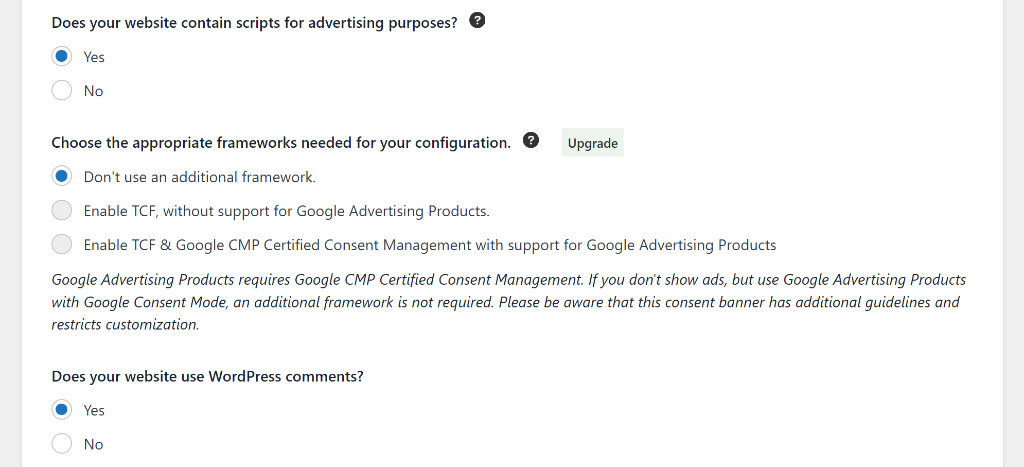
If you display ads on your website to make money, you might need something called IAB TCF support. This is a standard that ad networks use to verify user consent.
It also supports IAB TCF v2.2, which is great if you run ads on your site. You can enable these standards with a single click.
Complianz Compliance Tools
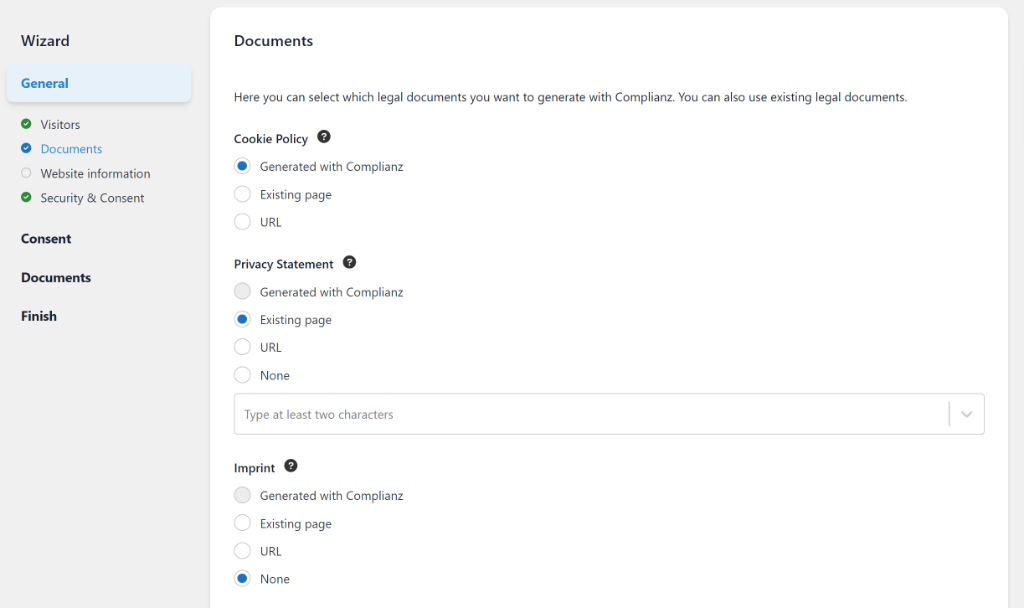
Complianz takes a slightly different approach by acting like a digital lawyer. Its biggest strength is generating full legal documents for you.
During the setup wizard, it offered to write a complete Privacy Policy and even an Imprint for my test site. This is incredibly useful if you have visitors from Germany or Austria, where an Imprint is required by law.
However, I noticed that Geo-Targeting works differently here. In the free version of Complianz, you usually have to pick one set of rules for the whole world.
If you want to show different banners to different countries, you must upgrade to their Premium version.
For Google Consent Mode v2, Complianz supports it fully. I found options to integrate it directly with the Google Site Kit plugin. It works well, but I felt it required a few more manual steps to configure compared to WPConsent.
Just like WPConsent, Complianz is also a verified consent management platform (CMP) for the TCF IAB framework. And you can select which framework to use by following the setup wizard.
Our Verdict
When it comes to offering compliance features, both plugins are equally matched.
WPConsent is the winner if you’re looking for advanced features in the free version. For example, I really liked how it handles Google Consent Mode v2 work out of the box in the Lite version, which is a massive advantage.
However, you should choose Complianz if you need help writing your legal pages. If you don’t have a privacy policy or cookie policy yet and don’t want to hire a lawyer, their document generator is very powerful.
5. Customization and User Experience
No one wants a huge, ugly pop-up blocking their content. I have spent years designing websites, and I know that if a banner looks bad, visitors will leave immediately.
You need a plugin that blends in with your brand while still following the law. I tested the design tools in both plugins to see which one was easier to style.
WPConsent Customization
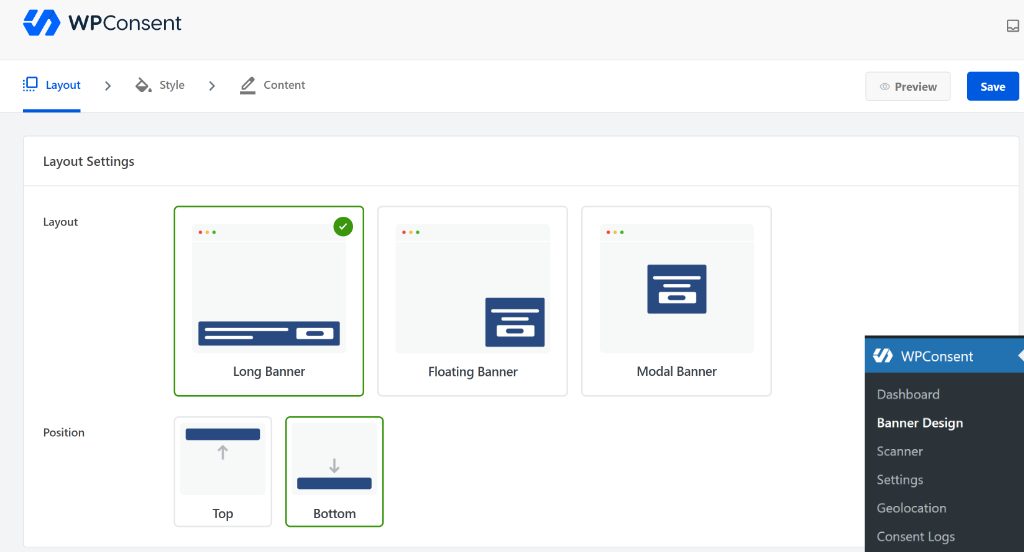
When I tested WPConsent, I found the customization process to be very visual and fast. It offers pre-built templates that look modern right out of the box. I could easily switch between different layouts, like a floating bar or a long banner.
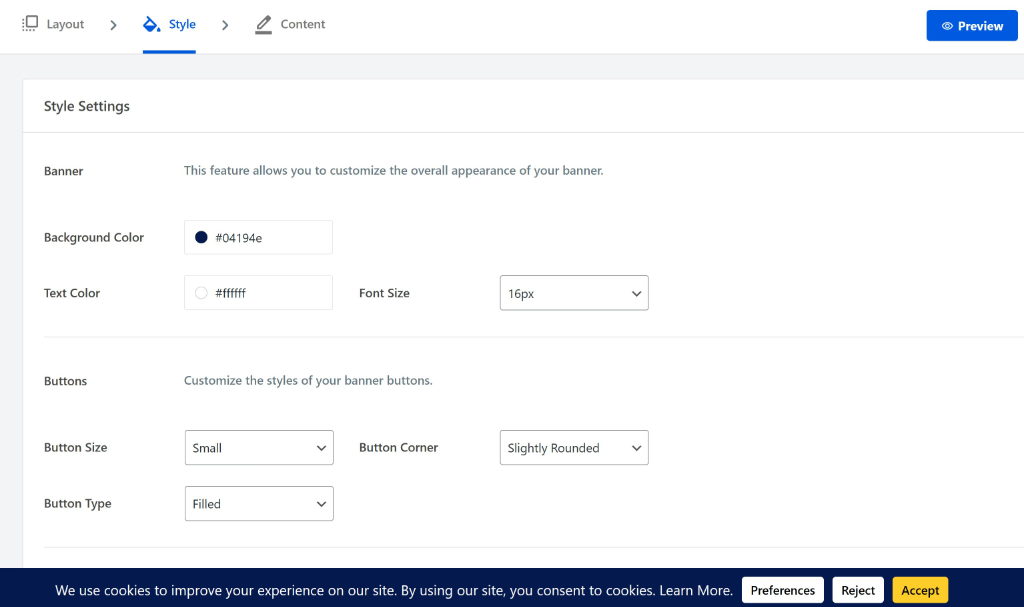
I changed the banner style by editing the background colors, button styles, and fonts to match my theme without writing any code.
The overall experience was pleasing, and the plugin was very easy to use. It felt like decorating a room where the furniture is already assembled for you.
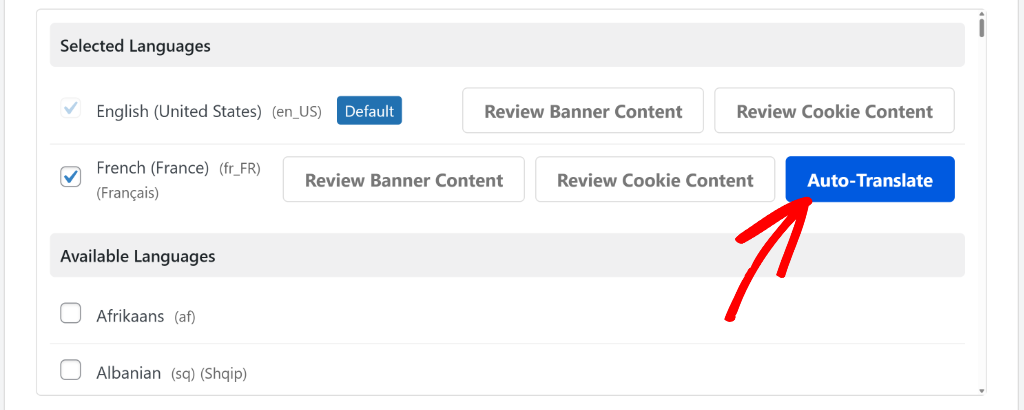
I also noticed that WPConsent supports multiple languages, which is great for user experience. If you have international visitors, WPConsent works with popular translation plugins to show the banner in their native language.
What’s more interesting is that it offers an AI-powered auto-translation option. It supports over 70 different languages, so you can easily show a location-based cookie consent banner and display cookie details in your visitors’ native language.
Most importantly, I found that WPConsent is very light on performance. Since it is self-hosted, it runs entirely on your own server and doesn’t wait for an external API to load the banner.
Complianz Customization
Complianz takes a more functional approach to its design. While it has styling options, it doesn’t offer a pre-built template that you can choose from and customize.
Instead, you can see a preview of the cookie banner and edit its appearance, colors, and text.
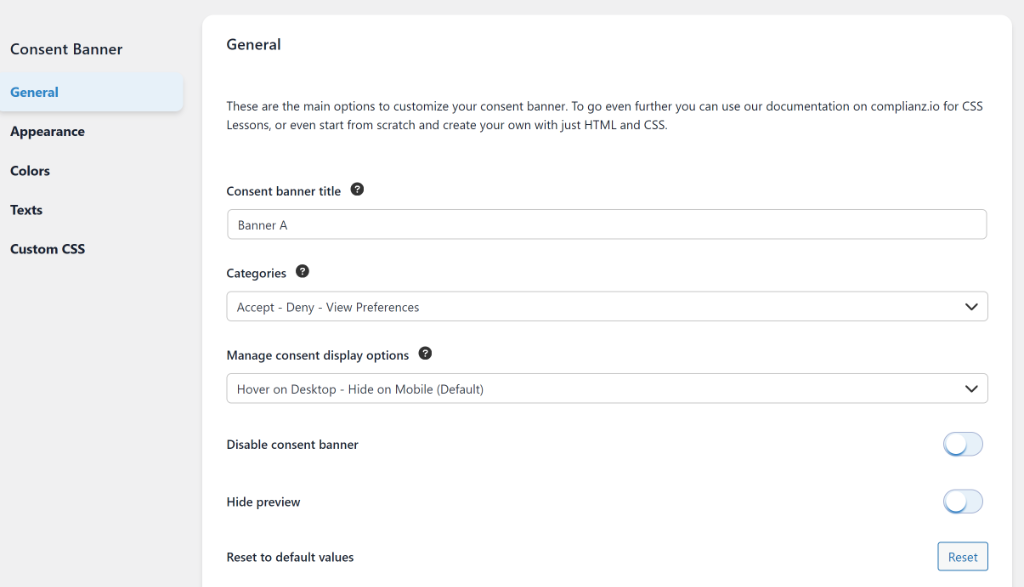
If you use their Premium version with TCF v2.2 support, the banner becomes very standardized. This ensures you meet strict advertising rules, but it gives you less freedom to make the banner look unique.
For the user experience, Complianz is very good at handling consent revocation. It automatically injects a floating “Manage Consent” button or adds a tab to your policy page so users can change their minds easily.
However, because Complianz is a full “Privacy Suite” that scans your site from the backend, it feels heavier than WPConsent. It does a lot of work behind the scenes, which can sometimes impact resource usage on smaller hosting plans.
Our Verdict
In my opinion, WPConsent is the winner for design and performance. It allows you to create a good-looking banner quickly, and its self-hosted nature keeps your site loading fast.
It is the best choice if you want a “bloat-free” experience that doesn’t annoy your visitors.
You should choose Complianz if you need a strictly standardized look for ad networks. If you are required to use the rigid TCF v2.2 layout for programmatic advertising, Complianz handles that professional look very well.
6. Pricing Comparison
Pricing for privacy tools can be tricky. I have seen many services that look cheap at first, but get very expensive once your traffic grows.
Some tools charge you based on how many “pageviews” or “sessions” you get. It feels like being punished for having a popular website.
I checked the pricing models for both WPConsent and Complianz to see which one offers better value for money without hidden costs.
WPConsent Pricing and Value
The biggest selling point for WPConsent is its self-hosted model. Because it runs on your own server, they do not charge you based on how many people visit your site.
I found that the WPConsent Lite version is surprisingly generous. It includes essential features like automatic script blocking, cookie banner templates, and even Google Consent Mode v2 right out of the box.
If you upgrade to WPConsent premium plans, then you pay a flat yearly license fee. There are 4 pricing plans to choose from, starting from $49.50/year. And the best part is that you get a 14-day money-back guarantee.
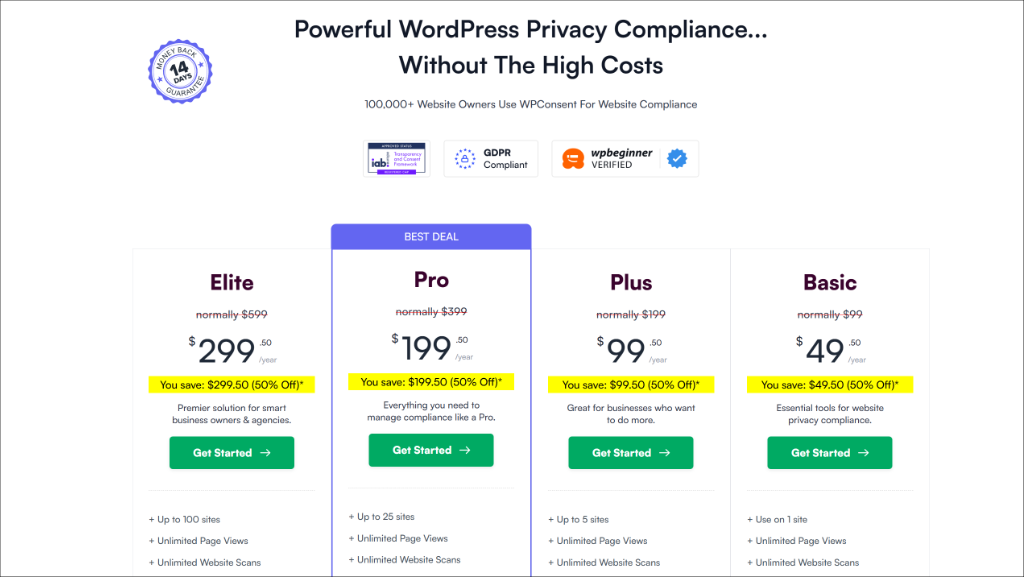
The Pro version unlocks advanced tools like Geolocation to show different banners to different countries, and the Do Not Sell addon. You get unlimited pageviews and scans without ever worrying about hitting a hidden limit or getting a surprise bill.
Complianz Pricing and Value
Complianz also offers a free version for WordPress. It is quite powerful, but I noticed it has some significant limits compared to the paid version.
In the free version, you cannot use the dynamic geolocation feature. This means you have to pick one set of rules (like strict GDPR) and force it on every visitor worldwide, which might be overkill for US visitors.
To get the full “Privacy Suite,” you need Complianz Premium. This unlocks the legal document generator, which can write your Privacy Policy and Imprint for you. It is also the only way to get TCF v2.2 support if you run ads on your site. While the features are excellent, the cost is tied to unlocking these specific premium capabilities.
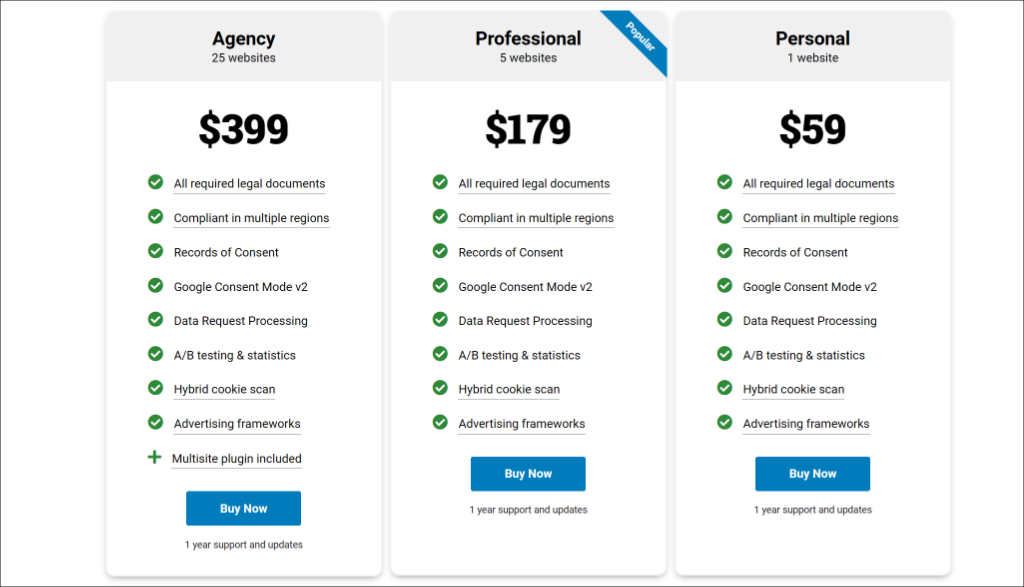
That said, Complianz offers 3 premium pricing plans, which start from $59/year. One of the things that stand out compared to WPConsent is that Complianz comes with a 30-day money-back guarantee.
Our Verdict
If you are running a high-traffic site or plan to grow, then WPConsent is the better value. Since it doesn’t charge by the pageview, your costs stay predictable even as your business gets bigger. Plus, you get a lot of powerful features, which make it super easy to manage cookies in WordPress.
Complianz is worth the extra money if you specifically need the legal document generator. It saves you the cost of hiring a lawyer to draft a privacy policy, which can be quite expensive.
WPConsent vs Complianz: Which Should You Choose?
After spending hours configuring both plugins, the right choice really depends on what you value most.
You should pick WPConsent if you want a fast, ‘set it and forget it’ solution. It is perfect for bloggers, small businesses, and agencies who want to be compliant without slowing down their site.
I found it to be the best option for blocking third-party scripts automatically without needing to touch any code. Plus, if you want to keep your costs predictable and your data on your own server, this is the winner.
On the other hand, you should pick Complianz if you have a complex site operating across many conflicting jurisdictions and need help writing your legal documents.
FAQs – WPConsent vs Complianz
1. Is Complianz better than WPConsent?
It depends on your needs. Complianz offers more configuration options and detailed legal documents, but WPConsent is simpler to use and includes features like IAB TCF that Complianz locks behind a premium. For most users, WPConsent is the better choice.
2. Is Complianz free?
Complianz has a free version with good features. However, advanced features like geolocation-based banners and IAB TCF compliance require Complianz Premium ($59/year).
3. Does WPConsent work with Complianz?
You should only use one cookie consent plugin at a time. Using both would create conflicts and confuse visitors with multiple banners.
4. Which plugin is better for GDPR compliance?
Both WPConsent and Complianz support GDPR compliance. WPConsent is easier to set up correctly, while Complianz offers more detailed configuration. Either can make your site GDPR compliant.
5. Can I switch from Complianz to WPConsent?
Yes. Deactivate Complianz, install WPConsent, and run through the setup wizard. Your previous consent records won’t transfer, but visitors will be prompted to consent again (which is normal when changing consent plugins).
I hope this article helped you learn the comparison between WPConsent vs Complianz. You may also want to see our guide on how to set up Microsoft Clarity consent mode in WordPress and beginners guide to PDPL compliance for WordPress.
If you liked this article, then please follow us on X (formerly known as Twitter). You can also leave a comment below if you need any assistance.