A membership site owner I spoke with recently had a pretty convincing argument for why her members didn’t need a cookie consent banner.
They’re already logged in, she said. They’ve already agreed to the terms of service. Isn’t that enough?
It’s one of the most common questions I hear from membership site owners, and the answer isn’t a simple yes or no.
Membership sites have layers of complexity that a standard blog or business site just doesn’t have. You’ve got logged-in users with persistent sessions, payment processors handling recurring billing, email marketing tools, course progress tracking, and video embeds for member content.
Each of these potentially involves cookies, and each one needs to be handled correctly. In this guide, I will walk you through cookie consent for membership sites.
Disclaimer: This article provides general information about cookie consent compliance and is not legal advice. For guidance specific to your situation, please consult a privacy attorney.
Why Set Up Cookie Consent for Membership Sites
If you’re running a membership site, you might assume you’re already covered. Your members agreed to your terms of service when they signed up. They’re logged in. Surely that counts for something, right?
Here’s the thing: it doesn’t. At least not when it comes to cookie consent.
GDPR and other privacy laws are about the cookies and tracking happening on your site, not about whether someone has an account.
A logged-in member hasn’t automatically agreed to be tracked by Google Analytics, retargeted by Facebook Pixel, or followed by your email marketing tool just because they created a membership. Each of those requires its own explicit consent.
On top of that, membership sites have more moving parts than a standard blog or business site. You’ve got persistent login sessions, payment processors handling recurring billing, email marketing integrations, course progress tracking, and video embeds in your member content. Each of these potentially involves cookies, and each one needs to be handled correctly.
The good news is that getting this right isn’t as complicated as it sounds. The key is showing a cookie consent banner to visitors before they become members, collecting their consent, and then carrying that choice forward even after they log in.
If someone accepted analytics cookies before signing up, that choice applies to their logged-in sessions too. If they rejected them, that rejection sticks.
Which Membership Cookies Need Consent?
WordPress membership sites use a mix of essential and non-essential cookies, and getting the categories right matters more than most site owners realize.
Essential cookies are the ones your membership site literally can’t function without. These don’t require consent. Some common examples:
- WordPress login session cookies that keep members logged in as they navigate
- Cookies that track membership level for access control
- Shopping cart cookies during checkout
- Security tokens for payment processing
Non-essential cookies are the tracking (statistics) and marketing tools you’ve layered on top of your membership system. These do require consent before they fire. Common examples include:
- Google Analytics tracks member behavior
- Facebook Pixel for retargeting members who don’t renew
- Email marketing tracking pixels
- Cookies set by embedded YouTube videos in your course content
Then there’s a gray area: course progress tracking. If you’re using a first-party cookie to remember where a member left off in a lesson, you could make a reasonable case that it’s essential to the experience.
But if you’re running a third-party analytics tool to track engagement across courses, that’s clearly non-essential and needs consent.
That said, let’s see how you can set up cookie consent for membership sites in WordPress.
How to Add Cookie Consent to Membership Sites
When it comes to making sure your membership site has proper cookie consent, the best solution is to use WPConsent.
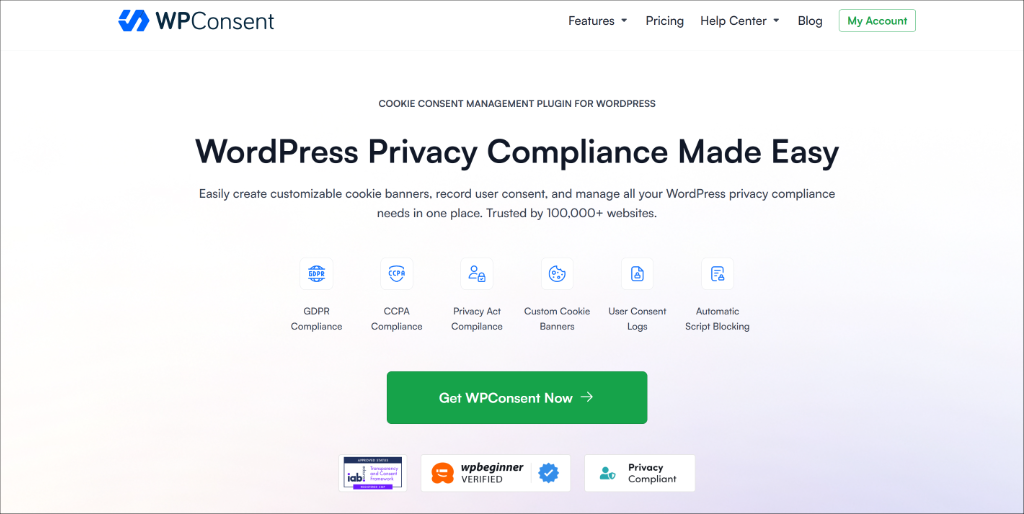
It is the WordPress cookie consent management plugin and works with the major membership plugins, including MemberPress, Restrict Content Pro, and WooCommerce Memberships.
It’s fully self-hosted, meaning all your consent data stays in your own WordPress database, not on a third-party server. There’s no SaaS subscription sending your member data somewhere else.
WPConsent also helps cover the compliance requirements most likely to affect WordPress site owners: GDPR (European Union), CCPA (California), PIPEDA (Canada), and other regional frameworks.
Plus, it is a registered CMP under the IAB Transparency & Consent Framework v2.3, the technical standard that governs how consent data is passed to advertising networks and third-party services.
A few things that make it the right fit for membership sites specifically:
- Automatic script blocking — WPConsent automatically scans your site and blocks third-party scripts from loading before a visitor gives consent. No manual coding required.
- Customizable cookie banner — You can match the banner to your brand with multiple layout options, including banners, popups, and modals.
- Consent record logs — Every user’s consent choice is logged and stored in your WordPress database, fully searchable and downloadable if you ever need to prove compliance.
- Smart geolocation — Show the consent banner only to visitors from regions that require it, like the EU or California, so you’re not interrupting everyone else’s experience.
- Automatic translations — If your membership has international members, WPConsent handles translations automatically.
To get started, you can use the WPConsent Lite version, which is available for free. However, if you want more advanced features like geolocation rules, custom script blocking, AI-powered auto translations, IAB TCF verifications, and more, then it’s highly recommended that you go with the WPConsent Pro version.
Once you have WPConsent installed and active on your site, you can follow the onscreen instructions in the setup wizard to scan your site for scripts, automatically configure them, and create a cookie consent banner.
Next, let’s look at how you can manage cookie consent for different elements like videos, email marketing tools, analytics tools, and others alike on your membership site.
How to Handle Video Content in Member Areas
Most membership sites include video content. This is where a lot of site owners accidentally fall out of compliance without realizing it.
The problem is that standard YouTube embeds start setting tracking cookies the moment the page loads, before a visitor has consented to anything. Vimeo, Dailymotion, and most other platforms work the same way.
So if your course library is full of embedded videos, you’ve potentially got tracking happening on every page view, consent or not. The good news is that WPConsent handles this automatically with its content blocking feature.
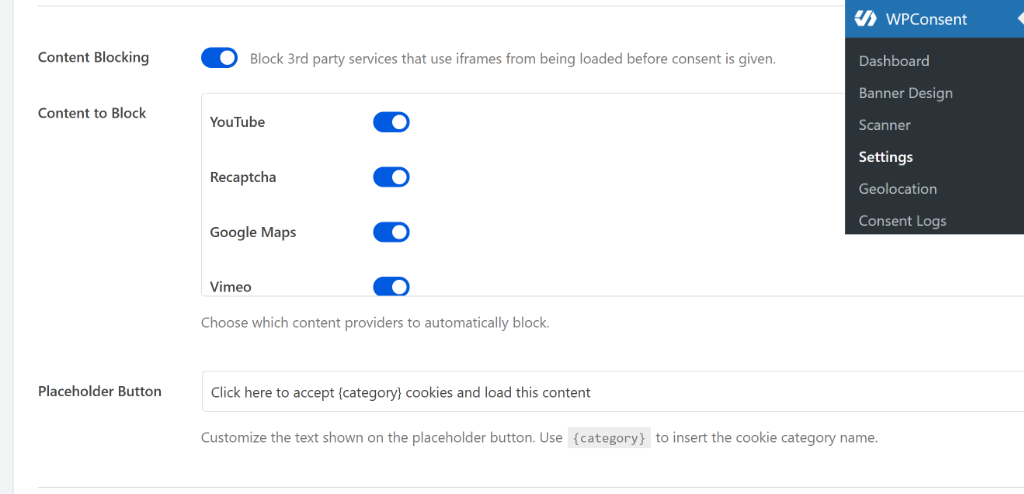
When a visitor hasn’t consented to marketing or functional cookies, WPConsent replaces your video embeds with a clean placeholder that explains why the video isn’t showing yet.
Once they accept, the video loads normally. For example, here’s what a YouTube embedded video will look like with the placeholder.

And if privacy is a core part of your membership’s value proposition, self-hosting your videos or switching to a privacy-first platform cuts out third-party tracking entirely. It adds some hosting complexity, but it’s worth considering if your audience cares deeply about data privacy.
How to Add Cookie Consent for Email Marketing Integration
If you’re running email marketing alongside your membership, there’s a compliance piece here that’s easy to miss.
When members click links in your emails, your email platform often drops tracking cookies on their browser to record that the visit came from email and follow what they do on your site afterward.
That tracking requires consent. If a member declined marketing cookies, that link click shouldn’t suddenly enable tracking they never agreed to.
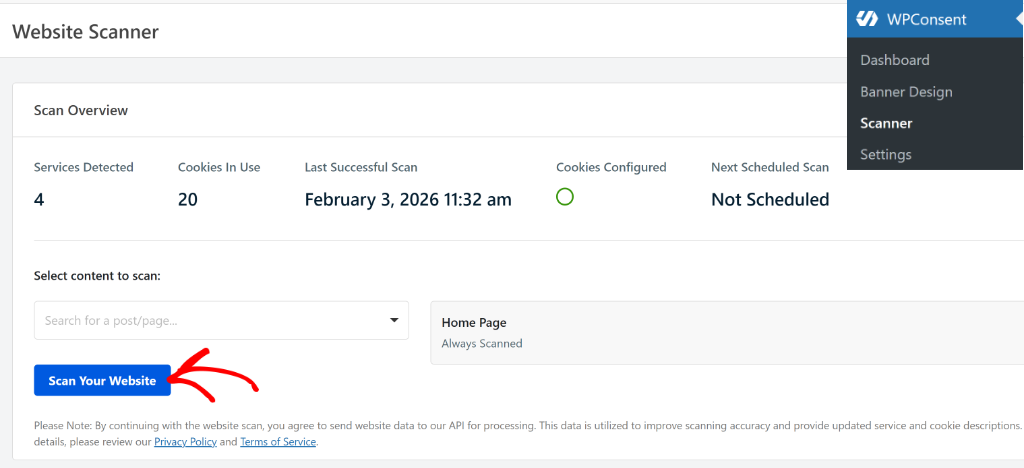
WPConsent’s automatic script blocking covers this. You can run the scanner by heading to WPConsent » Scanner from your WordPress dashboard. There is even an option to include specific pages in the scanning process.
You can learn more by following our guide on how to block third-party scripts in WordPress.
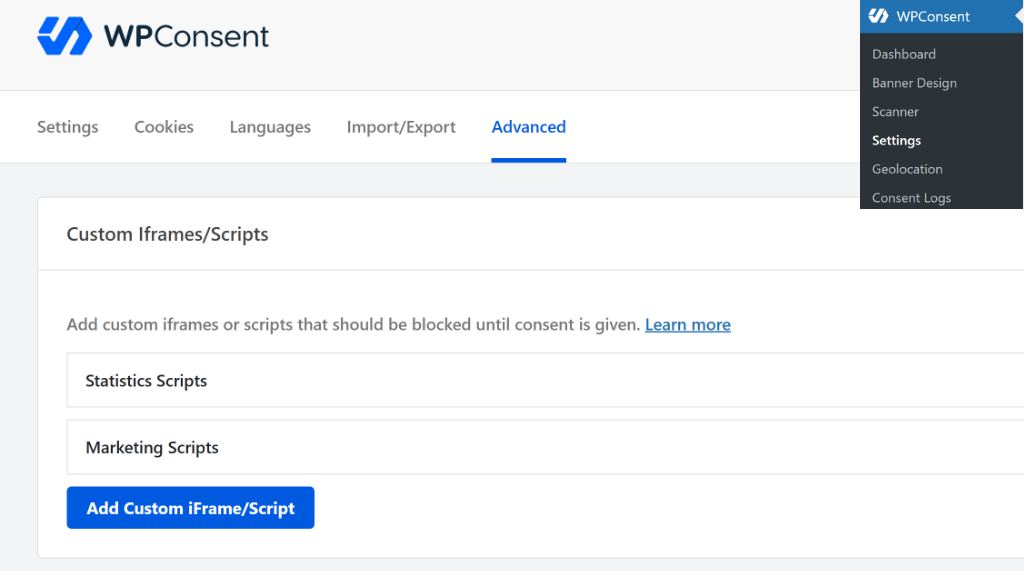
Besides that, you can also block custom scripts and iframes in WPConsent. This allows you to stay compliant and not let any scripts add cookies that the scanner might not pick automatically.
How to Manage Membership Payment Processor Cookies
Here’s one area where membership site owners can usually breathe easy. Most payment processor cookies (like Stripe, PayPal, and similar services) are classified as essential because they’re needed for fraud prevention and keeping the payment session intact. That puts them in the Necessary category, which means they don’t require consent.
WPConsent’s compliance scanner automatically detects and categorizes payment processor cookies when it scans your site, so you don’t have to figure out which ones are essential and which aren’t. It maintains an up-to-date database of known scripts and cookies, including those from major payment providers.
That said, it’s still worth checking your specific processor’s documentation. Some services offer analytics or advertising features that could push certain cookies into non-essential territory. If your processor is doing cross-site tracking for ad purposes, those would need consent — and WPConsent will flag them accordingly.
What are Common Scenarios on Membership Sites
Every WordPress membership site is a little different, so here’s how cookie consent plays out across some common setups.
Course platforms (MemberPress): The LMS’s own progress-tracking cookies are generally essential. Members need their progress saved to have a functional learning experience. But Google Analytics tracking, which lessons get the most engagement, is a different story. That’s analytics tracking, and it needs consent. WPConsent blocks it automatically until a member opts in.
Community sites (BuddyPress, bbPress): Forum session cookies are essential and don’t need consent. But embedded social content, sharing buttons, and any third-party widgets set non-essential cookies that do. WPConsent’s scanner picks these up during the initial scan and categorizes them correctly.
Tiered membership sites: The cookies that verify a member’s access level are essential; your site can’t show them the right content without them. But if you’re running marketing automation to identify members who are about to churn and target them with re-engagement campaigns, those tools use marketing cookies that require consent. WPConsent blocks them until the member opts in, then lets them fire normally once consent is given.
Why You Should Not Create a Cookie Wall
This is worth spelling out clearly because it’s a mistake that can get you into real trouble.
Blocking access to paid content until a member consents to tracking cookies is called a cookie wall, and it’s not valid under GDPR. Consent has to be freely given. If someone has already paid for your membership content, requiring them to also accept marketing tracking before they can access what they paid for is coerced consent, which doesn’t count.
WPConsent is built with this in mind. It blocks non-essential scripts and tracking without touching your membership access controls. Members who decline cookies still get full access to their content. They just won’t be tracked by your analytics and marketing tools. That’s exactly how it should work.
FAQs about Membership Sites Cookie Consent
1. Do logged-in members need to see a cookie banner?
They need to have consented at some point, but not necessarily see a banner every time they log in. The best approach is to collect consent before or during registration and remember that choice. If a member consented before creating an account, that choice carries forward after login.
2. Are membership login cookies essential?
Yes. Session and authentication cookies that maintain login state are essential for your membership site to function. They don’t require consent.
3. Can I track member engagement without consent?
First-party tracking that’s genuinely essential for the membership service might not require consent, but that’s a gray area. Third-party analytics like Google Analytics definitely require consent regardless of whether someone is a paying member.
4. Can I require cookie consent to access membership content?
No. Members who have paid for content must be able to access it regardless of their cookie choices. Blocking content until someone accepts tracking cookies is a cookie wall and isn’t valid under GDPR.
5. What about payment processor cookies?
Most payment processor cookies are essential for fraud prevention and completing transactions. They typically don’t require consent — but it’s worth checking your specific processor’s documentation to be sure.
I hope this guide helped you learn about cookie consent for WordPress membership sites. You may also want to see our guides on how to enable and configure GPC support on your WordPress site and how to audit your WordPress site for cookie compliance.
If you liked this article, then please follow us on X (formerly known as Twitter). You can also leave a comment below if you need any assistance.