
TL;DR:Cookie consent laws vary by country. The EU, UK, Brazil, Canada, and Thailand require opt-in consent before cookies fire. The US uses an opt-out model. Running one banner for all of them leaves you non-compliant in most. All eight laws covered in this guide are handled automatically by one screen in WPConsent Pro. Set your rules once, done.
Most companies install a cookie consent plugin, set up one banner, and call it done.
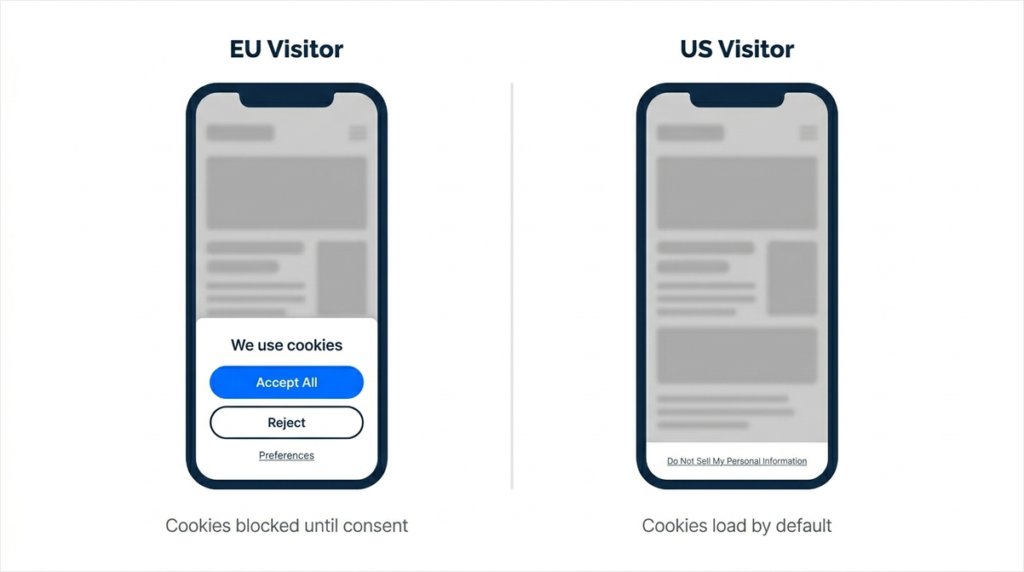
But here is the problem. A visitor from Germany and a visitor from California are seeing the same banner right now. And those two countries have completely different rules.
Germany requires opt-in consent before a single tracking cookie fires. No exceptions. California lets cookies run by default and only requires a “Do Not Sell” link.
Show the same banner to both visitors, and you are either blocking US users unnecessarily or leaving EU users without legally valid consent.
There are now eight major jurisdictions with active cookie consent laws.
Each has different requirements, different penalties, and different enforcement patterns. All eight of these laws are managed from a single screen in WPConsent. Set it once, done.
But first, you need to know what each country actually requires.
This guide covers exactly what each jurisdiction requires, what the fine looks like if you get it wrong, and how to configure WPConsent so the right banner fires automatically for every visitor.
The Location-based Rules feature in this guide, which serves the correct banner per country automatically, requires WPConsent Pro.
But you can start with the free version of WPConsent, which handles basic cookie consent out of the box.
Key Takeaways
- EU/UK/Brazil/Canada/Thailand: Opt-in required. Cookies must be blocked until the visitor actively accepts.
- US (CCPA): Opt-out model. Cookies run by default, but a “Do Not Sell” mechanism is required. Only applies to businesses meeting revenue or data thresholds.
- Switzerland: Risk-based. Opt-out is acceptable for basic analytics; opt-in is required for tracking and advertising cookies.
- Australia: In transition. The small business exemption is being removed; act before December 2026.
- The single biggest mistake: Treating all countries the same. One banner cannot satisfy both EU opt-in requirements and US opt-out design at the same time.
- The fix: WPConsent’s Location-based Rules. One screen, one setup, every visitor gets the right banner.
Quick Reference: Cookie Consent Requirements by Country (2026)
Expand to view the reference cookie consent requirements table 👇
| Country/Region | Law | Consent Model | Reject Button Required? | Max Penalty |
|---|---|---|---|---|
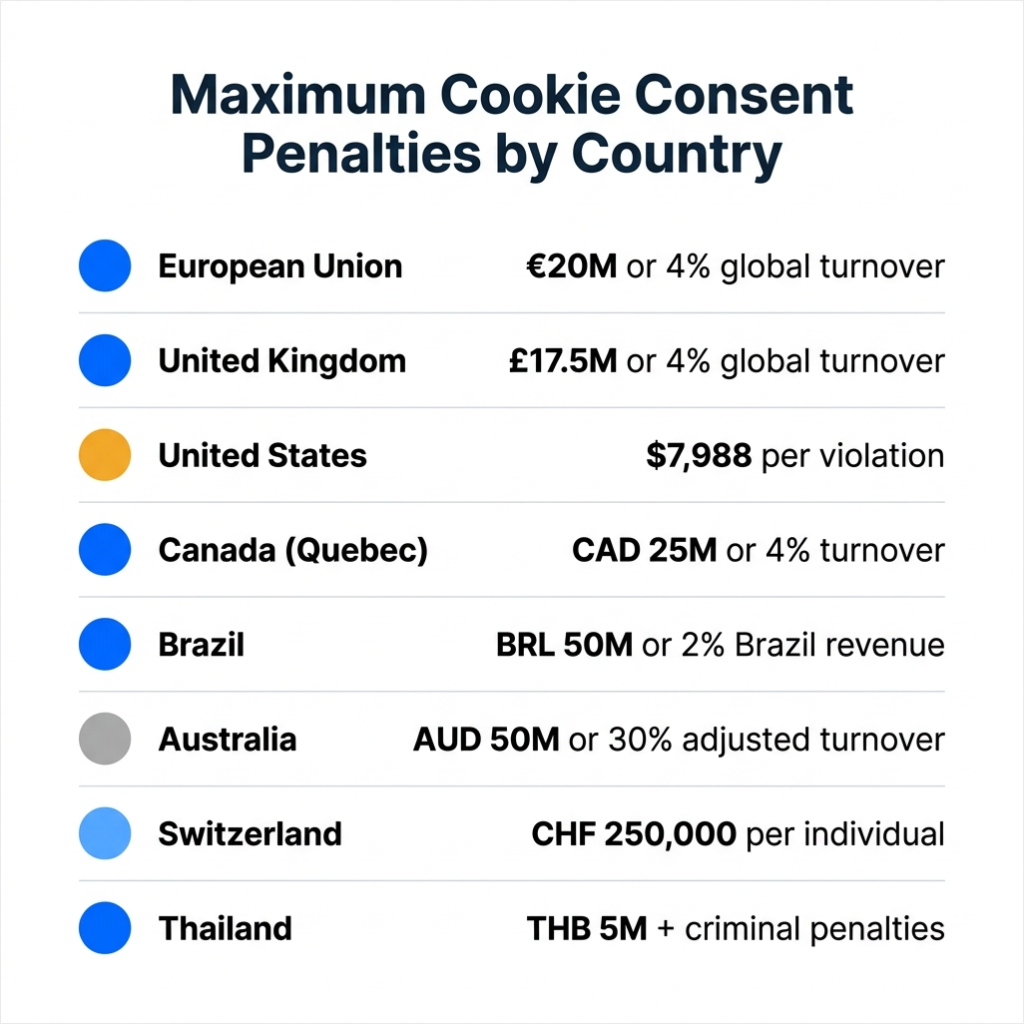
| European Union | GDPR + ePrivacy Directive | Opt-in | Yes, equal prominence | €20M or 4% global turnover |
| United Kingdom | UK GDPR + PECR + DUAA 2025 | Opt-in* | Yes, equal prominence | £17.5M or 4% global turnover |
| United States | CCPA/CPRA + state laws | Opt-out | Functionally, yes (Quebec) | $7,988 per intentional violation |
| Canada | PIPEDA + Quebec Law 25 | Opt-in (Quebec) / Implied (federal) | Functionally yes (Quebec) | CAD 25M or 4% worldwide turnover |
| Brazil | LGPD | Opt-in | Yes | BRL 50M or 2% Brazil revenue |
| Australia | Privacy Act 1988 (2024 reforms) | Transitioning to opt-in | Expected | AUD 50M or 30% adjusted turnover |
| Switzerland | nDSG/FADP | Risk-based | Yes (high-risk cookies) | CHF 250,000 per responsible individual |
| Thailand | PDPA | Opt-in | Yes, equal prominence | THB 5M admin + criminal penalties |
*The UK analytics exemption applies under narrow conditions. See the UK section below.
Let’s go through each jurisdiction in detail. For each one, you will find who the law applies to, what your banner must show, and the specific penalty you are looking at if something goes wrong.
If you want to quickly skip to the cookie compliance requirement you want to read on, use the table of contents below.
- 1. European Union: GDPR and the ePrivacy Directive
- 2. United Kingdom: UK GDPR, PECR, and the 2026 DUAA Update
- 3. United States: CCPA, VCDPA, and State Privacy Laws
- 4. Canada: PIPEDA and Quebec Law 25
- 5. Brazil: LGPD
- 6. Australia: Privacy Act 1988 (Major Reforms in Progress)
- 7. Switzerland: nDSG and the Risk-Based Approach
- 8. Thailand: PDPA
- How to Set Up Location-Based Cookie Consent in WPConsent
- FAQs: WordPress Cookie Consent Requirements by Country
- Final Take: Handle Cookie Consent for Every Country Automatically
Before you configure anything, find out what cookies your site is already setting. Paste your URL into WPConsent’s free Cookie Scanner and see every active tracking script on your homepage in 30 seconds. It shows exactly what needs to be covered by a consent rule.
Now that you have an idea of all the basics on consent requirements per country, let’s dive in.
1. European Union: GDPR and the ePrivacy Directive
Opt-in required
Most people call this “the GDPR cookie law,” but it is actually two laws working together.
The ePrivacy Directive is the cookie-specific law. It requires prior consent before any non-essential cookies fire on a visitor’s device.
GDPR defines what valid consent means. It must be freely given, specific, informed, and unambiguous. Understanding both helps you see why the requirements are so strict.
Non-essential cookies cannot fire until the visitor actively agrees. This means no pre-ticked boxes and no “by continuing to browse this site, you consent” language.
The visitor must take a positive action before a single analytics or marketing cookie loads.
With that in mind, your banner must show an Accept button and a Reject button with equal visual weight. The buttons must be the same size and the same number of clicks to reach.
A large blue “Accept All” button next to a small grey “Reject” link does not pass. Most EU data protection authorities now treat the absence of an equally prominent Reject button as a clear violation.
On top of that, granular consent by cookie category, like analytics, marketing, and preferences, is also required in most EU interpretations.
GDPR applies to any website with EU or EEA visitors, regardless of where the business is based. A US company with EU traffic must comply.
France’s data protection authority, CNIL, issued over €400M in cookie-related fines in 2025 alone. The maximum penalty is €20 million or 4% of global annual turnover, whichever is higher.
WPConsent handles this automatically. The GDPR Location Template sets opt-in mode, enables script blocking before consent, and pre-configures a banner with Accept, Reject, and Preferences buttons for all European visitors.
2. United Kingdom: UK GDPR, PECR, and the 2026 DUAA Update
Opt-in required, with one narrow analytics exemption
The UK left the EU but kept equivalent data protection standards. So, UK GDPR and the Privacy and Electronic Communications Regulations (PECR) govern cookie consent.
But, in February 2026, new provisions of the Data (Use and Access) Act 2025 (DUAA) came into force and introduced three limited exemptions from the consent requirement.
The exemptions cover:
- Strictly necessary cookies (already exempt before DUAA)
- Preference cookies that adapt appearance or functionality (language, theme, accessibility settings)
- Analytics cookies used solely for aggregate statistics to improve the website. But only when used by the website operator alone, with no data shared with third parties.
However, that last exemption is being widely misread.
Many sites are now treating it as “analytics cookies no longer need consent in the UK.” That is only true for pure first-party analytics with zero external data sharing.
If you use Google Analytics, which sends data to Google, the DUAA exemption does not apply. You still need consent for GA4.
The same applies if you use Google Consent Mode. The consent requirement does not disappear; it changes how data is modelled when consent is withheld.
Your banner must show Accept All and Reject All with equal visual prominence. The DUAA raised the maximum PECR penalty to £17.5 million or 4% of global annual turnover, now in line with UK GDPR levels.
UK law applies to any website with UK visitors, regardless of where the business is based.
WPConsent tip: Create a custom UK rule. Set consent mode to Opt-in and target the United Kingdom as the location. If you use only self-hosted, first-party analytics with no external data sharing, you can note that in your privacy policy. But most WordPress sites running GA4 still need the opt-in banner.
3. United States: CCPA, VCDPA, and State Privacy Laws
Opt-out required (sensitive data = opt-in)
The US has no single federal cookie law. Instead, a growing set of state laws applies.
For example, in:
- California, you get CCPA/CPRA
- Virginia, you get VCDPA
- Colorado, you get CPA
All three follow an opt-out model. That is, cookies can load by default, but you must give visitors a clear mechanism to stop the collection and sharing of their data.
Before you set up a US rule, check whether CCPA actually applies to your site.
CCPA only covers businesses that collect data from California residents AND meet at least one of these thresholds:
- $25M or more in annual revenue
- Buying or selling data on 100,000+ consumers
- Deriving 50% or more of revenue from selling consumer data
Many small WordPress sites do not meet any of these thresholds and are not technically required to comply with CCPA.
But Virginia and Colorado have different thresholds. Check your specific traffic and revenue before assuming you are covered.
If you do need to comply, your site must provide a “Do Not Sell or Share My Personal Information” link or mechanism.
As of 2025, all three state laws also require you to automatically honor Global Privacy Control (GPC) browser signals as opt-out requests.
A manual opt-out link alone is no longer sufficient if your visitors have GPC enabled in their browser.
Sensitive data like health information, financial data, geolocation, and children’s data requires opt-in consent under most US state laws, even within the opt-out framework.
The per-violation fine for intentional CCPA violations is $7,988 (inflation-adjusted January 2025). Each affected consumer counts as one violation.
WPConsent handles this automatically. The CCPA Location Template targets California only (not all of North America), sets consent mode to Opt-out, and leaves content blocking off. This way, cookies run by default while the banner provides the legally required opt-out path.
4. Canada: PIPEDA and Quebec Law 25
Opt-in required for Quebec visitors / implied consent for other Canadian visitors
Canada is often treated as a single, soft “implied consent” jurisdiction and that was broadly true under federal PIPEDA.
PIPEDA allows implied consent for low-risk, clearly explained cookie purposes. A banner that explains what cookies do and offers an opt-out option is generally acceptable at the federal level.
But Quebec changed the picture. Quebec Law 25, fully in force since September 2023, requires express opt-in consent before non-essential cookies fire, the same standard as the EU GDPR.
There is no minimum size threshold. Any business serving Quebec residents must meet Law 25’s opt-in standard for those visitors, including international businesses.
If you have Canadian visitors, you effectively need to meet the stricter Quebec standard to be safe. That means an opt-in banner that blocks non-essential cookies until the visitor actively accepts.
The maximum penalty under Quebec Law 25 is CAD 25 million or 4% of worldwide turnover, whichever is greater.
WPConsent tip: Create a custom Canada rule, set consent mode to Opt-in, and target Canada as the location. This satisfies both Quebec Law 25 and the stricter PIPEDA interpretation in a single rule.
5. Brazil: LGPD
Opt-in required
Brazil’s Lei Geral de Proteção de Dados (LGPD) requires free, informed, and unambiguous consent before non-essential cookies fire.
Consent must be purpose-specific. A single “accept our cookie policy” checkbox is not sufficient. Visitors must also be able to withdraw consent as easily as they gave it.
There is one requirement that almost every international WordPress site misses: your banner and consent interface must be in Portuguese for Brazilian visitors.
An English-only banner is non-compliant for a Brazilian audience. WPConsent supports multilingual banners combined with geo-targeting rules.
This means you can set up automatic translations to support Portuguese-language messages specifically for Brazil.
Note also that legitimate interest cannot be used as a legal basis for behavioral advertising cookies under LGPD. If you run retargeting or cross-site ad tracking, explicit consent is required.
Brazil’s data protection authority (ANPD) became fully independent in February 2026, and enforcement is growing.
The maximum penalty is BRL 50 million per infraction or 2% of the controller’s revenue in Brazil for the prior fiscal year.
WPConsent has a pre-built LGPD template. Enable it with one click for opt-in mode. Use the Customize Banner Message toggle to add a Portuguese-language consent message for full compliance.
6. Australia: Privacy Act 1988 (Major Reforms in Progress)
Transitioning to opt-in. Act now, not after the deadline
If you have read that Australia has no cookie consent requirement, that information is outdated.
The Privacy and Other Legislation Amendment Act 2024 is rolling out through 2025 and 2026, and it changes the picture significantly.
The old small business exemption excluded businesses with an annual turnover of under AUD 3 million from the Privacy Act, is being removed.
Almost all Australian businesses will now be in scope.
IP addresses, device IDs, and cookie identifiers have been explicitly added to the definition of “personal information.” Pre-ticked boxes and dark consent patterns are now restricted.
This means, “By using this site, you accept cookies” is no longer sufficient. In its place, active, granular consent is now the expected standard.
There is also a specific December 10, 2026, deadline for automated decision-making disclosure. Which means privacy policies, not just cookie banners, need updating this year.
The maximum penalty for serious or repeated violations is AUD 50 million or 30% of adjusted turnover during the breach period.
WPConsent tip: Create a custom Australia rule. Set consent mode to Opt-in and target Oceania, or drill down to Australia specifically. Getting this right before the December 2026 deadline avoids scrambling later.
7. Switzerland: nDSG and the Risk-Based Approach
Risk-based. Opt-in for tracking cookies, opt-out acceptable for basic analytics
Switzerland is not an EU member, and GDPR does not directly apply.
The Revised Federal Act on Data Protection (nDSG, or FADP in English) came into force on September 1, 2023. It mirrors GDPR in many ways, but the legal basis and enforcement mechanism are different.
Switzerland uses a risk-based approach. Strictly necessary cookies need no consent.
Low-risk analytics cookies, including first-party only, no cross-site tracking, and no data shared with third parties, are acceptable under an opt-out model.
While high-risk cookies, including behavioral advertising, cross-site tracking, and profiling involving sensitive data, require explicit opt-in.
Here is the detail that many miss: Swiss fines target the responsible individual, not the company.
Under the nDSG, the person at the organisation who made the non-compliant decision can be fined up to CHF 250,000 personally.
This is unique globally, and it changes the risk calculation for anyone running a site with Swiss visitors. A cookie banner is now mandatory under FDPIC 2025 guidelines.
The Swiss federal data protection commissioner stated explicitly that “without a banner, it is no longer possible” to comply.
WPConsent tip: Create a custom Switzerland rule. For most WordPress sites running standard analytics, set consent mode to Opt-out for the low-risk cookie categories. If you run retargeting or behavioral advertising, switch to Opt-in.
8. Thailand: PDPA
Opt-in required. One of the most actively enforced laws in Southeast Asia
Thailand’s Personal Data Protection Act (PDPA) became fully effective on June 1, 2022. Only strictly necessary cookies can run without consent. All other cookies require explicit opt-in before they fire.
Like most cookie consent requirements on this list, your banner must offer Accept and Reject options with equal visual prominence.
If your site targets Thai visitors, the banner should be in the Thai language, the same principle that applies to Portuguese in Brazil.
The PDPC (Personal Data Protection Committee) is one of the most active enforcement authorities in Southeast Asia right now. It issued THB 21.5 million in fines in August 2025 alone.
Interestingly, Thailand is one of the few jurisdictions globally where intentional violations can result in criminal charges.
Specific offences carry penalties of up to one year imprisonment or a THB 1 million fine, in addition to the administrative fine of up to THB 5 million.
On top of that, consent records must also be more detailed than most jurisdictions require.
Meaning, each record must include a timestamp, the specific choices made, and the exact version of the privacy notice shown to the visitor at the time of consent.
WPConsent tip: Create a custom Thailand rule under the Asia continent. Set consent mode to Opt-in. Use the Customize Banner Message toggle to add a Thai-language consent message.
That’s it. These are the cookie consent requirements from every country and region. Here is a quick visual to show you how cookie compliance rules are set up in each region.
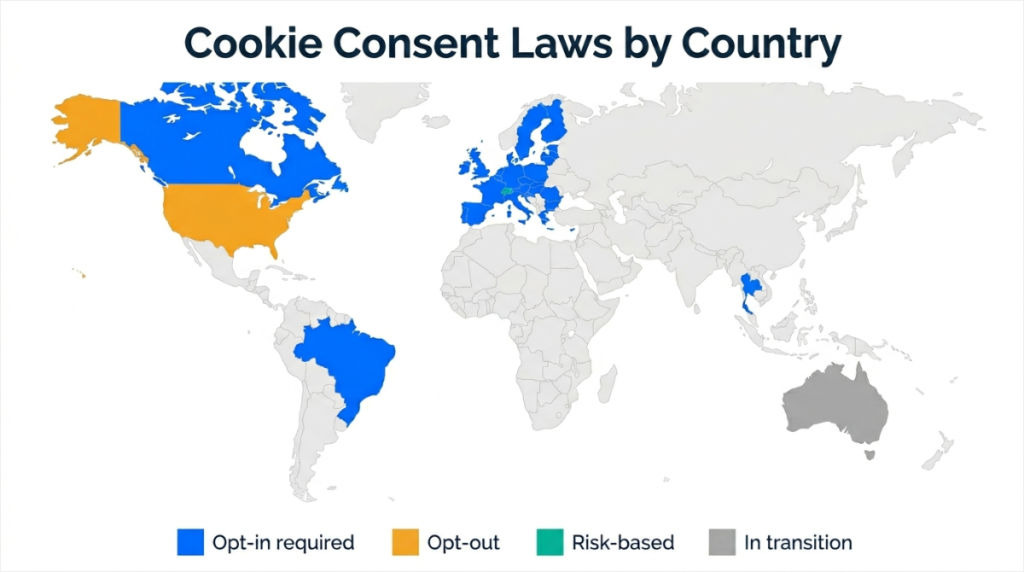
As you have noticed throughout this article, WPConsent can help you implement them in a quick and easy way.
With that in mind, let me walk you through how to set up location-based cookie consent with WPConsent.
How to Set Up Location-Based Cookie Consent in WPConsent
Before you set up your rules — find out what you’re working with. WPConsent’s free Cookie Scanner scans your homepage and shows every active tracking script and cookie in 30 seconds. You’ll know exactly what needs a consent rule before you configure anything.
First and most importantly, everything covered above can be handled from a single screen in WPConsent.
The Location-based Rules feature detects each visitor’s country using IP-based geolocation and serves the matching consent rule automatically, no code required.
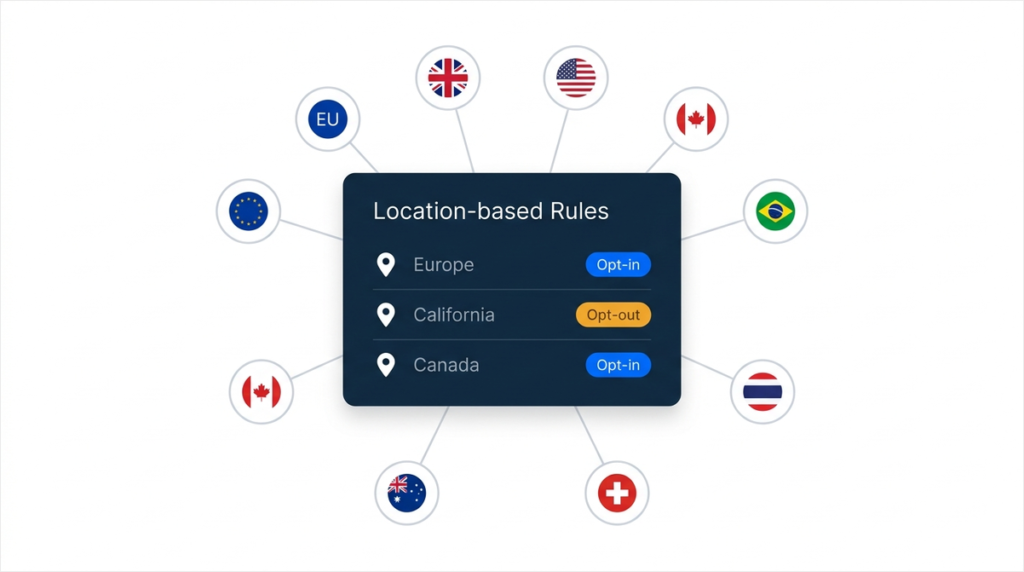
I will point out that Location-based Rules is a WPConsent Pro feature.
But the free version of WPConsent can help you with quick cookie consent management to help you comply with GDPR, CCPA / CPRA, ePrivacy, and more.
So, if you want to test out WPConsent Lite first, give it a try before upgrading.
Step 1: Open the Location-based Rules Screen
First, you need to install and activate WPConsent. If you need help with that, check out this guide on how to set up WPConsent.
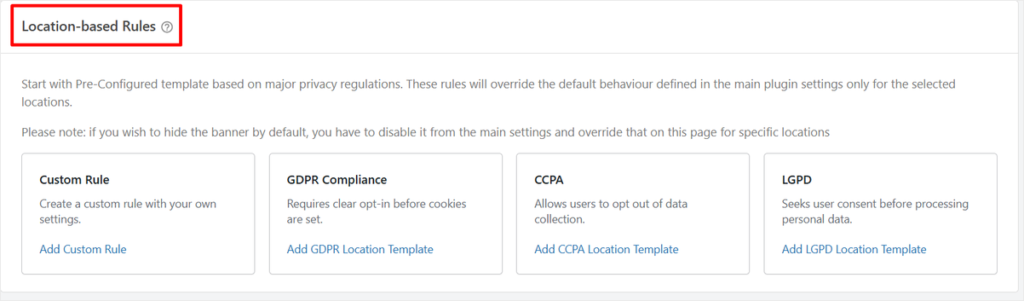
Once done, from your WordPress dashboard, go to WPConsent and click on Geolocation.
The Location-based Rules screen shows four cards: Custom Rule, GDPR Compliance, CCPA, and LGPD. The Custom Rule card is for any jurisdiction not covered by a template.
Step 2: Add the GDPR Template for EU Visitors
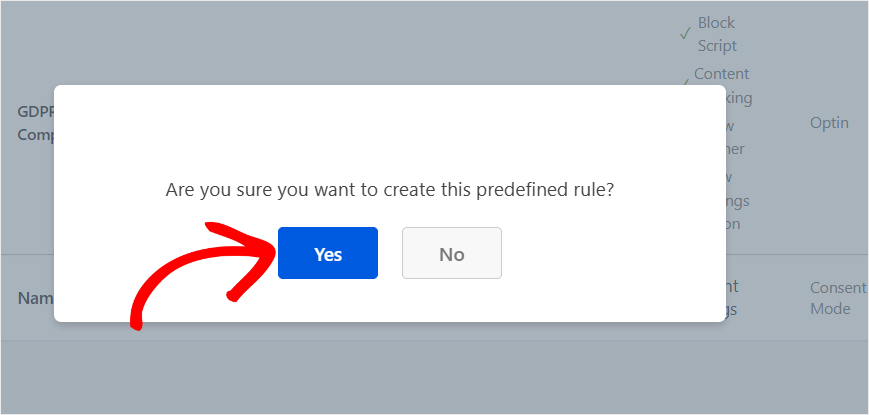
Click “Add GDPR Location Template” and confirm by clicking Yes on the prompt.
After this, you should see the GDPR tab set as “Added.”
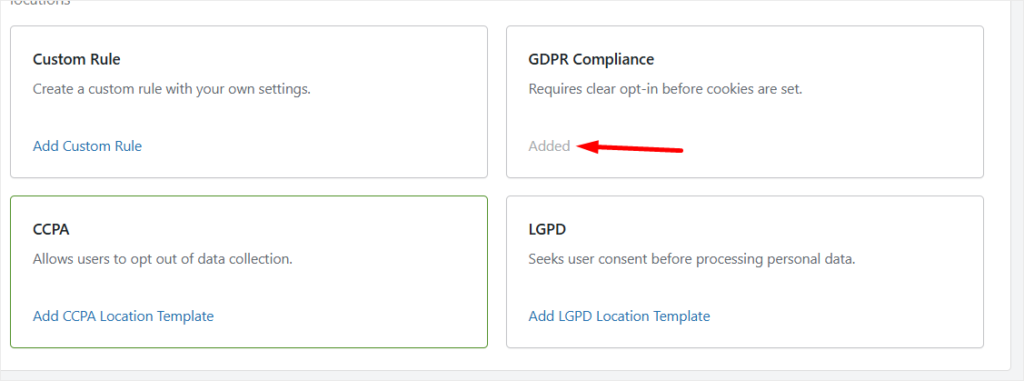
With this, WPConsent creates a rule that targets all of Europe in one click, sets consent mode to Opt-in, and pre-enables both script blocking and content blocking before consent is given.
The content blocking section comes pre-filled with the third-party services most commonly embedded on WordPress sites: YouTube, ReCAPTCHA, Google Maps, and Vimeo.
All four are blocked until the visitor gives consent, exactly what EU law requires.
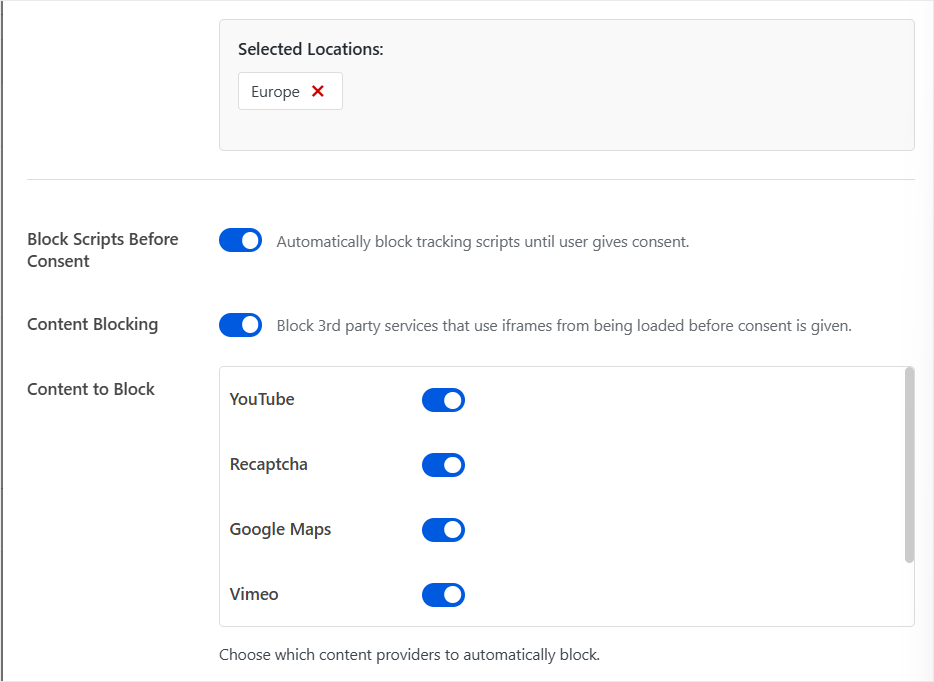
You do not need to configure anything else for the GDPR rule. The plugin already knows what EU law requires and has set everything accordingly.
Plus, you can see exactly what is set up on your WPConsent dashboard.
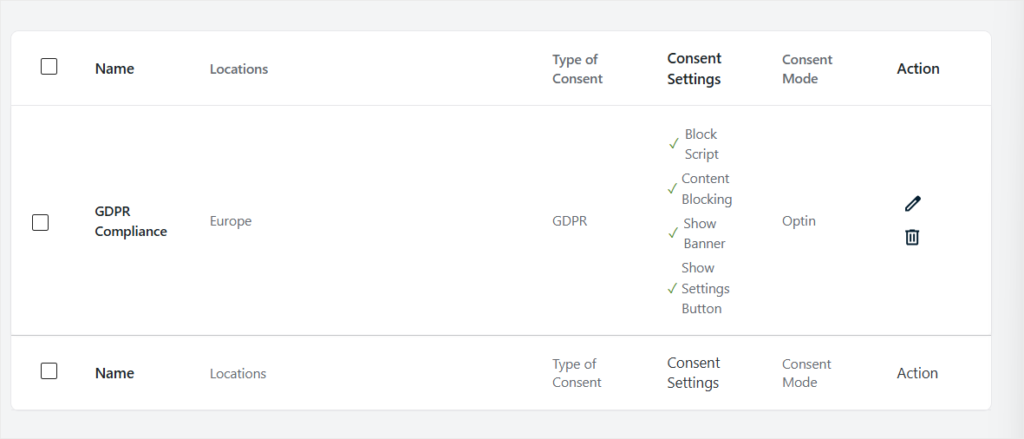
Step 3: Add the CCPA Template for US Visitors
Click “Add CCPA Location Template” and confirm. WPConsent creates a second rule that works very differently from the GDPR one, and that difference is intentional.
By default, the CCPA rule targets California only, not all of North America. It sets consent mode to Opt-out, meaning cookies run by default, and visitors can choose to stop them.
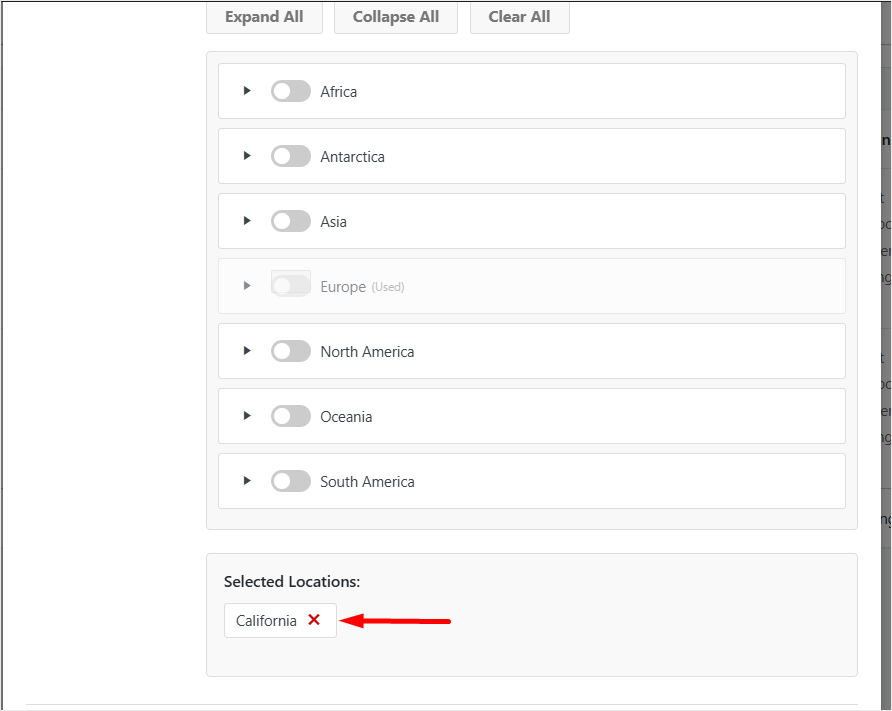
Content blocking is turned off in the CCPA rule because US law does not require scripts to be blocked before consent.
The table below the templates will now show both rules side by side. GDPR set to Optin on the left, CCPA set to Optout on the right. That contrast captures exactly what the law requires in each region.
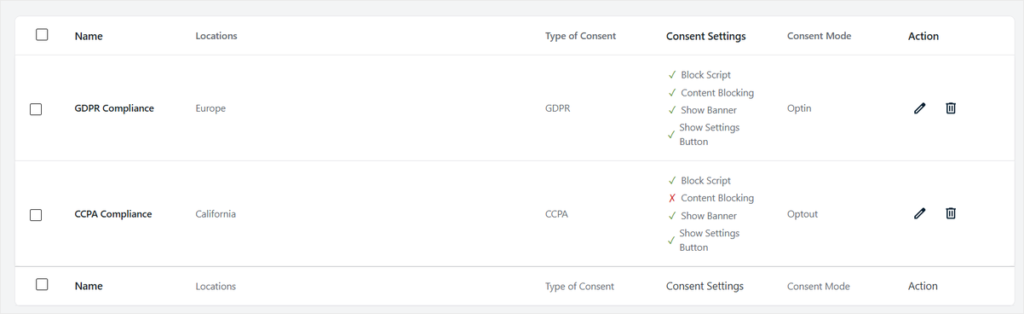
Step 4: Add Custom Rules for Other Countries
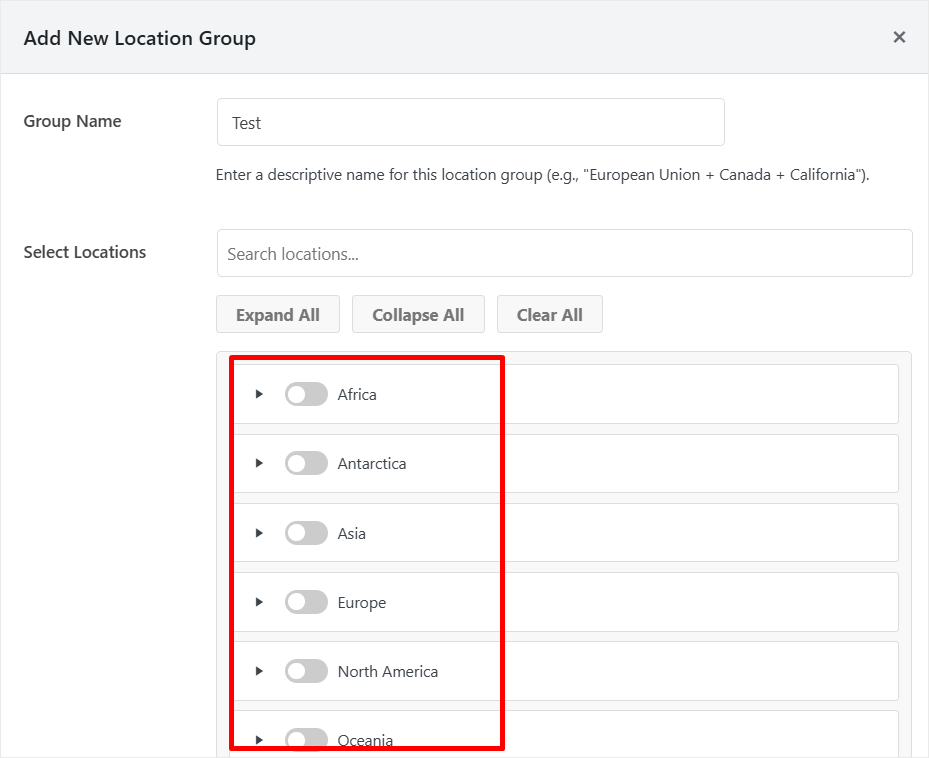
For any jurisdiction not covered by the three built-in templates, like the UK, Canada, Brazil, Switzerland, Thailand, and Australia, click “Add Custom Rule.” The Add New Location Group modal opens.
Give the rule a clear descriptive name, like “United Kingdom,” “Canada,” or “Thailand.” Then use the Select Locations panel to choose where the rule applies.
Continents are listed as toggles. Flip one on to select every country in that continent at once.
If you need a single country, click the arrow next to the continent name to expand the country list and select only the ones you need.
Once you have chosen the location, set the Consent Mode. The dropdown gives you two choices: Opt-in (user must actively consent) or Opt-out (consent assumed unless rejected).
Use the quick reference table at the top of this guide to know which one each country requires.

Repeat this for each additional jurisdiction on your list. Each rule runs independently, WPConsent matches the visitor’s location to the correct rule on arrival.
Step 5: Leave the Banner Defaults Unless You Need Custom Branding
Near the bottom of each rule’s settings, you will see two toggles: Customize Banner Buttons and Customize Banner Message. Both are off by default, and for most sites, you should leave them off.
When these toggles are off, WPConsent automatically uses legally appropriate default text and button labels for each jurisdiction.
The plugin knows what each law requires and fills in the correct language. You do not need to write a consent message from scratch.
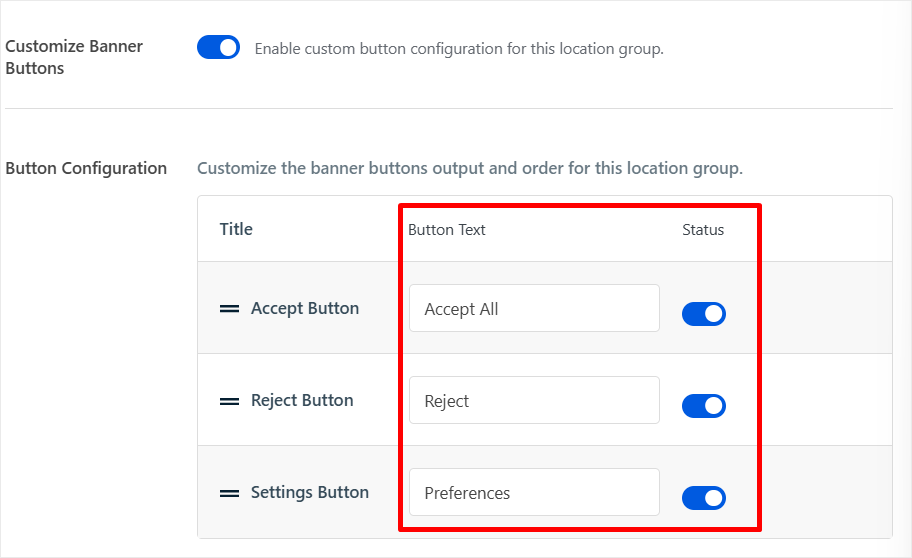
Turn on Customize Banner Buttons only if you want to change the button labels for brand consistency.
When you enable it, a configuration table appears showing three rows: Accept Button, Reject Button, and Settings Button. Each has a text field for custom labels and a toggle to enable or disable that button.
The defaults are “Accept All,” “Reject,” and “Preferences.”
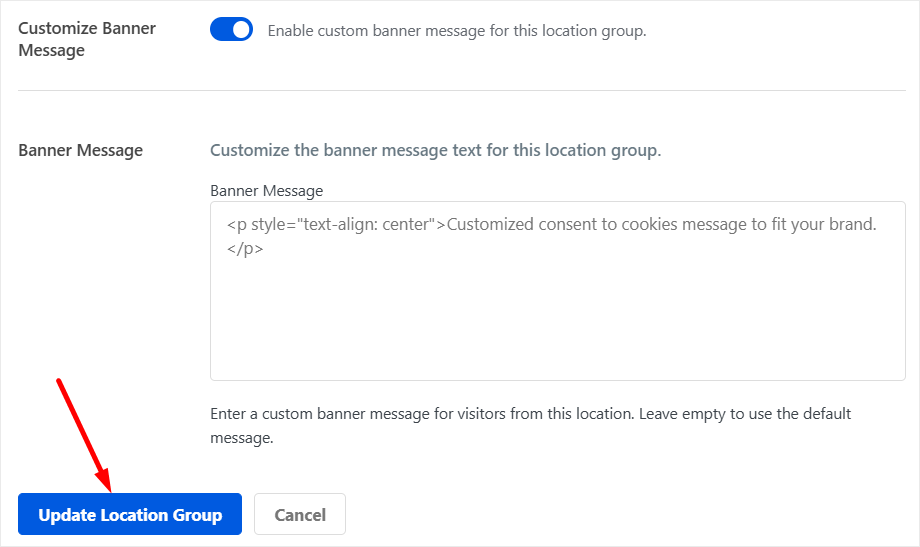
Turn on Customize Banner Message if you need a custom consent message. For example, a Portuguese-language message for your Brazil rule.
The message field accepts HTML. Leave it empty, and WPConsent uses the default message appropriate for that location.
Step 6: Save and You Are Done
Click “Save Location Group” for new rules or “Update Location Group” when editing an existing one. That is the entire setup.
From this point, every visitor who lands on your site is checked against your location rules.
EU visitors see an opt-in banner with a visible Reject button. California visitors see an opt-out banner with a Do Not Sell link. Thai visitors see an opt-in banner.
Each rule fires automatically; you do not touch it again unless the laws change.
Great. You now have a detailed list of cookie consent requirements per region and also a quick guide on how to set up WPConsent for the location.
If you are not sure where to start, use the free WPConsent Cookie Scanner. It shows you every tracking script your site is running and exactly what each country’s law requires you to do about it.
Still unsure? Check out the commonly asked questions below.
FAQs: WordPress Cookie Consent Requirements by Country
Do US websites need a cookie consent banner?
Not always. CCPA only applies to businesses meeting specific revenue or data volume thresholds. $25 million or more in annual revenue, data on 100,000 or more consumers, or more than 50% of revenue from selling consumer data. Many small WordPress sites do not meet any of these thresholds and are not required to comply with CCPA. That said, if your site runs Google Ads or Facebook Ads targeting US visitors, the ad platforms’ own consent policies may still apply regardless of CCPA.
Can I use one cookie banner for all countries?
You can use one banner design, but the rules it enforces must change by location. An opt-out banner shown to EU visitors is non-compliant. An opt-in banner shown to US visitors over-blocks by default and creates unnecessary friction. Geo-targeted consent, one rule per region, served automatically, is the correct approach and the one WPConsent’s Location-based Rules feature is built around.
Does GDPR apply to my site if my business is not in the EU?
Yes. GDPR applies to any website that has visitors from the EU or EEA, regardless of where the business is based. A US company, a Brazilian company, and a Canadian company all have to comply with GDPR if their sites have EU visitors. The law follows the visitor, not the business location.
What is the difference between opt-in and opt-out cookie consent?
Opt-in means cookies cannot fire until the visitor actively accepts them. Nothing loads until they click Accept. Opt-out means cookies fire by default, and visitors can choose to stop them at any time. The EU, UK, Brazil, Canada (Quebec), and Thailand require opt-in. The US requires opt-out. Switzerland requires opt-in for high-risk cookies and allows opt-out for basic analytics.
What is geo-targeted cookie consent?
Geo-targeted consent means your website detects where each visitor is located and shows them the consent banner that matches their country’s law. A UK visitor sees a GDPR-style opt-in banner. A California visitor sees a CCPA-style opt-out banner. WPConsent handles this automatically using IP-based location detection. No code, no manual switching, no separate banners to manage.
Final Take: Handle Cookie Consent for Every Country Automatically
Managing eight different consent laws manually is not realistic for most WordPress site owners.
The rules change, enforcement ramps up, and one generic banner leaves you exposed in at least half the jurisdictions in this guide.
WPConsent’s Location-based Rules feature handles every jurisdiction covered above from one screen in your WordPress dashboard.
Set up your rules once, and the right banner fires for each visitor automatically based on their location, on arrival, every time.
Get WPConsent Pro and set up location-based cookie consent today. New to WPConsent? Start with the free version of WPConsent and upgrade when you’re ready.
For a full walkthrough of the setup, see our guide to setting up location-based cookie consent in WordPress.

I am confused with the consent rules and setup. The website that i have is for nonprofit organisation and we donot sell anything The site is mainly to attract new members and provide information to our own members. Can you please clarify what we need to do
Hey Rodney, thank you for reaching out. For a site like yours we recommend specifically looking at any type of tracking (analytics, ads pixels) that you are doing on your website. That’s usually the largest source of cookies that have to be disclosed to your user. A good starting point is using the free WPConsent scanner. You can use it without installing the plugin to get started. You might just need to disclose cookies that are used for essential functionality like logins etc. If you need additional info feel free to reach out using the contact page.