Let’s face it, scanning a website for cookies is usually straightforward, until Google Tag Manager (GTM) gets involved.
While WPConsent’s scanner can easily detect that you are using GTM, it often hits a wall and cannot see the specific scripts loaded in the container. This means a lot of manual steps for configuring cookies.
But that’s about to change today!
I am thrilled to introduce a powerful improvement to the WPConsent scanner that solves this issue once and for all. You’ll now be able to scan and see inside the GTM container for scripts.
Let’s look at the details.
Automatically Scan GTM Container for Scripts
WPConsent’s scanner makes it very easy to uncover any script or service that might be adding cookies to your site and configure them for compliance.
But we wanted the scanner to be more powerful and frictionless than ever before. We didn’t want just a “workaround”; we wanted a true solution.
So starting today, our scanner will automatically analyze your Google Tag Manager container to detect the scripts living inside it.
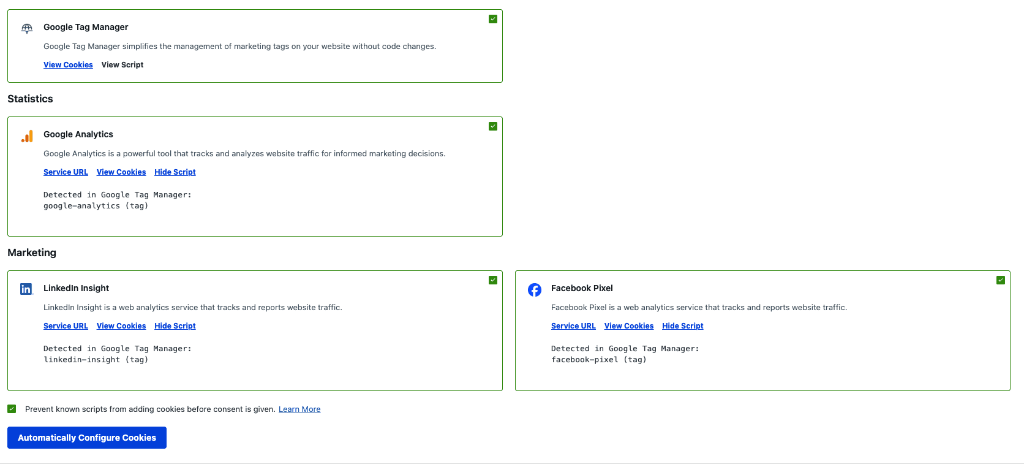
Instead of just telling you that you use GTM, WPConsent will now identify the specific services you are running and suggest them for auto-configuration.
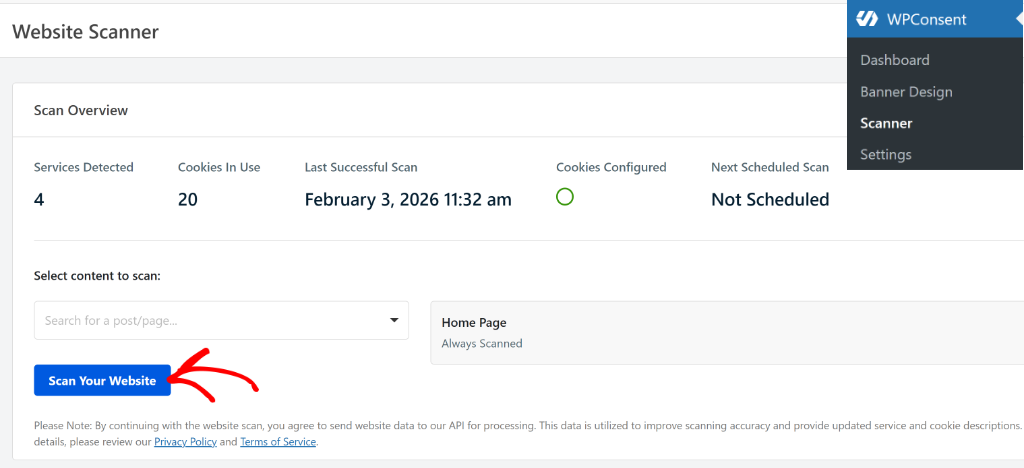
You can simply head to the Scanner page in WPConsent from your WordPress dashboard and scan your site for scripts and cookies.
After the scan is complete, you can scroll down to the Detailed Report section.
Here, you can see Google Tag Manager in the list.
How Does it All Work?
Behind the scenes, here’s what’s happening and how the enhanced scanner works:
- Intelligent ID Detection: First, our scanner detects the GTM container on your page and instantly identifies the specific Container ID.
- Zero-Setup Parsing: We automatically load and parse the container details using the public URL generated by your website. This is crucial because it means no setup is required on your end, no API keys, no login credentials, just instant analysis.
- Library Matching: We don’t just dump a list of raw code. We analyze the tags and match them against our extensive library of known scripts to tell you exactly which Google services (or custom tags) are present.
- Noise Filtering: Our system is smart enough to recognize the status of your tags. If you have paused a tag in GTM, we ignore it, ensuring your report only reflects what is actually active on your site.
What Does This Mean for You?
This means less manual guesswork and a much faster compliance setup.
You get a crystal-clear view of every service that sets cookies on your site, even those managed dynamically through GTM.
Here is the best part: This feature is available right now.
Because this is an enhancement to our scanning feature, you do not need to update the plugin. This improvement is fully backwards compatible and works immediately with your current version of WPConsent.
If you are a Premium WPConsent user, simply run a new scan from your dashboard and easily configure scripts inside your Google Tag Manager container.
So go ahead and give it a try and let us know what you think! Get started with WPConsent premium plans today to automatically detect and configure every service running inside your tag manager.
As always, thank you for helping us make WPConsent better with your feedback. If you have any questions, feel free to reach out!