
Many WordPress site owners have set up Google Analytics, installed a contact form, and possibly WooCommerce.
Many third-party tools and plugins drop cookies on your visitors’ browsers. Most did it before any visitor had a chance to say yes or no.
That’s the problem cookie consent solves.
It’s not just a banner. Cookie consent is the process of asking visitors for permission before your site stores data on their devices. In the EU, UK, California, and dozens of other places, that question isn’t optional anymore. And many other countries are not far behind.
By the end of this guide, you’ll know exactly what cookie consent is, who needs it, what the law requires, what a compliant setup looks like, and how to get your WordPress site there in minutes for free.
Key Takeaways
- Cookie consent is the legal requirement to ask visitors for permission before loading non-essential cookies, not just showing a notice after the fact.
- There are 4 cookie types. Only strictly necessary cookies are exempt. Analytics, advertising, and social media tools all require consent.
- Valid consent under GDPR must be freely given, specific, informed, and unambiguous. Most banners you see online fail at least one of these.
- Google Consent Mode v2 is now required for Google Analytics and Google Ads to function properly for EU visitors. WPConsent supports it out of the box.
- WPConsent’s free version covers everything most WordPress sites need: scanner, banner, script blocking, GCM v2, and automatic cookie policy generation.
What Is Cookie Consent?
Cookie consent is the process of asking website visitors for permission before storing non-essential cookies on their devices.
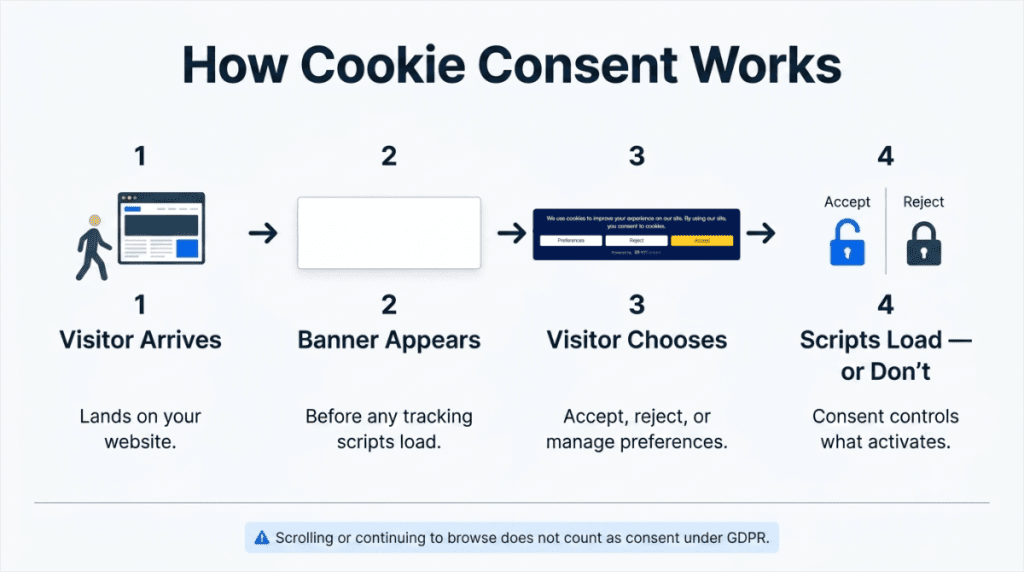
It requires a clear choice: accept, reject, or manage preferences before any tracking scripts load. Under GDPR, scrolling past a banner or continuing to browse does not count as consent.
How Cookie Consent Actually Works (The Part Most Sites Get Wrong)
A cookie is a small file your website stores on a visitor’s device. It can remember a login, save shopping cart items, or track browsing behaviour across the web.
Not all cookies work the same way. A cookie that keeps someone logged in is essential. A cookie that sends their browsing data to Google Analytics is not. Cookie consent is about the second type.
When a visitor lands on your site, non-essential cookies should not fire until they’ve agreed to let them. The visible part of the cookie consent is the banner. The invisible, and more important, part is the script blocking.
Script blocking means the tracking code doesn’t run until the visitor clicks Accept. The scripts stop completely. They don’t fire after the banner loads. They wait.
⚠️ Notice: A cookie notice and a cookie consent banner are not the same thing. A cookie notice tells visitors you use cookies. A consent banner stops those cookies from loading until the visitor responds
For easy navigation and to skip to exactly where you want to read in the article, use the table of contents below.
- Cookie Consent and Compliance
- Who Needs Cookie Consent?
- The 4 Types of Cookies (And Which Ones Need Consent)
- What Makes Cookie Consent Valid Under GDPR?
- Cookie Policy vs Cookie Consent
- What is Google Consent Mode v2?
- How Long Does Cookie Consent Last?
- Does My WordPress Site Have a Cookie Problem?
- How to Add Cookie Consent to Your WordPress Site
- WordPress Cookie Consent Compliance Checklist
- FAQs: What Is Cookie Consent?
Cookie Consent and Compliance
Cookie consent isn’t optional in many countries. It’s a legal requirement, and the laws are expanding.
The General Data Protection Regulation, GDPR, came into effect in the EU in 2018.
Under GDPR, websites must get clear, documented consent before setting non-essential cookies for EU visitors. GDPR doesn’t only apply to EU-based businesses. If your site is accessible from the EU and you collect data from EU visitors, GDPR applies to you.
The California Consumer Privacy Act (CCPA) followed in 2020. It requires an opt-out option for the sale or sharing of personal data. Since then, similar laws have been passed in Brazil, the UK, Canada, and more.
| Law | Where It Applies | Consent Model | Maximum Fine |
|---|---|---|---|
| GDPR | EU + EEA | Opt-in before cookies fire | €20M or 4% global revenue |
| UK GDPR | United Kingdom | Opt-in before cookies fire | £17.5M or 4% global revenue |
| CCPA / CPRA | California, USA | Opt-out from data sale/sharing | $7,500 per intentional violation |
| LGPD | Brazil | Opt-in consent required | 2% of Brazilian revenue, up to R$50M |
| Quebec Law 25 | Canada (Quebec) | Express consent required | $25M CAD or 4% global revenue |
GDPR fines can reach €20 million or 4% of annual global revenue.
For example, Amazon was fined €746 million for GDPR violations. In fact, cumulative GDPR enforcement has exceeded €7.1 billion across more than 2,800 enforcement actions.
For smaller WordPress sites, the more immediate risk is complaints triggering investigations. For a full breakdown of requirements by country, see our cookie consent requirements by country guide.
Who Needs Cookie Consent?
Short answer: if your WordPress site uses non-essential cookies and receives visitors from the EU, UK, Brazil, or California, yes, you need cookie consent.
- EU and UK visitors: GDPR and UK GDPR require opt-in consent before non-essential cookies fire. This applies to any website accessible from the EU, not just businesses based there.
- California visitors: CCPA requires a “Do Not Sell or Share My Personal Information” option. It’s an opt-out model, but it’s a legal obligation, not a courtesy.
- Over 20 US states, including Virginia, Colorado, Texas, and recently Indiana and Maryland, now have comprehensive privacy laws similar to CCPA.
Check out the chart below to see which cookie consent rules apply to your region.
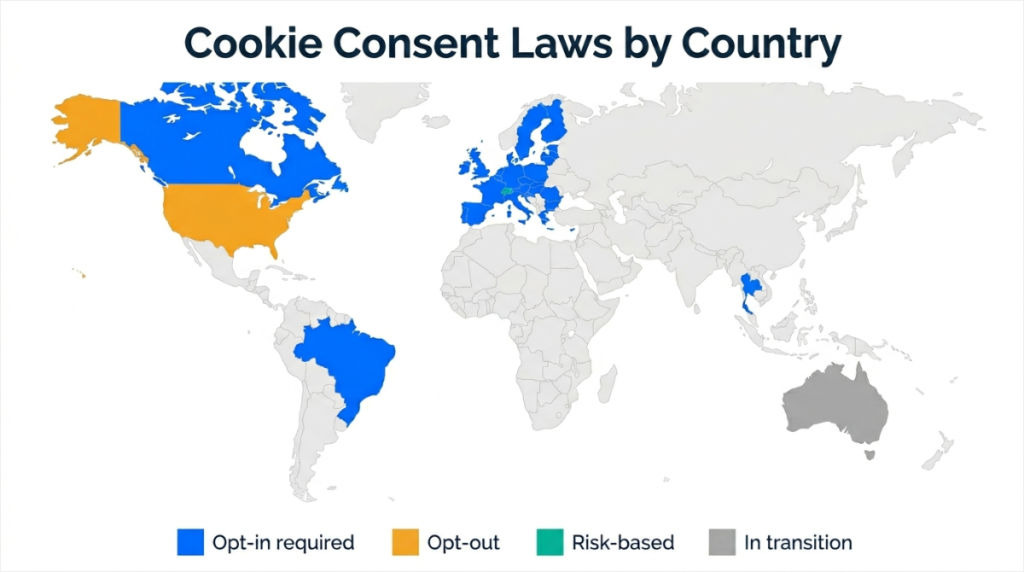
The practical rule for most WordPress sites: if you have analytics or a marketing pixel running, you need cookie consent. And almost every WordPress site does.
The 4 Types of Cookies (And Which Ones Need Consent)
Before you can set up cookie consent correctly, you need to know what cookies your site is actually using and which ones require consent.
- Strictly necessary cookies keep your site functional; login sessions, shopping cart, security tokens. No consent required, but disclose them in your cookie policy.
- WordPress examples: WooCommerce session cookie, WordPress login cookie, Wordfence.
- Preference (functional) cookies remember visitor choices: language, region, layout. Consent required in some jurisdictions.
- WordPress examples: language-switcher plugins and accessibility tools.
- Analytics cookies track how visitors use your site and send data to a third-party platform. Consent is required under GDPR with no exceptions.
- WordPress examples: Google Analytics, Matomo, Hotjar, MonsterInsights.
- Marketing and advertising cookies track visitors across websites to build profiles for targeted advertising. Consent is required everywhere.
- WordPress examples: Meta Pixel, Google Ads tag, LinkedIn Insight Tag, TikTok Pixel.
| Cookie Type | What It Does | Common WP Examples | Consent Required? |
|---|---|---|---|
| Strictly Necessary | Keeps the site working | WooCommerce, login, security | ❌ Not required |
| Preference | Remembers visitor choices | Language switcher, accessibility | ⚠️ Depends on jurisdiction |
| Analytics | Tracks site usage | Google Analytics, Hotjar, Matomo | ✅ Required |
| Marketing | Tracks for advertising | Meta Pixel, Google Ads, TikTok Pixel | ✅ Required everywhere |
What Makes Cookie Consent Valid Under GDPR?
GDPR sets the strictest cookie consent standard in the world. Valid consent has four conditions; all four must be met.
- Freely given: Visitors must be able to decline as easily as they can accept. Pre-ticked boxes are not valid. One click to reject must be as accessible as one click to accept.
- Specific: Consent for analytics doesn’t cover advertising. Each category needs its own agreement.
- Informed: Visitors must know which cookies will fire, what they do, and which third parties receive data before they consent.
- Unambiguous: Scrolling, clicking away, or continuing to browse do not count as consent. The visitor must take a clear, affirmative action.
And there’s a fifth requirement: proof. GDPR Article 7 requires a record of every consent decision; who consented, when, to what, and under which version of your policy.
In other words, you need to keep proper logs of all consent activity on your site.
What a Compliant Banner Must Have
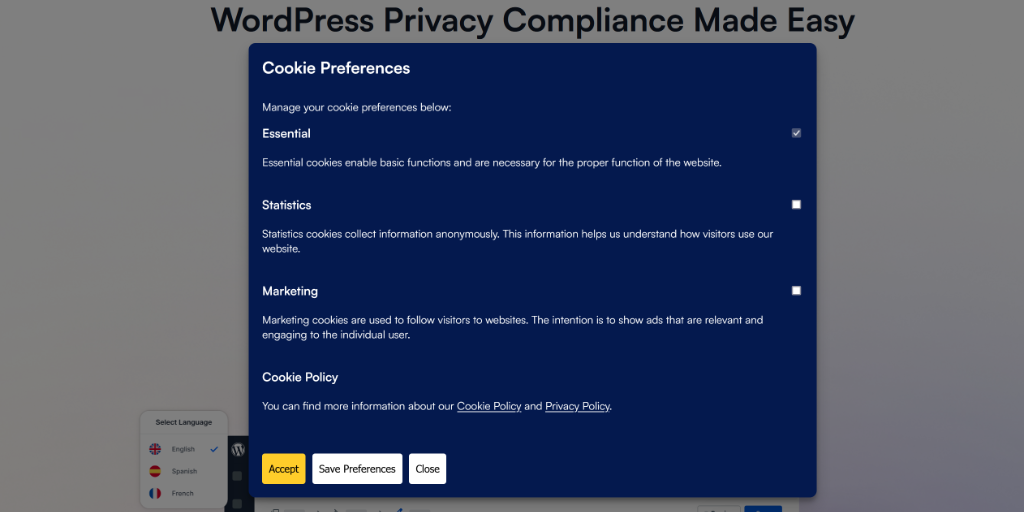
- A Reject button as prominent as Accept. This means the same size, same position
- A Preferences or “Manage cookies” option for granular control
- A clear description of each cookie category before consent is given
- A way to withdraw consent at any time after the initial choice
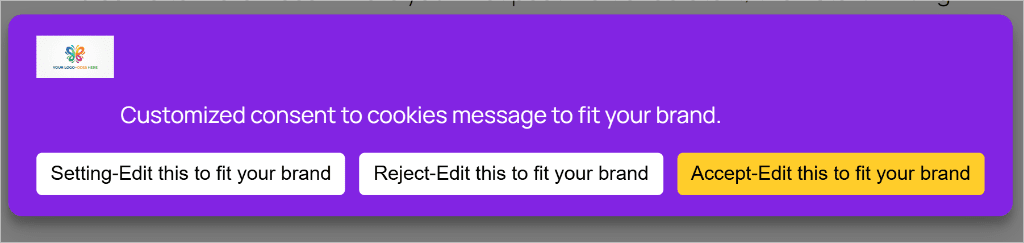
💡 WPConsent Tip: WPConsent’s default banner is built around these 4 GDPR requirements. The three-button structure, Preferences / Reject / Accept. This ensures equal prominence for all choices and satisfies the “freely given” condition out of the box. No configuration needed to start compliantly.
Check out the WPConsent expanded banner below and see how it checks all the boxes above. Use it as a reference for what you need on your site.
Cookie Policy vs Cookie Consent
These two terms get mixed up constantly. They’re not the same thing, and you need both.
A cookie policy is a written page on your site explaining what cookies you use, why, how long they last, and which third parties receive data.
Cookie consent is the mechanism that asks visitors for permission before cookies load. This is a banner, a preference centre, and a script blocker working together.
Having a cookie policy page doesn’t make your site compliant. The policy tells visitors what you do. Consent is the process of asking them before you do it.
| Cookie Policy | Cookie Consent | |
|---|---|---|
| What it is | A written page on your site | A banner + script blocker |
| What it does | Explains your cookie use | Asks permission before cookies load |
| GDPR required? | ✅ Yes | ✅ Yes |
| CCPA required? | ✅ Yes | Opt-out mechanism required |
WPConsent generates your cookie policy page automatically, included in the free version. Plus, the policy updates itself when new cookies are detected.
What is Google Consent Mode v2?
If you run Google Analytics or Google Ads on your WordPress site, Google Consent Mode v2 is not optional.
Google made it mandatory for EU visitors in March 2024. Without it, your analytics data for EU visitors who decline cookies is incomplete. As a result, your Google Ads campaigns lose the ability to model conversions for those visitors.
When a visitor declines analytics cookies, Google Analytics normally receives no data from that session.
With Consent Mode v2 enabled, Google uses machine learning to model what that visitor would have done, so your data gaps are filled with estimates rather than blanks.
The two signals Consent Mode v2 requires: analytics_storage controls whether Google Analytics fires, and ad_storage controls whether Google Ads conversion tracking fires.
💡 WPConsent Tip: WPConsent supports Google Consent Mode v2 out of the box. Once activated, it automatically sends the correct consent signals to Google based on each visitor’s choices. No extra configuration, no code, no third-party integration needed.
How Long Does Cookie Consent Last?
Consent doesn’t last forever. GDPR requires that consent be renewed periodically, and different data protection authorities have set different expectations.
| Jurisdiction | Authority | Recommended Renewal |
|---|---|---|
| France | CNIL | 6 months |
| Germany | DSK | 6–12 months |
| Spain | AEPD | 24 months |
| United Kingdom | ICO | 12 months |
| General best practice | — | 12 months |
Does My WordPress Site Have a Cookie Problem?
Some WordPress site owners assume their site is compliant because they installed a banner plugin.
But the reality is, every plugin, theme, and embedded tool (YouTube, Google Maps, social sharing buttons ) you install can add new cookies.
On top of that, a banner you configured months ago may not account for the cookies added by the plugin you installed last week.
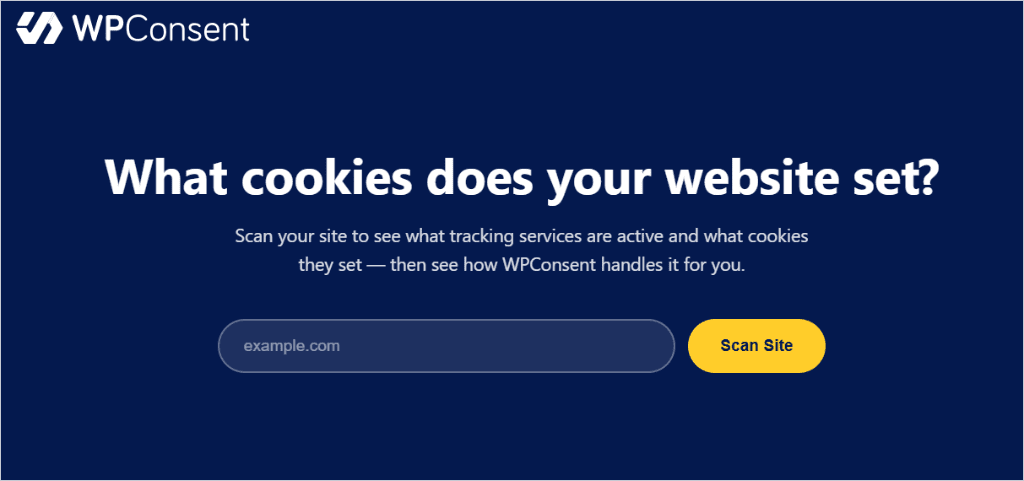
The first step to real compliance isn’t setting up a banner. It’s finding out what cookies your site is actually setting right now.
💡 WPConsent Tip: Use this free scanner from WPConsent to see what tracking services are active and what cookies they set. No email required. Run it before anything else. You’ll likely find cookies you didn’t know were there.
How to Add Cookie Consent to Your WordPress Site
Once you know what cookies you’re setting, the setup is straightforward.
WPConsent’s free version covers the core of what most WordPress sites need: a customisable banner, automatic script blocking, a cookie scanner, Google Consent Mode v2 support, and an automatically generated cookie policy page.
For the premium version of WPConsent, go to the official site and sign up.
If you have any issues about setting up this consent plugin, check out our guide on how to install WPConsent. Once you install and activate WPConsent, it will take you through every step below through the setup wizard. So all you have to do is follow along.
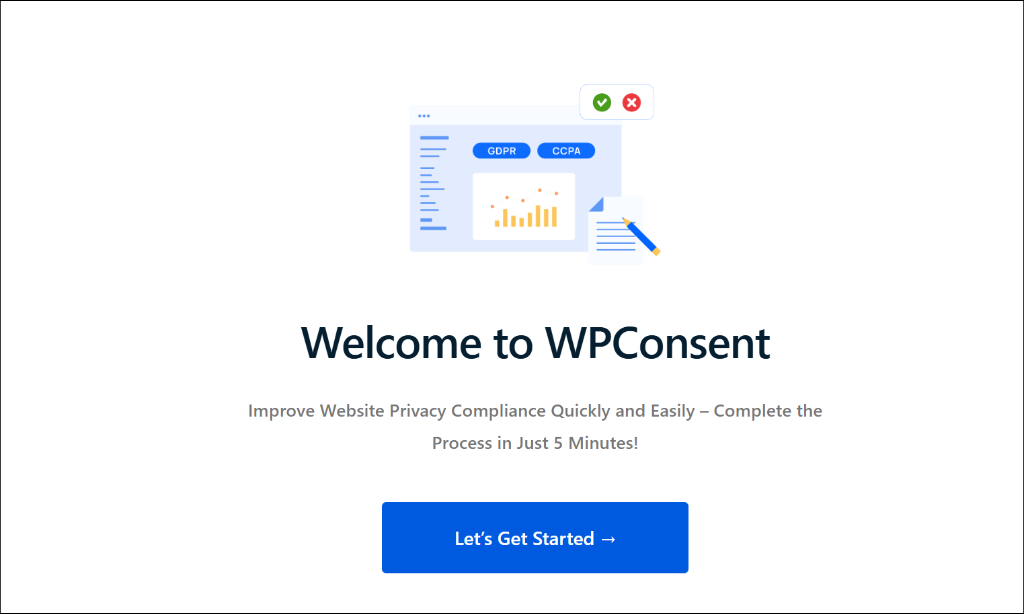
But, if you don’t want to go through the wizard, here are the exact steps to take.
Step 1: Scan your Site
Go to WPConsent » Scanner in your WordPress dashboard. Then hit “Scan Your Website” to see which tool scripts are adding cookies.
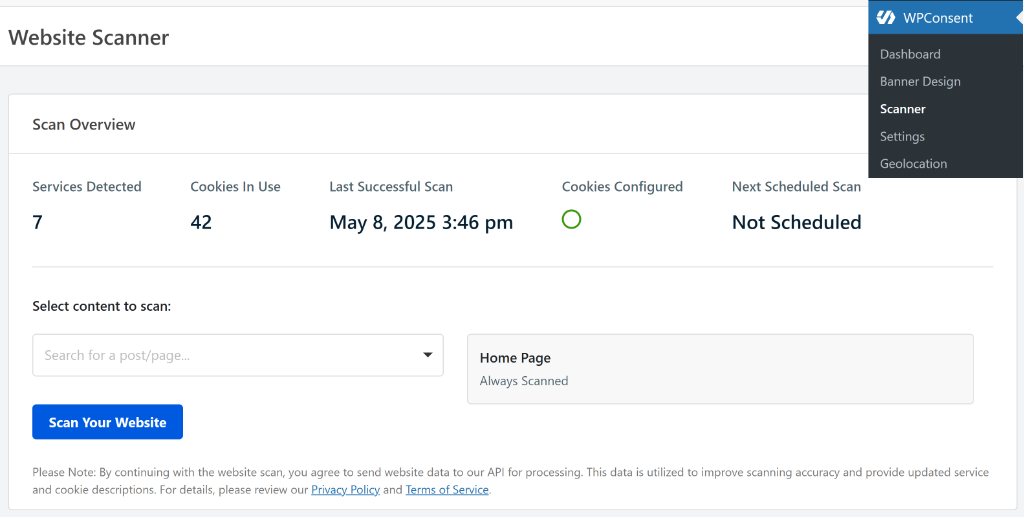
WPConsent then scans your site and categorises the cookies it finds. It shared the exact plugin or tool, what it does, the cookies, and scripts. After that, review the results and confirm the categories are correct.
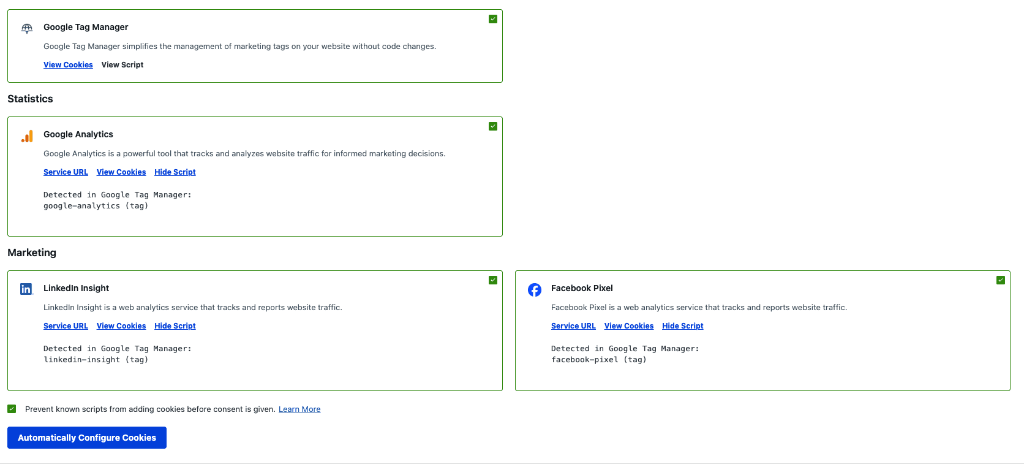
Step 2: Activate Consent Banner
Next, go to WPConsent » Settings and enable “Consent Banner.” Also, enable Script Blocking to prevent known scripts from adding cookies before consent is given.
If you want to give users more control after the banner is dismissed, enable the Settings Button.
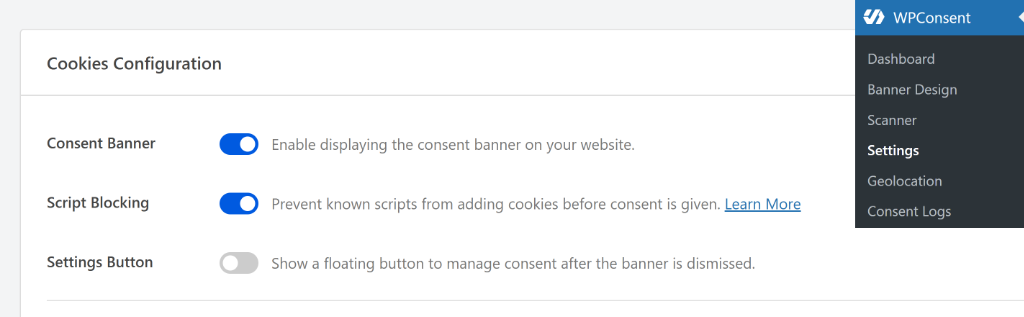
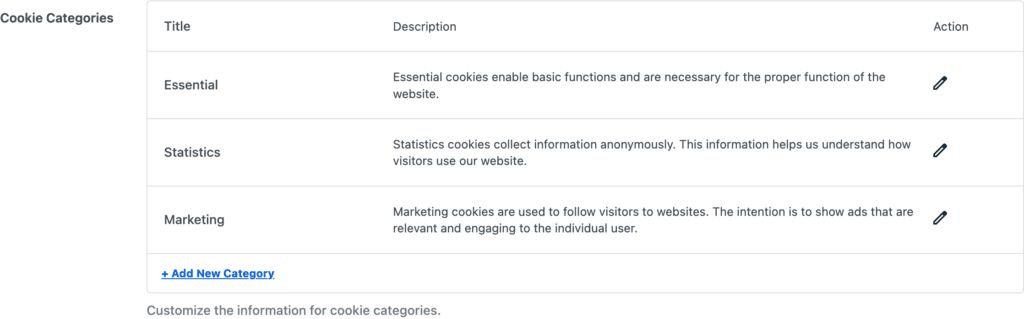
Still on the same page, WPConsent shows you 3 main categories, which include essential, statistics, and marketing. Use the pencil icon to edit each.
Step 3: Create your Cookie Banner
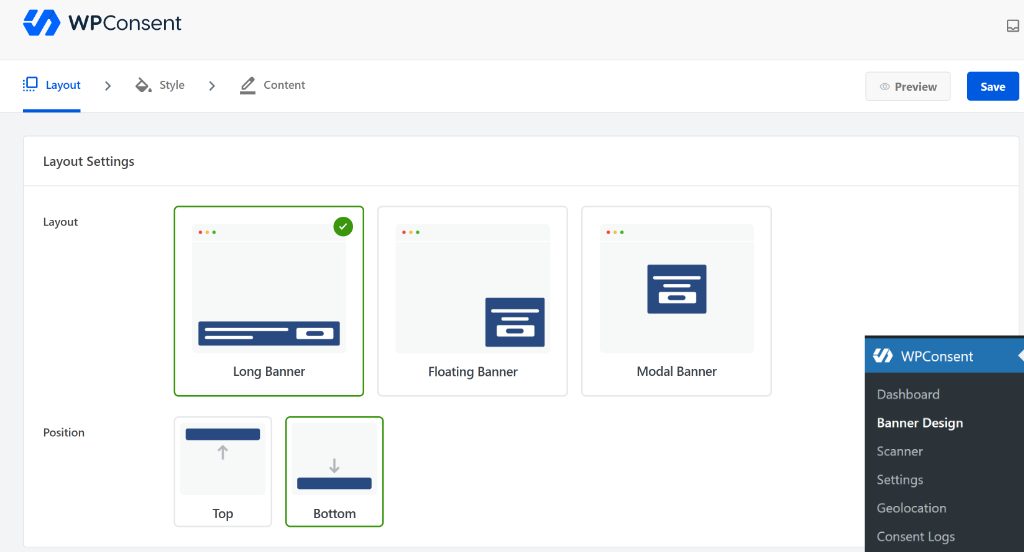
To do this, go to WPConsent » Banner Design. On the first screen, select the cookie banner layout from long banner, floating banner, and Modal Banner.
Right below this, select the position to either Top or Bottom.
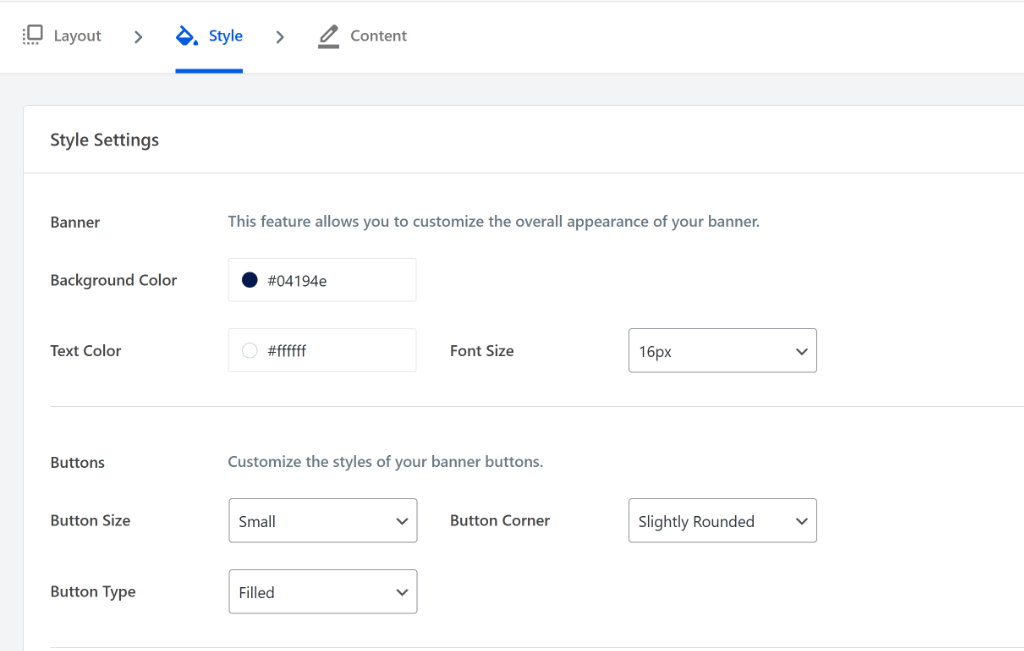
Once done, go to the Style tab. Here, set your brand colours, adjust the button labels, and sizes. This ensures your cookie banner looks like it is part of your site, not an afterthought.
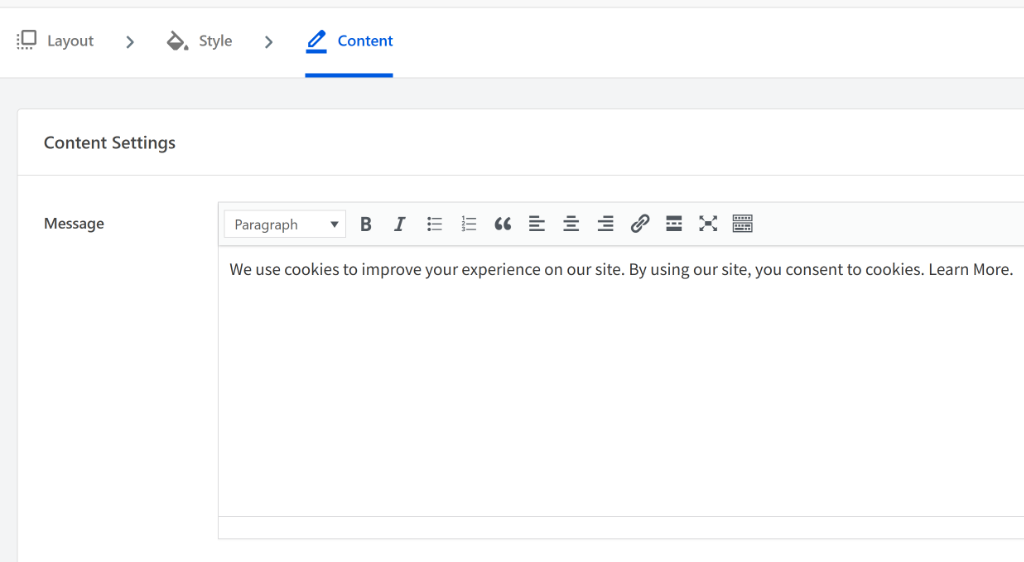
After that, head to the “Content” tab and edit the text that will appear in the banner.
By default, WPConsent provides a text that you can use for your website. Simply modify the existing text or add your own under the Message area.
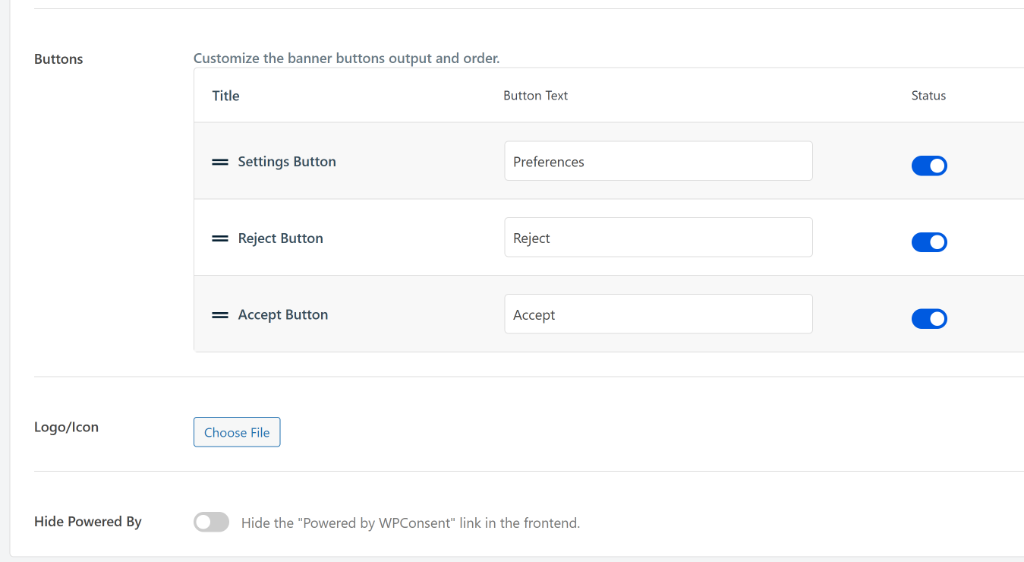
Finally, scroll down the Content tab, and you will find an area to customize the banner buttons and the order they appear. You can edit the button texts and activate/deactivate them with toggle buttons.
On this page, you can also add your logo to complete your consent banner.
Step 4: Go Live
Click Save on the top right corner of the page, and your consent banner now appears before any non-essential scripts fire. Visitors can change their preferences at any time via the floating icon.
That’s it! You are now fully compliant.
💡 WPConsent Tip:
With WPConsent, you can add location-specific consent banners with one click with the Smart Geolocation feature. This shows a GDPR opt-in banner to EU visitors and a CCPA opt-out banner to California visitors automatically. You can also set up a consent banner for other locations with Geolocation Rules. See how with this article on how to add location-based cookie consent.
WordPress Cookie Consent Compliance Checklist
Now that you understand what cookie consent is and how to set it up on your site with WPConsent, here is a checklist of everything you should do to be compliant.
- ☐ Scan your site: find every cookie currently being set
- ☐ Categorise cookies: confirm necessary / preference / analytics / marketing are correct
- ☐ Script blocking is active: non-essential scripts must not fire before consent
- ☐ Banner has a Reject button: as prominent and easy to find as Accept
- ☐ Cookie policy page exists: lists all cookies, purposes, and third parties
- ☐ Google Consent Mode v2 enabled: required if you run Google Analytics or Ads
- ☐ Consent expires and re-asks: configured to renewal interval for your jurisdiction
- ☐ Consent logs are kept: timestamp, what was accepted, under which policy version
- ☐ Visitors can withdraw consent: preferences icon accessible after initial choice
Start with the list above and go through each item one at a time. If anything is unclear, check out the commonly asked questions below.
FAQs: What Is Cookie Consent?
Do I need cookie consent on my WordPress site?
If your site uses non-essential cookies, analytics, advertising pixels, social sharing tools, or embedded videos, and receives visitors from the EU, UK, California, or Brazil, yes. Cookie consent is legally required in those jurisdictions.
What is the difference between a cookie banner and a cookie notice?
A cookie notice informs visitors that your site uses cookies. A cookie consent banner actually stops non-essential cookies from loading until the visitor responds. Under GDPR, a notice alone is not compliant. Cookies must be blocked until consent is given.
What happens if I don’t have cookie consent on my website?
Visitors from the EU can file complaints with their local data protection authority. Those complaints can trigger investigations. GDPR fines can reach €20 million or 4% of annual global revenue. CCPA violations can result in fines up to $7,500 per intentional violation.
Which cookies require consent?
Non-essential cookies require consent, analytics tools, advertising pixels, social media embeds, and marketing retargeting tools. Essential cookies, login sessions, shopping cart, security do not require consent.
Is a cookie policy the same as cookie consent?
No. A cookie policy is a written page explaining what cookies you use and why. Cookie consent is the mechanism that asks visitors for permission before those cookies load. GDPR requires both.
Does cookie consent apply to US websites?
Yes, in some cases. If your US website receives visitors from the EU, GDPR applies regardless of where your business is based. California’s CCPA applies to businesses that collect data from California residents and meet certain thresholds.
What is Google Consent Mode v2, and do I need it?
Google Consent Mode v2 is Google’s system for maintaining analytics and advertising data quality when visitors decline cookies. It became mandatory for Google Analytics and Google Ads users with EU traffic in March 2024. Without it, your EU analytics data is incomplete. WPConsent supports it in the free version.
How often do I need to re-ask for cookie consent?
It depends on the jurisdiction. France requires renewal every 6 months. The UK and general best practice suggest 12 months. Spain allows up to 24 months. WPConsent handles this automatically with a configurable consent expiry setting.
What are dark patterns in cookie consent?
Dark patterns are design choices that manipulate visitors into accepting cookies. Hiding the Reject button, pre-ticking consent boxes, or blocking site content until cookies are accepted. Under GDPR, dark patterns are a compliance violation. France’s CNIL fined Google €150 million and Facebook €60 million for this in 2022.
Final Verdict
Cookie consent is not a banner you install once and forget. It’s an ongoing process, scanning for new cookies, maintaining a valid banner, logging consent decisions, and re-asking when consent expires.
Many WordPress sites are not compliant today. Not because site owners don’t care, but because the default state of WordPress. You install analytics, install a pixel, install a form plugin, which creates cookie exposure that most people never audit.
WPConsent handles the full picture: scanner, banner, script blocking, Google Consent Mode v2, automatic cookie policy, and consent logs.
👉 Get WPConsent Pro: Add consent logs, geolocation, and IAB TCF compliance
👉 Install WPConsent free: Get your WordPress site compliant in minutes
The free version covers most of what your site needs. Pro adds geolocation, consent logs, and IAB TCF compliance for advertising-heavy sites.