
Some of your visitors never show up in your analytics because they ignored your cookie banner.
You can see page views, traffic sources, and campaign results for the visitors who consented. But you can’t see how many people saw your banner and left without making a choice.
That means you may be making decisions with an incomplete picture of your traffic.
WPConsent 1.1.9 adds Banner Analytics, so you can now see how many visitors ignored your banner.
Use that number to decide what to change. Adjust your banner’s wording, layout, or placement, then check whether more visitors respond.
Banner Analytics is available on the Basic plan and up, with no extra cost for existing paid users. There is also no limit on the number of banner views it counts.
Just update to WPConsent 1.1.9, and it starts collecting.
On Pro and above, you can track those changes over time and compare your results before and after an edit from a trend line.
If you are on the free version, Banner Analytics comes with any paid plan.
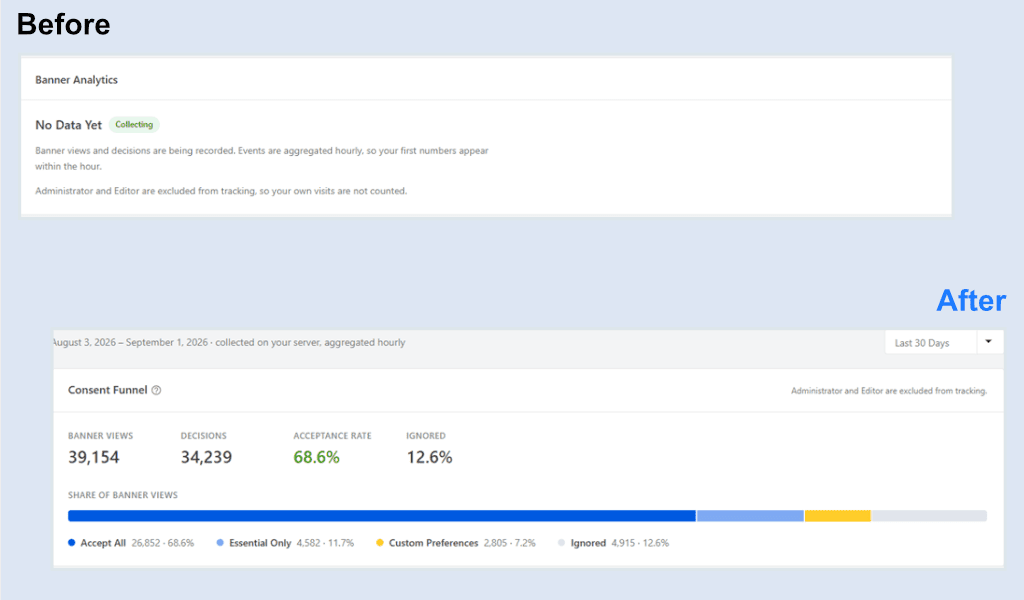
Here is what the report looks like after you update, and what it looks like once visitors start arriving.
How many visitors are you missing?
Your analytics only measure visitors when your tracking tools are allowed to run, so anyone who declines or ignores the banner is left out.
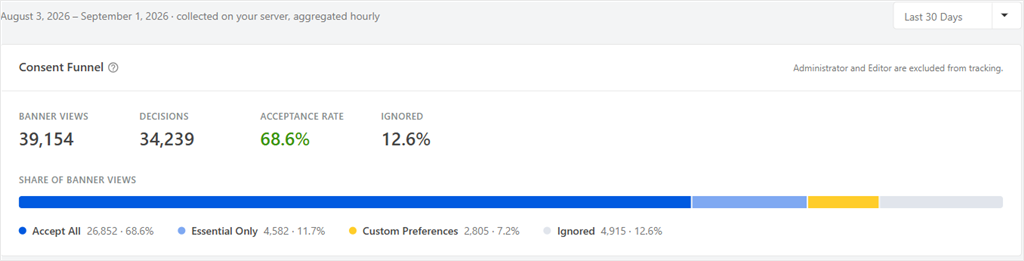
Every paid plan includes the Consent Funnel. It shows how many visitors saw your banner, how many made a decision, what share accepted, and how many ignored it.
Once you understand your audience better, the next question is: how do you improve your banner?
Maybe your wording is too long, the buttons aren’t clear enough, or maybe the banner is easy to miss.
Make changes and then watch your numbers.
Did your banner change make a difference?
On Pro and above, Acceptance Rate Over Time shows your rate day by day and marks when you last edited the banner.
Since Banner Edit compares your acceptance rate after the change with the rate before it.
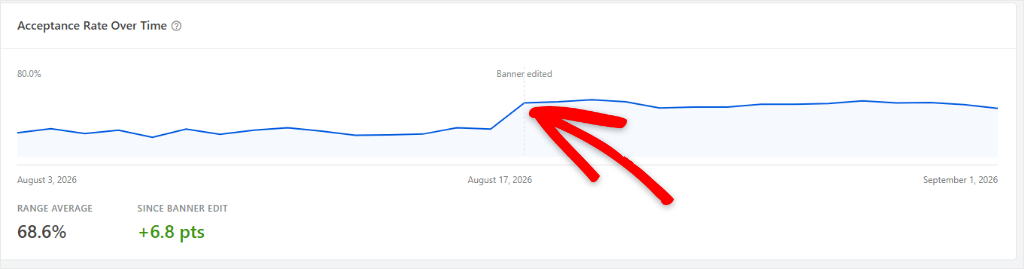
You don’t have to guess whether a new banner works better.
Where are visitors being missed?
Your overall rate doesn’t tell you everything. Metrics can differ a lot between cookie categories.
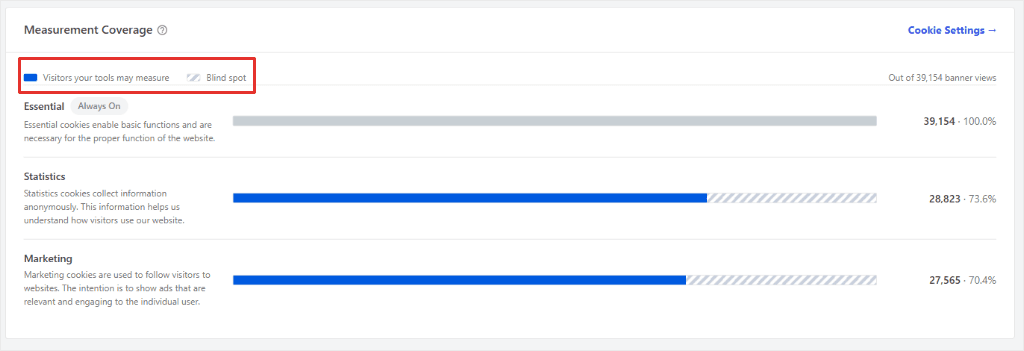
On Pro and above, Measurement Coverage breaks the numbers down by cookie category. You can see how many visitors your tools are allowed to measure and how many fall outside that group.
If you use region rules in Cookie Settings, the same report can also break the funnel down by those groups.
For example, you might compare EU visitors with visitors from US states.
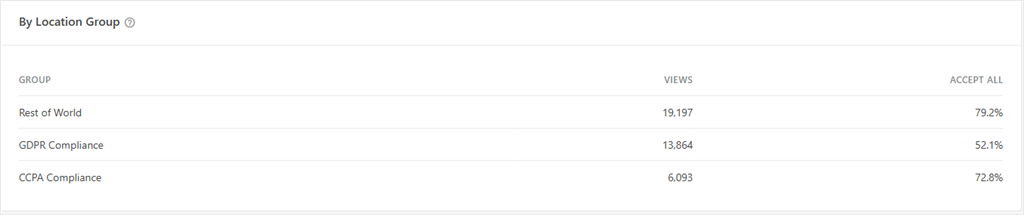
And one region can sit well below the rest while your overall rate still looks healthy.
What does Banner Analytics count?
Banner Analytics counts a view when the cookie banner appears.
If the visitor makes a choice later, WPConsent records that decision as well. This lets the report show the full path from seeing the banner to accepting, declining, or ignoring it.
The entries do not record an IP address, a cookie, or other information that identifies the visitor.
The data also stays on your WordPress site. Nothing is sent to a third-party analytics service, and the totals are stored in your own database.
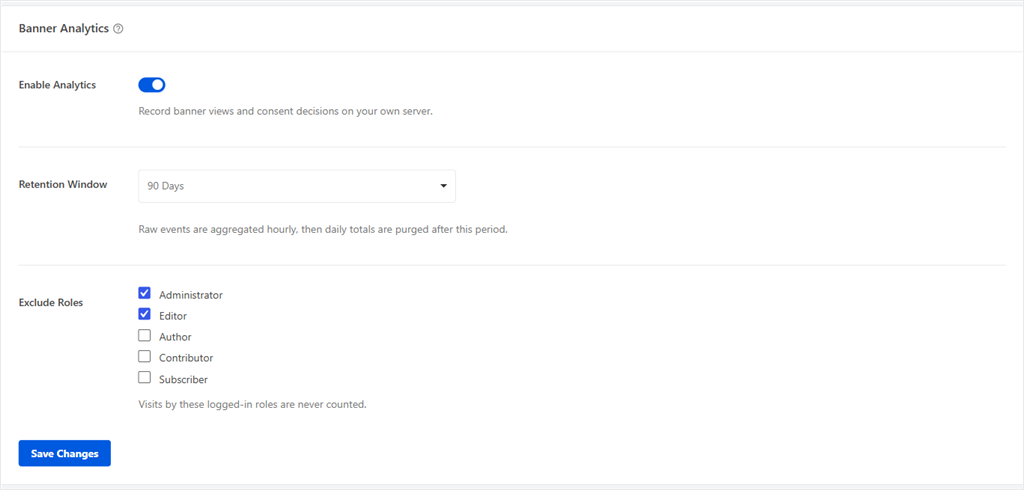
You can turn Banner Analytics off completely if you don’t want to use it. You can also exclude specific logged-in roles from the counts.
Administrators and editors are excluded by default and stay out of the reports.
The tracking script does not load on pages viewed while logged in as an excluded role.
You can choose a retention period from 30 to 365 days. Older data is deleted automatically.
WPConsent 1.1.9 also improves the preferences panel for keyboard users. You can move through the consent toggles with the Tab key and switch them with the Space key.
Opening a category to read its details leaves your consent setting unchanged. These accessibility improvements are available to everyone on both free and paid versions.
Getting started
If you are on the Basic plan or higher, update to WPConsent 1.1.9 and Banner Analytics will start collecting data.
Your first numbers should appear within the hour.
New to WordPress consent?
You can start with WPConsent for free. Banner Analytics is included on every paid plan.