TL;DR:
A cookie policy and a privacy policy are different documents. The privacy policy covers all your data practices, while the cookie policy covers cookies and tracking tech specifically. You don’t strictly need two separate pages. The actual requirement is that cookie information stays accessible, not that it lives on its own URL. Most WordPress sites keep them separate anyway, since the cookie side changes far more often.
Your cookie banner says “See our cookie policy for details.”
You already have a privacy policy, sitting in your footer since the day you launched. Are those the same document?
No, because they serve different purposes.
- Privacy policy: explains how your site handles personal information.
- Cookie policy: explains the cookies and tracking technologies your site uses.
Neither one is the cookie banner itself, which is the thing that actually collects a visitor’s choice.
The real question is whether the cookie information behind that banner is actually accessible. That’s easy to get right on day one and easy to lose months later, after a plugin update quietly adds a tracker.
Here’s what separates the two documents, what regulators actually require, and how to keep the answer true after today.
Key Takeaways
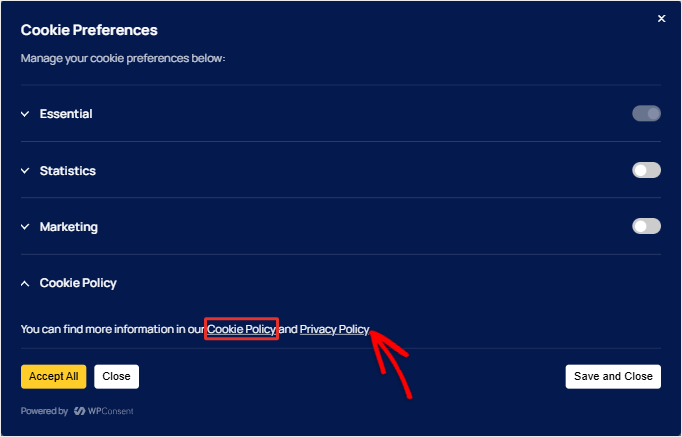
- Both belong in your footer, and your cookie policy also needs a direct link from the banner itself.
- No law requires two separate pages. The UK’s data protection regulator asks whether a visitor can actually find and read the cookie information.
- Cookie policies can go stale fast, since your site’s scripts change more often than most site owners remember to update the page.
- WPConsent keeps your cookie policy in sync with what your scans find. Rerun it yourself on the free plugin, or schedule it on paid plans.
This article is detailed, so we’ve broken it into sections. Use the links in the Table of Contents below to navigate.
- What Each Document Actually Covers
- What the ICO Says, and Where That Puts Each Document
- Why Keeping Them Separate Is Still the Practical Choice
- Your Cookie Policy Only Stays Accurate If It's Kept in Sync
- How WPConsent Keeps Your Cookie Policy Accurate
- FAQs: Cookie Policy vs Privacy Policy
- Keep Your Cookie Policy as Accessible as the Day You Wrote It
What Each Document Actually Covers
These two aren’t quite side by side. Cookies are personal data, so your privacy policy already has to account for them at a high level.
What the cookie policy adds is the detail underneath: which cookies, set by whom, and for how long.
What the Cookie Policy Covers
A cookie policy covers the tracking side of your site’s data practices, named item by item rather than summarized in a sentence.
- Simply saying “we use cookies” isn’t enough to give visitors meaningful information about them.
- Your cookie policy should explain the cookies and tracking technologies used on your site, including those set by third-party services.
- For example, if your site uses Google Analytics or a Meta Pixel, those services can set cookies on your visitors’ devices, just like your site does.
- That means a cookie policy that only lists your own cookies can leave out trackers that visitors need to know about.
What the Privacy Policy Covers
A privacy policy covers that broader picture in full. Not just cookies, but everywhere else personal data moves on your site.
- It accounts for how your site collects, uses, and shares personal data.
- On a typical WordPress site, that can include form submissions, WooCommerce checkouts, email signups, and other ways visitors share their information.
- Each of these involves personal data moving from the visitor to your site or to a third-party service.
- So, mentioning cookies in your privacy policy isn’t enough if it leaves out what your checkout collects, how you use that information, or how long you keep it.
| Cookie Policy | Privacy Policy | |
|---|---|---|
| Purpose | Discloses cookies and tracking tech | Discloses all personal data practices |
| Scope | Narrow: cookies, pixels, similar technologies | Broad: forms, accounts, orders, analytics, everything |
| Content | Cookie names, providers, duration, purpose, controls | What’s collected, why, who it’s shared with, retention, rights |
| User control | Explains how to manage cookie preferences | Explains data rights (access, deletion, correction) |
| When it’s generally needed | Site uses non-essential cookies or tracking tech | Site collects or processes personal information |
That covers what belongs in each document. Where they live and how easy they are to reach is a separate question.
What the ICO Says, and Where That Puts Each Document
The UK’s Information Commissioner’s Office (ICO) focuses on whether visitors can actually find the information they need.
Under its PECR cookie guidance, consent isn’t valid if the cookie information is somewhere visitors can’t reasonably find or read.
A cookie policy can legally sit inside your privacy policy, as long as it’s clearly written and easy to find there.
You don’t need two separate pages, and the ICO doesn’t ask for them. What it asks is that the cookie information is clear and easy for visitors to find.
That has a direct effect on placement.
Your privacy policy belongs in the footer. Plus, anywhere you collect information directly, like signup forms, checkout, and account registration.
Your cookie policy belongs in the footer too. But it also needs a direct link from the cookie banner itself.
⚠️ One catch
Don’t make a visitor dig through your site to find the cookie policy your banner mentions. If the banner says “see our cookie policy,” that link should go straight to the page, not to a search bar or a footer link.
Why Keeping Them Separate Is Still the Practical Choice
Your cookie inventory can change every time you add a plugin or connect a new marketing tool.
Your broader privacy practices usually don’t change nearly as often.
Combine the two, and every cookie change means editing a page that also covers checkout data, contact forms, and email signups, then checking that the cookie information is still easy to find.
Keep them separate, and you can update the cookie page without touching the rest of your privacy policy.
This lets a site owner who already has a privacy policy page link directly to a focused cookie page and keep it updated without constantly revisiting the rest of the policy.
Your Cookie Policy Only Stays Accurate If It’s Kept in Sync
Your privacy policy can stay accurate even after your site’s cookies change. But your cookie policy needs an update when they do.
If nobody updates it, it ends up describing a site that no longer exists, either because the policy was generic from the start and never matched your site, or because it was accurate on day one and quietly went stale after a new script was added.
Whichever way it happens, the page your banner points to is out of date, and nothing about running WordPress day-to-day tells you that on its own.
How WPConsent Keeps Your Cookie Policy Accurate
WPConsent is one of the best WordPress plugins for cookie consent, and it covers the cookie policy side too.
After you install it, the setup wizard scans your pages and matches the scripts it finds against a library of known services and cookies. Click Auto-Configure Selected to add them to your banner.
Check out this guide to see how to set up WPConsent with the setup wizard.
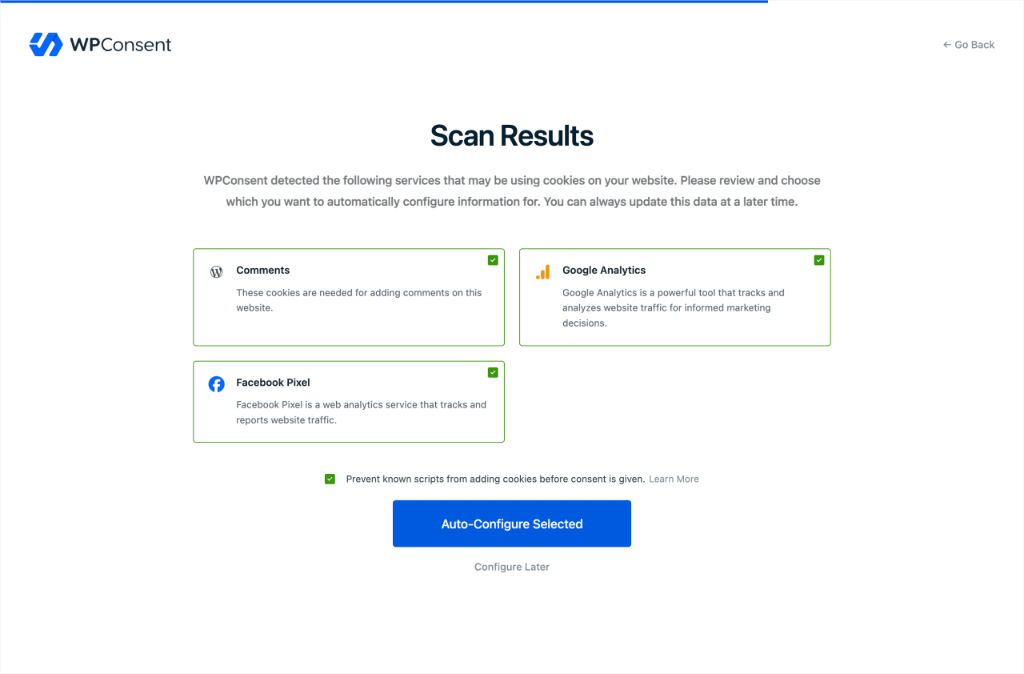
That same scan feeds your cookie policy page, so the list starts from what is actually running on your site.
To create the page, go to WPConsent » Settings, scroll to the Cookie Policy field, and click Generate Cookie Policy Page.
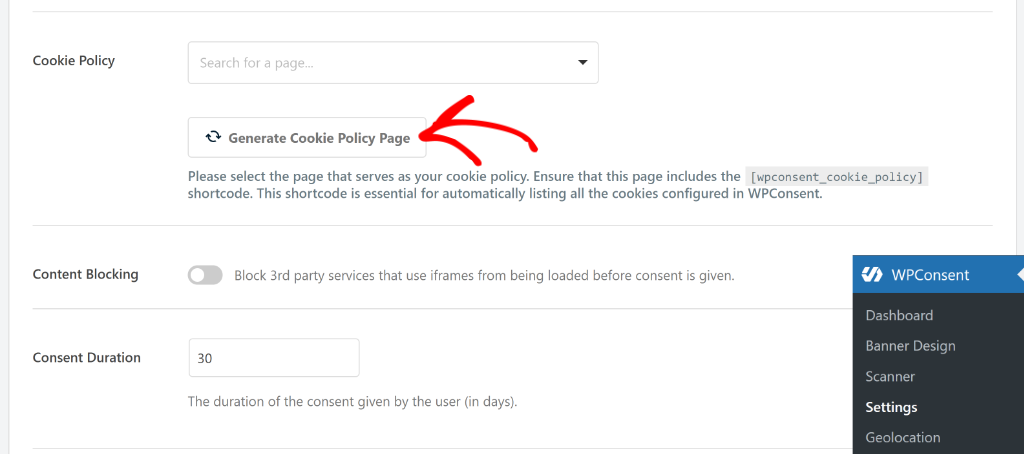
After this, you get a confirmation popup where you can click OK or view the new page straight away.
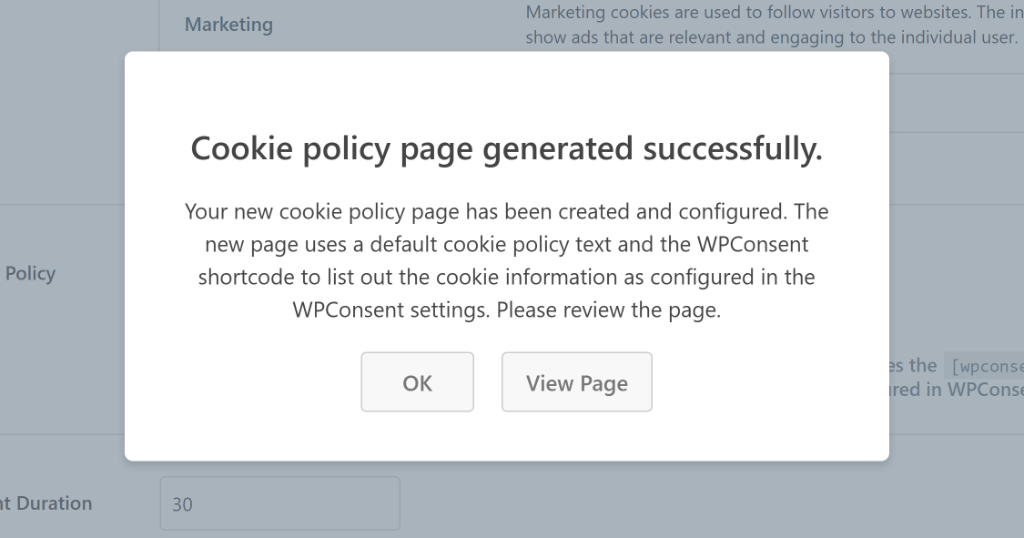
You get a real, published WordPress page with a short intro you can rewrite in your own words, plus the shortcode that lists your cookies.
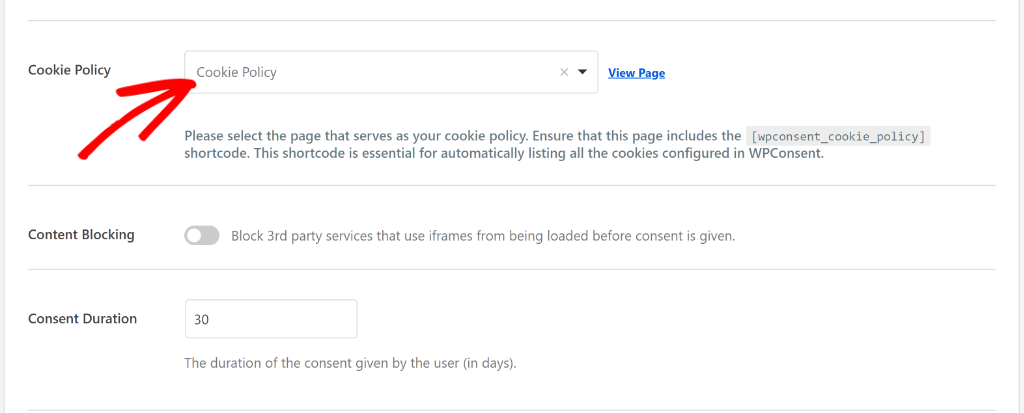
On the settings screen, the Cookie Policy field now shows the new page selected. If you already have a cookie policy page, use the dropdown to select it instead.
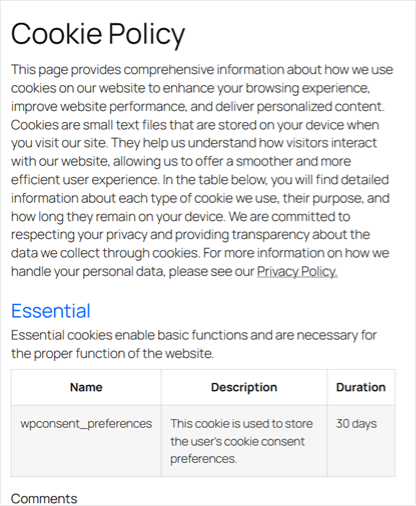
Visit the page, and the list is already there: cookies sorted into categories like Essential and Comments, each one grouped under the service that set it, named, described, and given a real duration.
Add a new script later and rerun the scan from WPConsent » Scanner. The page picks up whatever changed, so you are not hand-editing the cookie list every time your site does.
On the free plugin, you run that scan yourself.
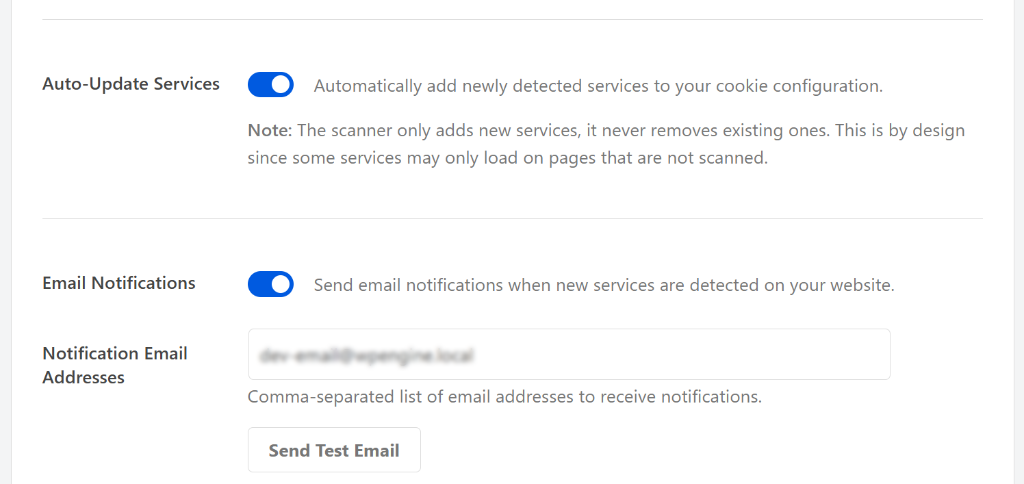
On paid plans, you can put it on a schedule and switch on two more settings independently of each other. One adds newly detected services to your configuration for you. The other emails you when a scan finds something new.
Check out this post on WPConsent Free vs Pro to see what each plan offers.
One thing to know either way is that the scan only adds services, never removes them. A service that’s already configured might still be running somewhere the scan just didn’t cover.
See How to Create a Cookie Policy Page in WordPress for more details.
How to Create a Privacy Policy Page
WordPress has a built-in feature for this.
Go to Settings » Privacy, and either select an existing page or click Create New Page.
WordPress drops in a template, pre-populated with suggested sections based on your active plugins. You then edit it to match what your site actually does.
WPConsent’s job is the cookie policy side.
Can WPConsent Help You Create One Combined Page?
The steps above leave you with two separate pages. The privacy policy you already had or just created, and a new cookie policy page WPConsent generated.
But you can also use WPConsent to combine your privacy policy and cookie policy into one page instead.
First, add the wpconsent_cookie_policy shortcode to your existing privacy policy page.
Then go to WPConsent » Settings and select that same page in the Cookie Policy field. The shortcode behaves exactly the same here, it just lives on the page you already have.
Check out our WPConsent review for a full breakdown of everything this consent plugin can do.
You now have a better understanding of the difference between a privacy policy page and a cookie policy page. If anything is unclear, check out the FAQs below.
FAQs: Cookie Policy vs Privacy Policy
Which one should I write first if I don’t have either yet?
Start with the privacy policy. It covers the broader ways your site collects and uses personal information. Then create the cookie policy once you’ve identified the cookies and tracking technologies your site uses.
What happens if my cookie policy goes out of date?
The information visitors relied on to make their choice is no longer accurate, which weakens the same accessibility argument regulators use for consent. In practice, it usually just means a script you added later is running without ever being disclosed.
Can a cookie policy be part of a privacy policy?
Yes, as long as the cookie information is clear and easy to find. If visitors have to dig through a long privacy policy to find it, that can create an accessibility problem.
Is a cookie policy required by GDPR?
GDPR and the related ePrivacy rules require clear disclosure and, generally, consent before non-essential cookies load. The law doesn’t name a specific document called “cookie policy.” It requires the information to be accessible somewhere, whether that’s a standalone page or a genuinely clear section of your privacy policy.
Does CCPA require a cookie policy?
Not a specifically named document. CCPA requires covered businesses to disclose their data practices and provide an opt-out mechanism, and cookie information can satisfy that as part of your broader privacy disclosures, as long as it’s actually there and findable.
Does a cookie policy replace a cookie banner?
No. The policy explains your cookies, while the banner manages the visitor’s consent choice. If your site uses non-essential cookies you need both: the disclosure, and the mechanism that collects the choice. One can’t stand in for the other.
How often should I update my cookie policy?
Whenever your cookies or tracking tools change. On the free plugin, that means rerunning the scan yourself after a change; paid plans can run that scan on a schedule instead, so you don’t have to remember.
Keep Your Cookie Policy as Accessible as the Day You Wrote It
The document count was never really the question.
Whether you keep one page or two, what matters is that visitors can find the cookie information they need and that it still matches what your site is doing.
That’s the part that’s easy to miss. Your site keeps changing after the day you write the policy.
That’s what WPConsent handles for you.
Your cookie policy stops being something you have to remember to check and starts being something that reflects your site as it actually is.
Scan your site and generate a cookie policy that lists what’s actually running.
Get WPConsent free →
Put those scans on a schedule so new trackers don’t sit undisclosed until you next check.
Get WPConsent Pro →
Additional Resources
Go deeper into the setup, or see how these pieces fit into your site’s broader compliance picture.
- How to Create a Cookie Policy Page in WordPress for Free: The full click-by-click walkthrough of the generator
- What Is Cookie Consent? The Complete WordPress Beginner Guide: The adjacent distinction between a cookie notice and real consent
- Ultimate WordPress Cookie Consent Requirements by Country: See what rules apply for each region in one go.
- How to Audit Your WordPress Site for Cookie Compliance: The fuller check, beyond just the policy page
- GDPR vs CCPA in WordPress: Learn the key differences WordPress site owners need to know
Disclaimer: This article is provided for informational and educational purposes only and does not constitute legal advice. No tool, WPConsent included, can by itself guarantee compliance with GDPR, CCPA, or any other privacy law. If you have questions about your site’s specific legal obligations, consult a licensed attorney.