Documentation, Reference Materials, and Tutorials for WPConsent
Managing Cookies
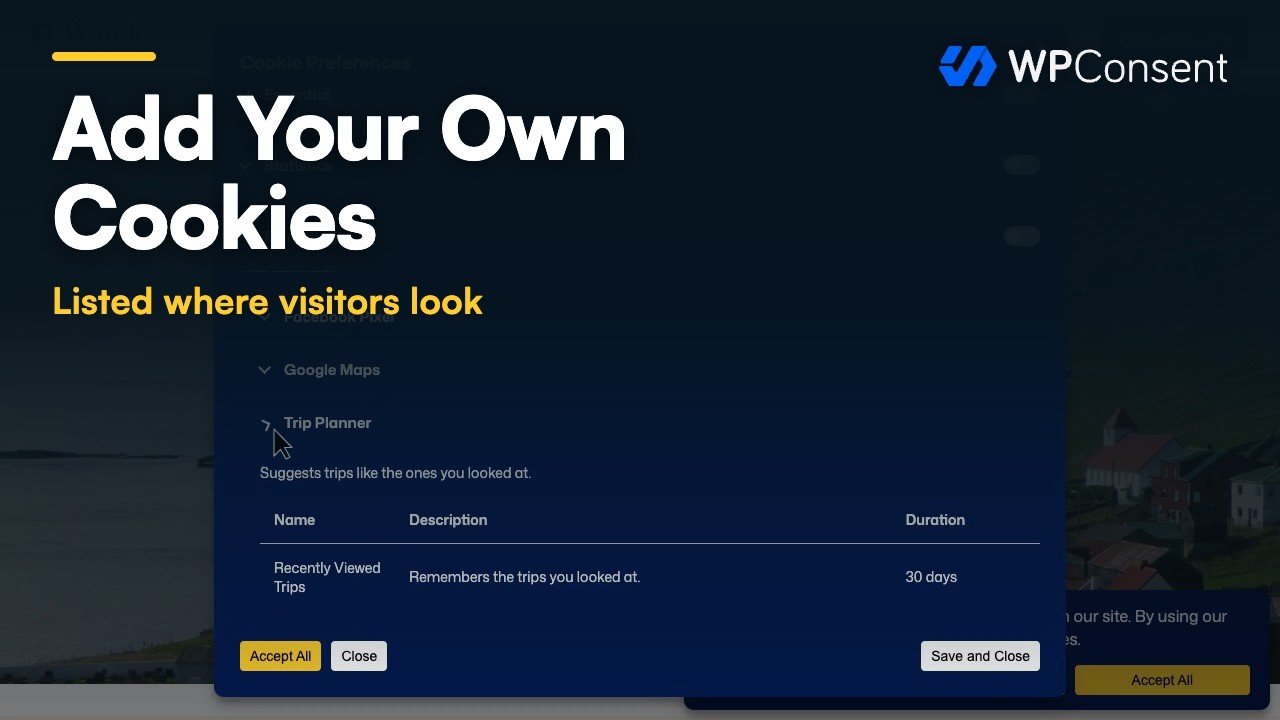
Want to keep your consent banner and cookie policy accurate? WPConsent lets you add, edit, and delete individual cookie entries so visitors always see up-to-date information. Managing cookies ensures your site stays transparent and compliant.
WPConsent installed and activated on your site. See our installation guide if you need help.
Administrator access to your WordPress dashboard.
Opening the cookies tab
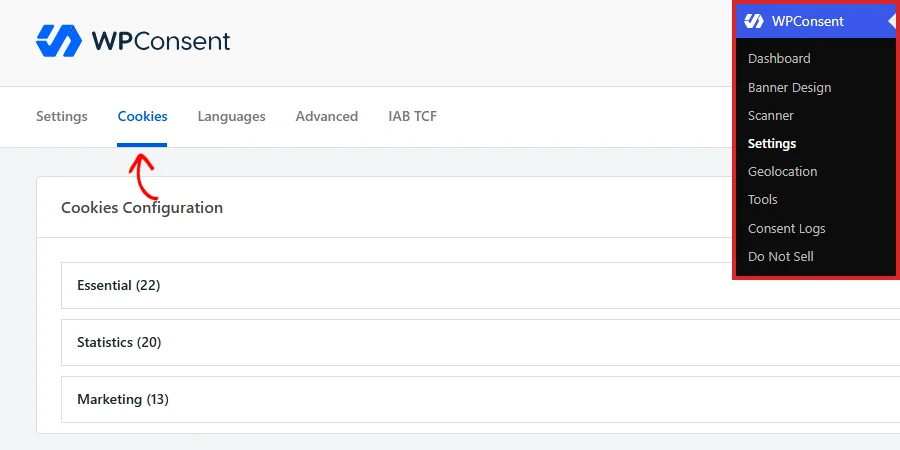
To get started, navigate to WPConsent >> Settings in your WordPress admin menu. Then, click the Cookies tab at the top of the page.
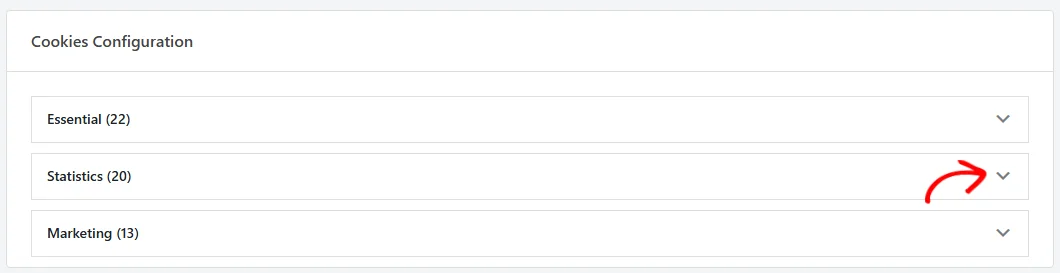
You’ll see an accordion listing your cookie categories. Each accordion header shows the category name and the number of cookies it contains in parentheses, for example, Essential (1). The first category is expanded by default.
Understanding the cookie list layout
Inside each expanded category, cookies appear in a table with 5 columns:
Column
Description
Cookie Name
The human-readable name displayed to visitors.
Cookie ID
The technical identifier stored in the browser.
Description
A brief explanation of what the cookie does.
Duration
How long the cookie persists (for example, “30 days”).
Actions
Edit and delete buttons for the cookie.
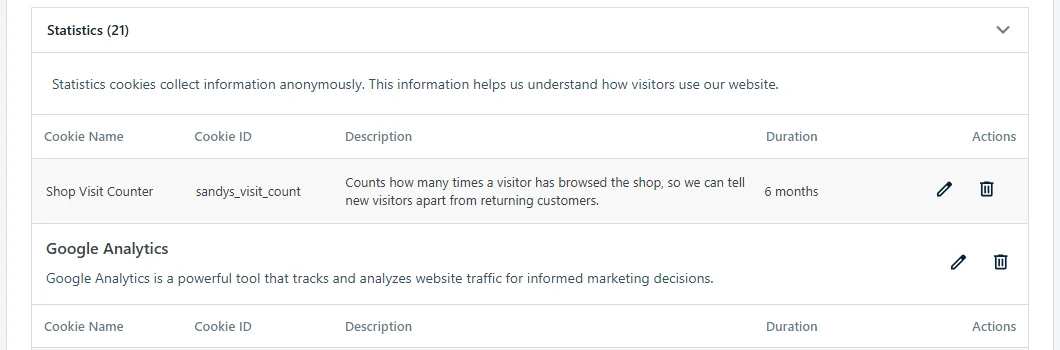
If the category contains services, each service appears as a labeled group within the category. Cookies belonging to a service are listed under that service’s header. Cookies not assigned to any service appear directly under the category header.
Adding a cookie manually
First, expand the category where you want to add the cookie.
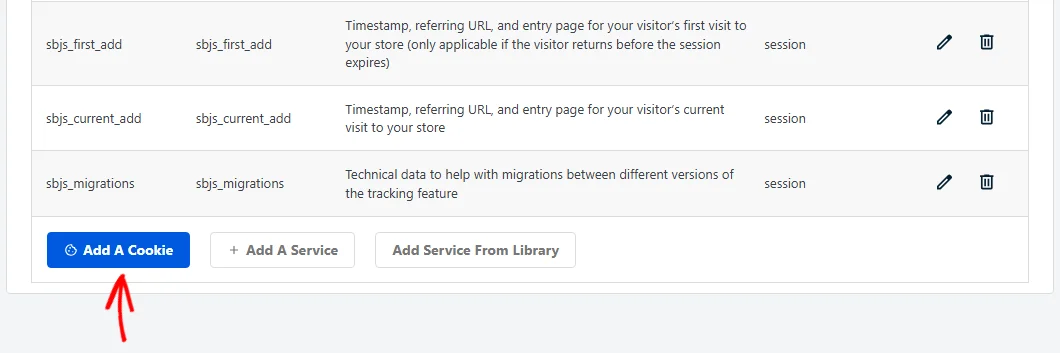
Then, click the Add A Cookie button at the bottom of that category’s section.
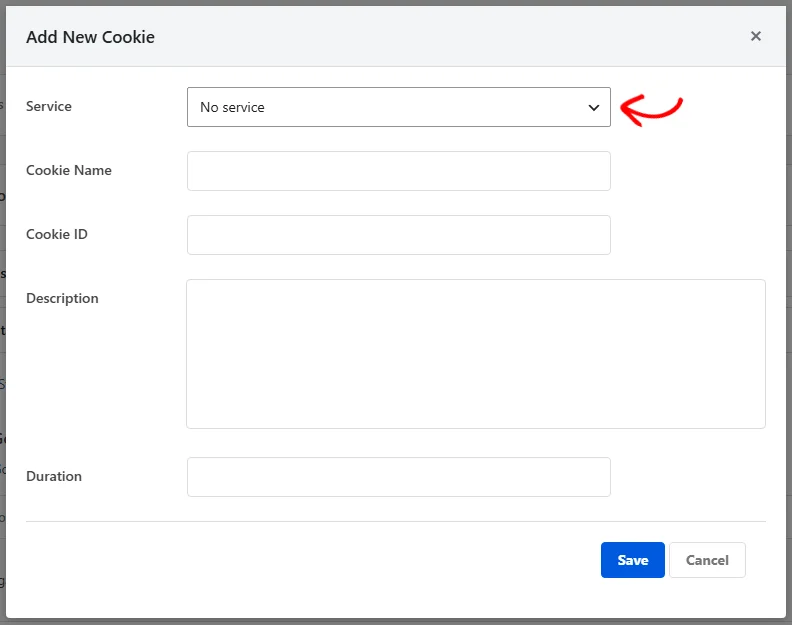
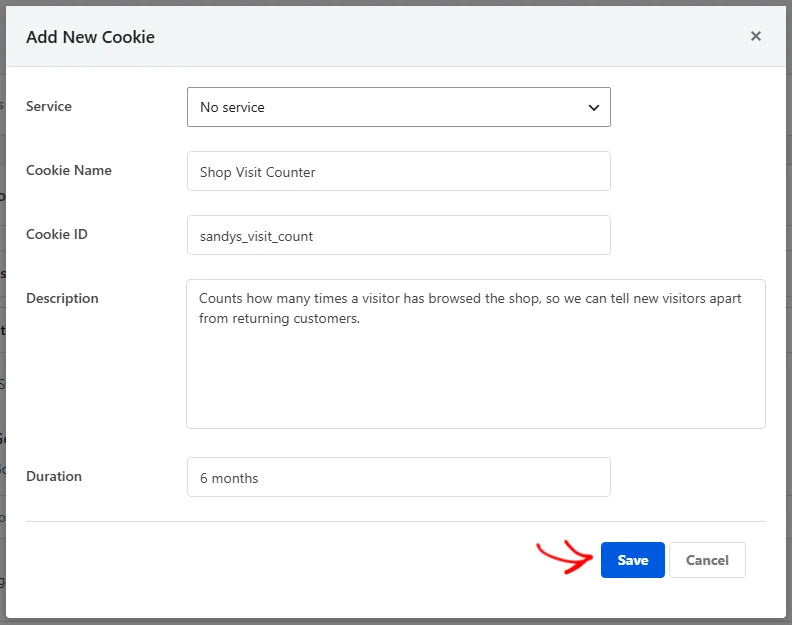
A modal dialog titled Add New Cookie opens with the following fields:
Field
Required
Description
Service
No
A dropdown listing available services in this category. Defaults to “No service,” which assigns the cookie directly to the category.
Cookie Name
Yes
The display name visitors see (for example, “Google Analytics”).
Cookie ID
No
The technical cookie identifier stored in the browser (for example, _ga).
Description
No
A plain-language explanation of the cookie’s purpose.
Duration
No
How long the cookie lasts (for example, “2 years” or “Session”).
Fill in the fields and click Save.
The new cookie appears immediately in the list without a page reload. WPConsent saves it via AJAX and adds a new row to the table.
Note: The Cookie Name field is required. If you leave it empty, WPConsent displays an error and doesn’t save the cookie.
Assigning a cookie to a service
When you add or edit a cookie, the Service dropdown lists all services that belong to the current category. Select a service from the dropdown to group the cookie under that service in the list.
If you choose No service, the cookie is assigned directly to the cookie category instead. This is appropriate for cookies that your own website sets rather than a third-party service.
The Service dropdown updates dynamically based on the category. It only shows services that belong to that specific category. If you haven’t created any services in a category, the dropdown shows only the “No service” option.
To learn how to create and manage services, see our guide on managing services.
Editing an existing cookie
First, find the cookie you want to edit in the list.
Then, click the edit icon (pencil) in the Actions column.
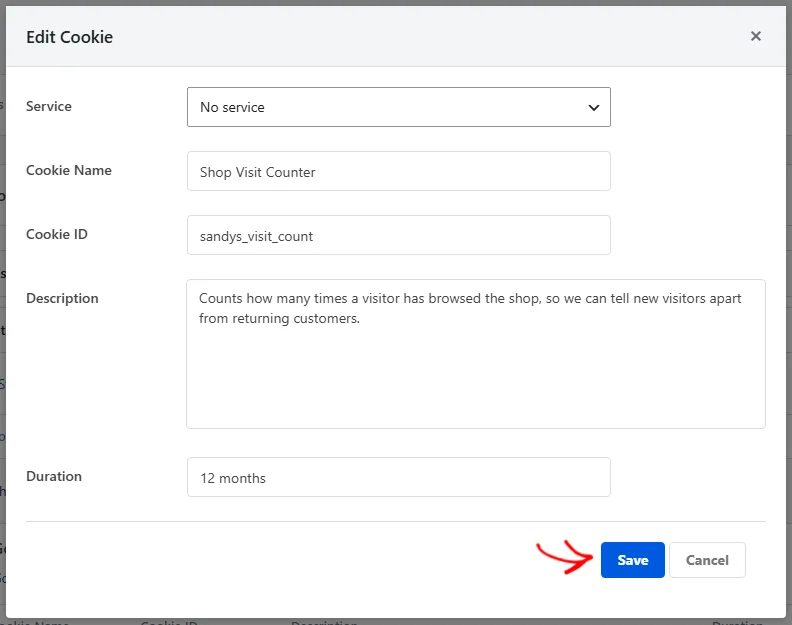
The Edit Cookie modal appears, pre-filled with the cookie’s current values.
Update any field: Service, Cookie Name, Cookie ID, Description, or Duration.
Finally, click Save.
The changes appear immediately in the cookie list.
Deleting a cookie
First, find the cookie you want to remove.
Then, click the delete icon (trash) in the Actions column.
A confirmation dialog asks “Are you sure you want to delete this cookie?”
Click OK to confirm.
The cookie is permanently removed from the database and disappears from the list.
Important: Deleting a cookie can’t be undone. The cookie entry is permanently removed. If you need it again, you’ll have to add it manually or re-run a scan.
Working with scanner-detected cookies
When you run a website scan and configure the detected services, WPConsent automatically creates cookie entries for each recognized service. These cookies are marked internally as auto-added.
You can edit auto-added cookies the same way you edit manual ones. Feel free to change the name, description, or duration to better match your preferences.
If you re-scan your site later and configure the results again, WPConsent skips cookies that already exist. It doesn’t overwrite your manual edits.
Good cookie descriptions help your visitors make informed consent decisions. They also demonstrate compliance to regulators. Follow these guidelines:
Be specific about purpose. Write “Stores your cookie consent preferences for this website” instead of “Used for functionality.”
Mention data collected. If the cookie tracks page views or user behavior, say so. For example: “Collects anonymous statistics about how visitors navigate the website.”
Use plain language. Avoid technical jargon. Your visitors aren’t developers.
Include the service name. When a cookie belongs to a third-party service, mention it. For example: “Set by Google Analytics to distinguish unique users.”
State the duration clearly. Use human-readable formats like “2 years,” “30 days,” or “Session” (for cookies that expire when the browser closes).
Keep it concise. 1 to 2 sentences is enough. Descriptions appear in the preferences panel and cookie policy page where space is limited.
The free Cookie Library is a useful resource for looking up accurate descriptions and durations for common third-party cookies.
Pro Feature: With the paid version, you can import services and their cookies directly from the Cookie Library with 1 click using the Add Service From Library button. This saves you from looking up and entering cookie data manually.
Verifying your setup
To confirm your cookies are set up correctly:
First, visit the cookie policy page on your site (the page with the
Essential
Essential cookies enable basic functions and are necessary for the proper function of the website.
Name
Description
Duration
wpconsent_preferences
This cookie is used to store the user's cookie consent preferences.
30 days
free-pricing
Used to update the pricing page URL based on the visitor's landing for consistency.
Session
CloudFlare
CloudFlare provides web performance and security solutions, enhancing site speed and protecting against threats.
Used by the content network, Cloudflare, to identify trusted web traffic.
session
__cf_bm
Cloudflare's bot products identify and mitigate automated traffic to protect your site from bad bots. Cloudflare places the __cf_bm cookie on End User devices that access Customer sites that are protected by Bot Management or Bot Fight Mode. The __cf_bm cookie is necessary for the proper functioning of these bot solutions.
session
__cflb
When enabling session affinity with Cloudflare Load Balancer, Cloudflare sets a __cflb cookie with a unique value on the first response to the requesting client. Cloudflare routes future requests to the same origin, optimizing network resource usage. In the event of a failover, Cloudflare sets a new __cflb cookie to direct future requests to the failover pool.
session
_cfuvid
The _cfuvid cookie is only set when a site uses this option in a Rate Limiting Rule, and is only used to allow the Cloudflare WAF to distinguish individual users who share the same IP address.
session
cf_clearance
Whether a CAPTCHA or Javascript challenge has been solved.
session
__cfseq
Sequence rules uses cookies to track the order of requests a user has made and the time between requests and makes them available via Cloudflare Rules. This allows you to write rules that match valid or invalid sequences. The specific cookies used to validate sequences are called sequence cookies.
session
cf_ob_info
The cf_ob_info cookie provides information on: The HTTP Status Code returned by the origin web server. The Ray ID of the original failed request. The data center serving the traffic
session
cf_use_ob
The cf_use_ob cookie informs Cloudflare to fetch the requested resource from the Always Online cache on the designated port. Applicable values are: 0, 80, and 443. The cf_ob_info and cf_use_ob cookies are persistent cookies that expire after 30 seconds.
session
__cfwaitingroom
The __cfwaitingroom cookie is only used to track visitors that access a waiting room enabled host and path combination for a zone. Visitors using a browser that does not accept cookies cannot visit the host and path combination while the waiting room is active.
session
cf_chl_rc_i
These cookies are for internal use which allows Cloudflare to identify production issues on clients.
session
cf_chl_rc_ni
These cookies are for internal use which allows Cloudflare to identify production issues on clients.
session
cf_chl_rc_m
These cookies are for internal use which allows Cloudflare to identify production issues on clients.
session
Comments
These cookies are needed for adding comments on this website.
Name
Description
Duration
comment_author
Used to track the user across multiple sessions.
Session
comment_author_email
Used to track the user across multiple sessions.
Session
comment_author_url
Used to track the user across multiple sessions.
Session
Easy Digital Downloads
Easy Digital Downloads is a complete eCommerce solution for WordPress.
Name
Description
Duration
edd_items_in_cart
Stores information about the cart.
Session
edd_session_
Stores information about the current user session.
Session
Login
These cookies are used for managing login functionality on this website.
Name
Description
Duration
wordpress_test_cookie
Used to determine if cookies are enabled.
Session
wordpress_logged_in
Used to store logged-in users.
Persistent
wordpress_sec
Used to track the user across multiple sessions.
15 days
Stripe
Stripe is a payment processing platform that enables businesses to accept online payments securely and efficiently.
This cookie is used as a referral-cookie that stores the visitor’s profile – the cookie is overwritten when the visitor re-enters the website and new information on the visitor is collected and stored.
Session
_conv_s
This cookie contains an ID string on the current session. This contains non-personal information on what subpages the visitor enters – this information is used to optimize the visitor's experience.
1 day
_conv_v
This cookie is used to identify the frequency of visits and how long the visitor is on the website. The cookie is also used to determine how many and which subpages the visitor visits on a website – this information can be used by the website to optimize the domain and its subpages.
6 months
Google Analytics
Google Analytics is a web analytics service offered by Google that tracks and reports website traffic.
Contains information related to marketing campaigns of the user. These are shared with Google AdWords / Google Ads when the Google Ads and Google Analytics accounts are linked together.
90 days
__utmx
Used to determine whether a user is included in an A / B or Multivariate test.
18 months
_gali
Used by Google Analytics to determine which links on a page are being clicked
30 seconds
_ga_
ID used to identify users
2 years
_ga
Used to distinguish users.
2 years
_gat
Used to throttle request rate.
1 minute
_gid
Used to distinguish users.
24 hours
__utma
Used to distinguish users.
Persistent
__utmb
Used to determine new sessions/visits.
30 minutes
__utmc
Used to determine if the user is in a new session/visit.
Session
__utmt
Used to throttle request rate.
10 minutes
__utmv
Used to store visitor-level custom variable data.
2 years
__utmz
Stores the traffic source or campaign that explains how the user reached your site.
6 months
Microsoft Clarity
Clarity is a web analytics service that tracks and reports website traffic.
Used to store interaction and conversion data for campaigns in conjunction with Revenue Attribution
1 year
omCountdown-{id}-{elementId}
Used for countdown elements {elementId} in campaigns {id} to determine when it should complete
Session
om-{id}-closed / omSlideClosed-{id}
Used specifically with slide-in campaigns {id} to determine if it has been closed or not by a visitor.
30 days
om-success-cookie / omSuccessCookie
used to determine if a visitor has successfully opted in to any campaign on your site to unlock content when using the Content Locking feature.
365 days
om-success-{id} / omSuccess-{id}
Used to determine if a visitor has successfully opted in to a campaign with the ID of {id} on your site
365 days
omSeen-{id}
Used to determine if a visitor has been shown a campaign by the slug. No expiration date
30 days
om-{id}
used to determine if a visitor has interacted with a campaign ID of {id} on your site.
30 days
om-interaction-cookie / omGlobalInteractionCookie
Used to determine if a visitor has interacted with any campaign on your site.
Session
om-global-cookie / omGlobalSuccessCookie
Used to prevent any future OptinMonster campaigns from showing on your site.
Session
_omappvs
Cookie is used to identify returning visitors
1 day
shortcode). Verify that your cookies appear under the correct categories and services.
Then, open the consent banner on your site and click Preferences. Check that each category lists the cookies you configured.
Finally, in the Cookies tab, expand each category and verify that cookie names, IDs, descriptions, and durations are accurate.
FAQ
Why doesn’t my new cookie appear in the list?
Make sure you filled in the Cookie Name field. This field is required. If the save action failed, check your browser console for JavaScript errors and confirm your WordPress admin AJAX is working correctly.
Why does the Service dropdown show only “No service”?
The dropdown only lists services that already exist in the selected cookie category. If you need a service, create one first. Click Add A Service in the same category, or see our guide on managing services.
Why do scanner-detected cookies have generic descriptions?
The scanner populates cookies with default descriptions from the WPConsent service database. You can edit any cookie to improve its description. Click the edit icon and update the Description field with more specific language.
Can I undo a deleted cookie?
Deleted cookies can’t be recovered. You’ll need to add the cookie again manually or re-run a website scan to repopulate it. See our guide on scanning your website for help.
Conclusion
You now know how to add, edit, delete, and verify individual cookies in WPConsent. Accurate cookie records keep your consent banner and cookie policy trustworthy for visitors. To learn how to group cookies under third-party tools, we recommend reading about managing services next.
Websites store cookies to enhance functionality and personalise your experience. You can manage your preferences, but blocking some cookies may impact site performance and services.
Essential cookies enable basic functions and are necessary for the proper function of the website.
Name
Description
Duration
Cookie Preferences
This cookie is used to store the user's cookie consent preferences.
30 days
free-pricing
Used to update the pricing page URL based on the visitor's landing for consistency.
Session
CloudFlare provides web performance and security solutions, enhancing site speed and protecting against threats.
Used by the content network, Cloudflare, to identify trusted web traffic.
session
__cf_bm
Cloudflare's bot products identify and mitigate automated traffic to protect your site from bad bots. Cloudflare places the __cf_bm cookie on End User devices that access Customer sites that are protected by Bot Management or Bot Fight Mode. The __cf_bm cookie is necessary for the proper functioning of these bot solutions.
session
__cflb
When enabling session affinity with Cloudflare Load Balancer, Cloudflare sets a __cflb cookie with a unique value on the first response to the requesting client. Cloudflare routes future requests to the same origin, optimizing network resource usage. In the event of a failover, Cloudflare sets a new __cflb cookie to direct future requests to the failover pool.
session
_cfuvid
The _cfuvid cookie is only set when a site uses this option in a Rate Limiting Rule, and is only used to allow the Cloudflare WAF to distinguish individual users who share the same IP address.
session
cf_clearance
Whether a CAPTCHA or Javascript challenge has been solved.
session
__cfseq
Sequence rules uses cookies to track the order of requests a user has made and the time between requests and makes them available via Cloudflare Rules. This allows you to write rules that match valid or invalid sequences. The specific cookies used to validate sequences are called sequence cookies.
session
cf_ob_info
The cf_ob_info cookie provides information on: The HTTP Status Code returned by the origin web server. The Ray ID of the original failed request. The data center serving the traffic
session
cf_use_ob
The cf_use_ob cookie informs Cloudflare to fetch the requested resource from the Always Online cache on the designated port. Applicable values are: 0, 80, and 443. The cf_ob_info and cf_use_ob cookies are persistent cookies that expire after 30 seconds.
session
__cfwaitingroom
The __cfwaitingroom cookie is only used to track visitors that access a waiting room enabled host and path combination for a zone. Visitors using a browser that does not accept cookies cannot visit the host and path combination while the waiting room is active.
session
cf_chl_rc_i
These cookies are for internal use which allows Cloudflare to identify production issues on clients.
session
cf_chl_rc_ni
These cookies are for internal use which allows Cloudflare to identify production issues on clients.
session
cf_chl_rc_m
These cookies are for internal use which allows Cloudflare to identify production issues on clients.
session
These cookies are needed for adding comments on this website.
Name
Description
Duration
comment_author
Used to track the user across multiple sessions.
Session
comment_author_email
Used to track the user across multiple sessions.
Session
comment_author_url
Used to track the user across multiple sessions.
Session
Easy Digital Downloads is a complete eCommerce solution for WordPress.
Name
Description
Duration
edd_items_in_cart
Stores information about the cart.
Session
edd_session_
Stores information about the current user session.
Session
These cookies are used for managing login functionality on this website.
Name
Description
Duration
wordpress_test_cookie
Used to determine if cookies are enabled.
Session
wordpress_logged_in
Used to store logged-in users.
Persistent
wordpress_sec
Used to track the user across multiple sessions.
15 days
Stripe is a payment processing platform that enables businesses to accept online payments securely and efficiently.
This cookie is used as a referral-cookie that stores the visitor’s profile – the cookie is overwritten when the visitor re-enters the website and new information on the visitor is collected and stored.
Session
_conv_s
This cookie contains an ID string on the current session. This contains non-personal information on what subpages the visitor enters – this information is used to optimize the visitor's experience.
1 day
_conv_v
This cookie is used to identify the frequency of visits and how long the visitor is on the website. The cookie is also used to determine how many and which subpages the visitor visits on a website – this information can be used by the website to optimize the domain and its subpages.
6 months
Google Analytics is a web analytics service offered by Google that tracks and reports website traffic.
Contains information related to marketing campaigns of the user. These are shared with Google AdWords / Google Ads when the Google Ads and Google Analytics accounts are linked together.
90 days
__utmx
Used to determine whether a user is included in an A / B or Multivariate test.
18 months
_gali
Used by Google Analytics to determine which links on a page are being clicked
30 seconds
_ga_
ID used to identify users
2 years
_ga
Used to distinguish users.
2 years
_gat
Used to throttle request rate.
1 minute
_gid
Used to distinguish users.
24 hours
__utma
Used to distinguish users.
Persistent
__utmb
Used to determine new sessions/visits.
30 minutes
__utmc
Used to determine if the user is in a new session/visit.
Session
__utmt
Used to throttle request rate.
10 minutes
__utmv
Used to store visitor-level custom variable data.
2 years
__utmz
Stores the traffic source or campaign that explains how the user reached your site.
6 months
Clarity is a web analytics service that tracks and reports website traffic.