Short Answer
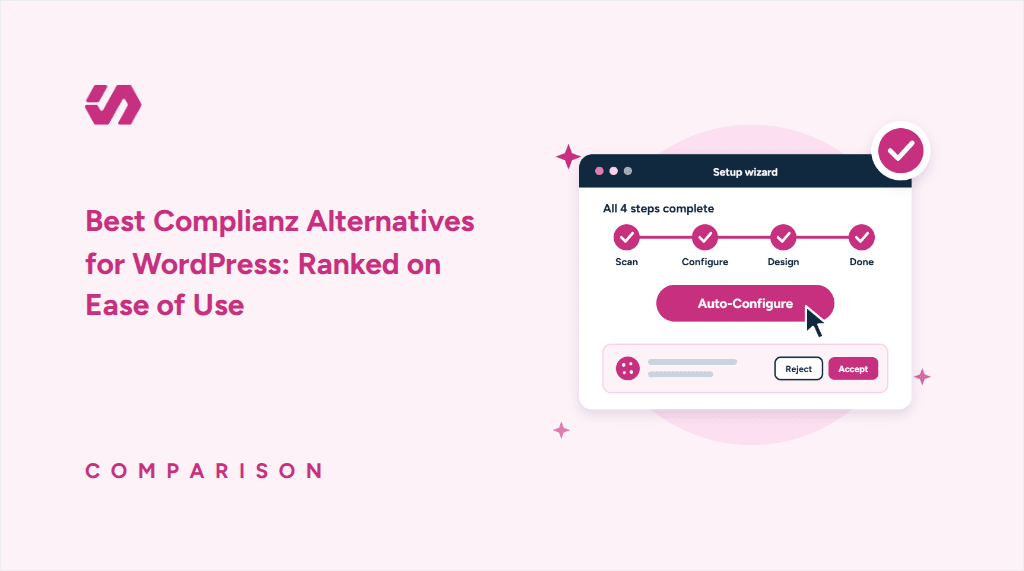
WPConsent is the easiest Complianz alternative to use for most WordPress sites. It runs inside WordPress for a fixed price, sets up in four screens, and includes Google Consent Mode free. Complianz still leads on legal documents.
Key Takeaways
- The easiest Complianz alternative depends on how much setup you want to do and how easy the settings are to manage afterward.
- Check what’s free. Google Consent Mode is free on some plugins and paid on others.
- Some cloud consent tools charge by traffic or page count, so costs can grow with your site. Many self-hosted plugins charge a fixed price per site.
- If you use Complianz Premium’s consent records, export them before switching. They won’t import into your new plugin, but they can remain in your WordPress database.
Complianz is one of the most popular cookie consent plugins for WordPress, with more than a million active installs on WordPress.org.
It covers a wide range of privacy laws and has a free version, but setup can take a while, and Google Consent Mode needs Premium.
If you want something simpler, these are the options we’d look at.
We ranked five Complianz alternatives by ease of use, starting with the easiest.
We installed each plugin available on WordPress.org on our test site and went through its setup process. Borlabs Cookie doesn’t have a free version or trial, so we evaluated it using its published setup guide and user reviews.
We judged ease of use by how quickly you get a working banner, how much you set up yourself, and how easy it is to change things later.
Why People Look for a Complianz Alternative
Complianz does a lot well. But three things keep coming up in its lower-star reviews.
1. A long setup. The wizard sets up your banner and collects details for legal documents, so it asks a lot before your banner goes live.
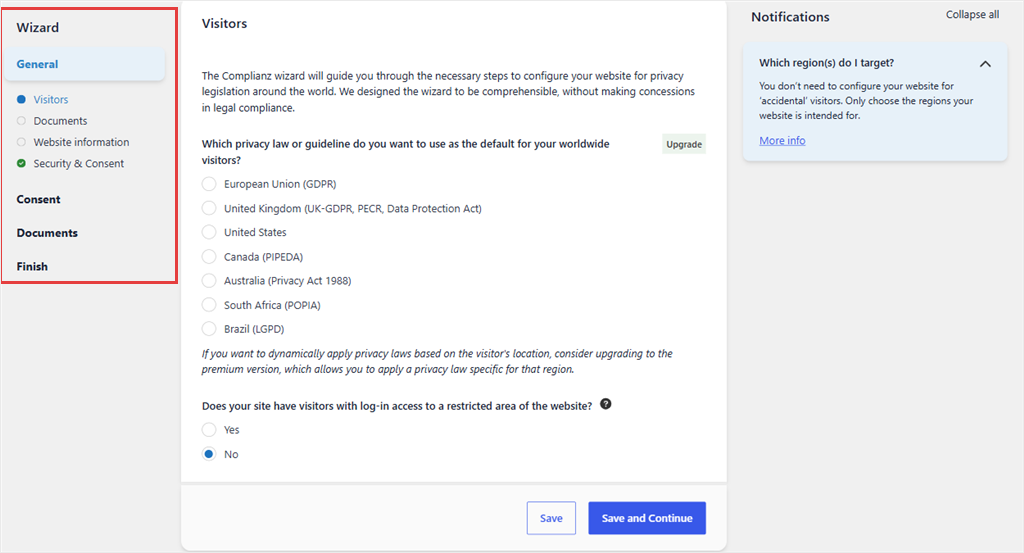
2. A smaller free version. In June 2026, Complianz moved its full site scan to Premium. The free scan now needs an email sign-up. It also skips shop, cart, and checkout pages, as well as products.
3. Consent Mode on Premium. Complianz keeps Google Consent Mode v2 on Premium, from $59 a year. Without it, the free plugin doesn’t pass your visitors’ consent choices to Google Analytics or Google Ads.
That said, Complianz has real strengths. It runs inside WordPress, as a self-hosted consent plugin. Plus, it charges a fixed price per site and covers many regions.
Premium also writes a privacy statement, imprint, and disclaimer.
So look for an alternative that keeps those strengths and makes setup easier.
The 5 Best Complianz Alternatives, Easiest First
Before we get into our list of the best Complianz alternatives for WordPress, check out the table below for a quick overview.
| Plugin | How setup works | Free Consent Mode v2 | Runs in | Pricing model | Starts at | Best for |
|---|---|---|---|---|---|---|
| Complianz (what you have now) | Long wizard; free scan needs sign-up | No, Premium only | WordPress | Fixed, per site | $59, 1 site | Sites that need legal documents generated |
| 🥇 WPConsent | 4 screens, auto-configures what the scan finds | Yes | WordPress | Fixed, per site | $49.50, 1 site | The easiest switch from Complianz that stays in WordPress |
| 🥈 CookieYes | Banner on activation, connect an account to scan | Yes, up to 5,000 pageviews/mo | WordPress, then cloud once you connect | Per domain, by pageviews | $100, 1 domain | Owners who also run non-WordPress sites |
| 🥉 Real Cookie Banner | Free license, then a 12-step checklist | No, paid only | WordPress | Fixed, per site | €59, 1 site | Owners who want legal guidance and will pay |
| 4. Borlabs Cookie | Setup assistant with a Quick mode | No free version | WordPress | Fixed, per site | €49, 1 site | Agencies that want deep control |
| 5. Cookiebot | Create an account, paste an ID into the plugin | Yes, 1 domain up to 50 subpages | Cloud | Per domain, by page count | €84, 1 domain | Larger sites across several domains |
1. WPConsent ⭐⭐⭐⭐⭐
Best for: WordPress site owners who want the easiest switch, with Google Consent Mode included free
WPConsent is the closest Complianz alternative. It’s self-hosted, so you keep the same control you have with Complianz, because you keep working inside your WordPress dashboard.
Plus, you still pay a fixed price per site, not one based on traffic.
And unlike Complianz, WPConsent includes Google Consent Mode in its free version. It’s #1 because you get a working banner in four screens.
Why Is WPConsent the Easiest Complianz Alternative to Use?
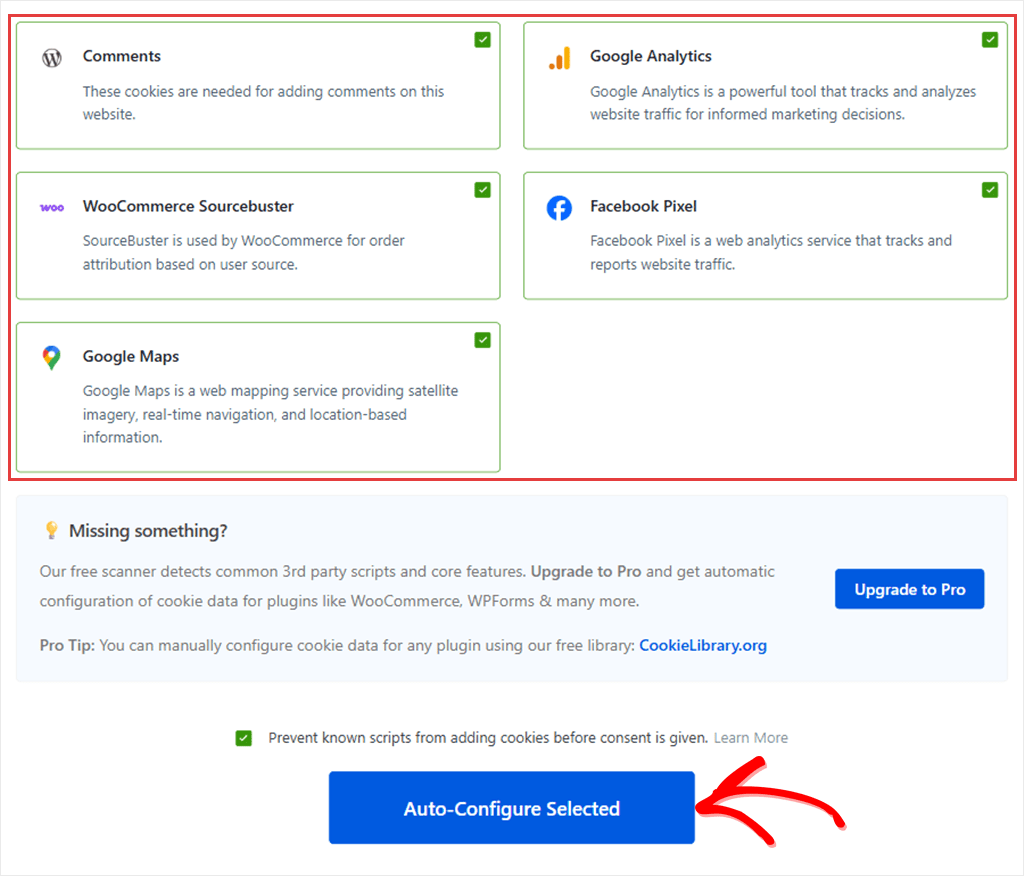
Once you install WPConsent, open the setup wizard and follow the screens. After a short welcome screen, WPConsent scans your site and lists the services it finds.
On our test store, the scan found five services setting 28 cookies, including Google Analytics, Facebook Pixel, and Google Maps. Each one showed up as a card, already ticked.
Click Auto-Configure Selected, and it sets them all up. Known tracking scripts then wait until a visitor agrees. The same scan also feeds your cookie policy page.
You don’t have to configure each detected service separately.
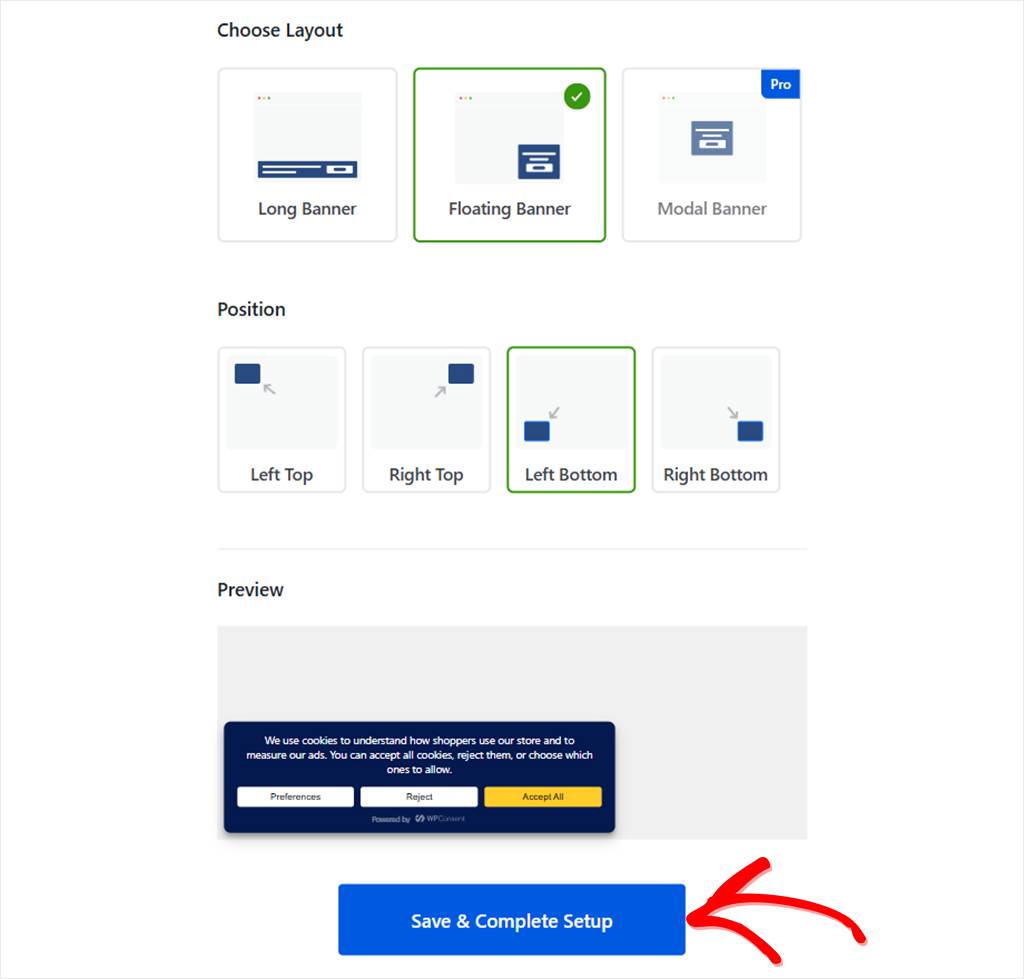
The last screen asks you to pick a banner layout and position, with a preview underneath.
Clicking Save & Complete Setup turns the banner on. You can change every part of it later, so there’s no pressure to get the design perfect here.
Where WPConsent Has an Advantage
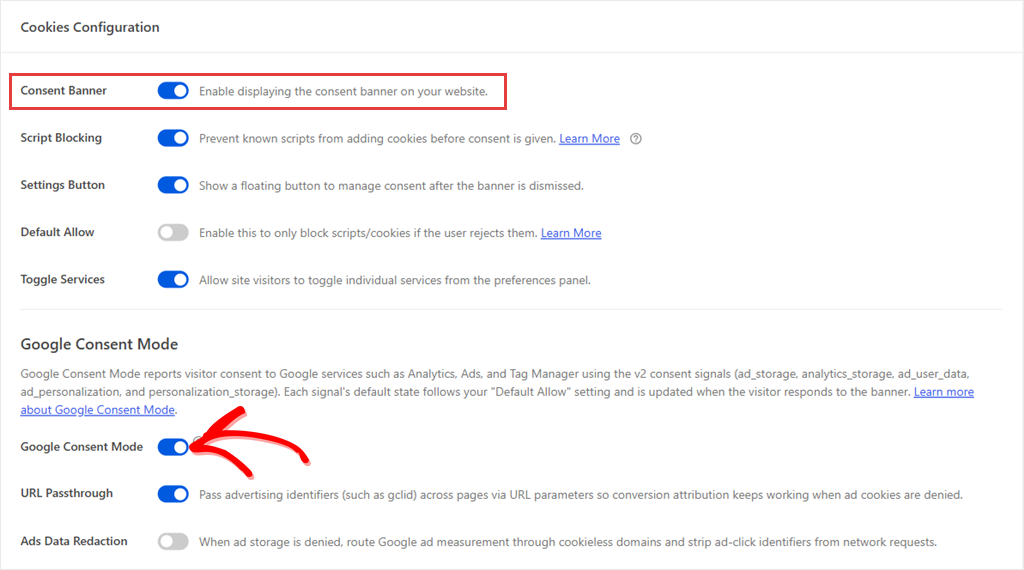
There’s no separate Google Consent Mode step.
The setting is already on in the free plugin, and it starts working when that last screen turns your banner on. It covers Google Analytics, Google Ads, and Google Tag Manager.
So if the scan found Google Analytics, Consent Mode is sending its signals as soon as you finish.
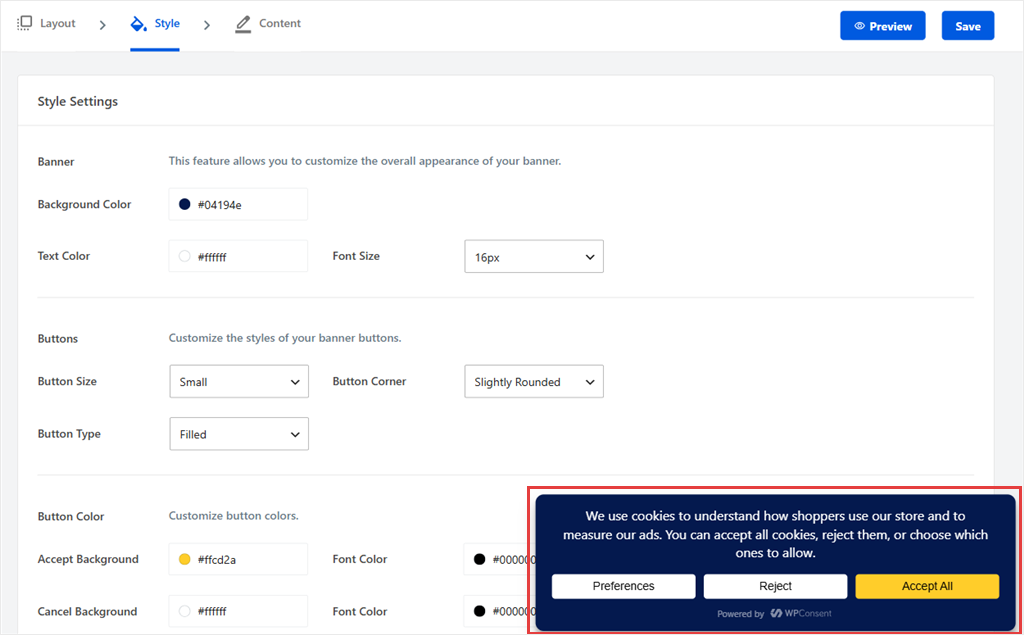
Changing the banner afterward is simple too.
In WPConsent » Banner Design, the Preview button shows your banner on screen while you adjust colors, text, and buttons.
Add a new plugin later? Run the scanner again to see what it finds. Paid plans can run those scans on a schedule.
The free scanner always checks your homepage, and it suggests your checkout and cart pages to include in the scan. You can add any other post or page from a dropdown, and you don’t need an account.
What You Keep When You Switch
Here’s how WPConsent free and paid plans compare with Complianz:
- Free on both: cookie scanner, script blocking, and a cookie policy page.
- Paid on both: consent logs and geolocation.
- Free on WPConsent, Premium on Complianz: Google Consent Mode v2.
🟢► Pros
- Four-screen setup: Auto-Configure Selected sets up what the scan found, so you’re not answering legal questions one by one.
- Free Google Consent Mode v2: It works for the Google tools the scan found as soon as you finish setup.
- Stays in WordPress: Your settings stay on your own site, like they did with Complianz. Consent logs on paid plans stay there too.
- Flat pricing: Every plan has unlimited pageviews and scans, so a busy month doesn’t change your bill.
- Live banner preview: See your banner on screen while you change its colors, text, and buttons.
- Free scanner, no account: Scans run from your dashboard without a sign-up, and suggest your checkout and cart pages.
🔴► Cons
- One banner language on the free plan: You can write your banner text in any language. Showing it in several languages starts on the Basic plan, and automatic translations on Plus.
- Fewer legal documents: WPConsent creates your cookie policy page. WordPress can start a privacy policy for you under Settings » Privacy, but an imprint or disclaimer needs another tool.
Pricing: The core plugin is free on WordPress.org. Paid plans start from $49.50 for 1 site (Basic). Plus is $99.50 for 5 sites, Pro is $199.50 for 25, and Elite is $299.50 for 100.
2. CookieYes ⭐⭐⭐⭐
Best for: site owners and agencies who also run sites outside WordPress
CookieYes is one of the most-installed cookie plugins on WordPress, with more than a million sites.
It’s #2 because its banner went live the moment we activated it. Google Consent Mode v2 and automatic script blocking are on the free plan too.
It sits below WPConsent because scanning your site and sorting its cookies needs you to connect your WordPress site to CookieYes’ web app.
How Easy Is CookieYes to Set Up?
Once you connect, your banner loads from CookieYes’ servers, your consent logs are stored in its cloud, and your banner follows a monthly pageview limit.
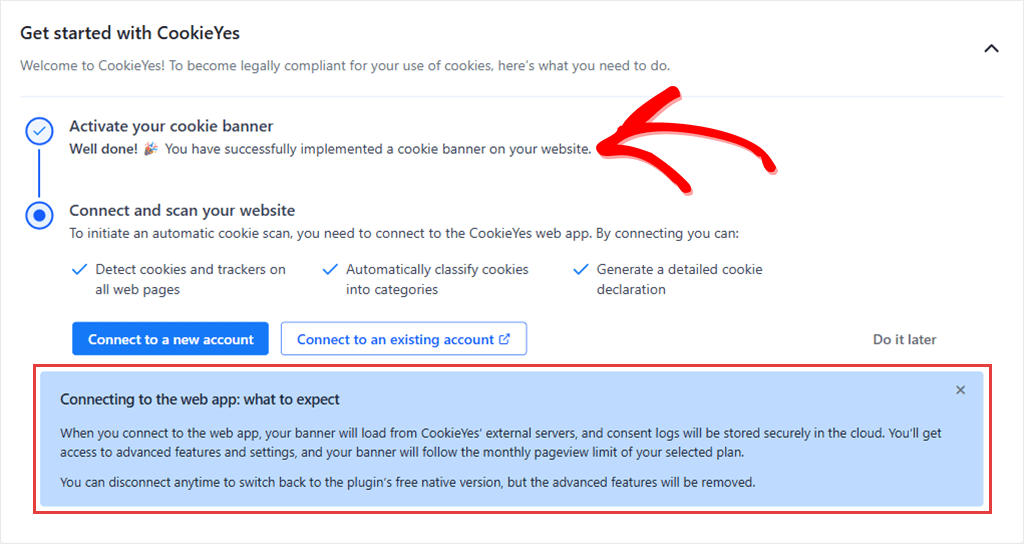
On the free plan, the limit is 5,000 pageviews a month, with CookieYes branding on the banner. Paid plans are per domain and priced by traffic.
Some long-time users also say the free plan has shrunk over time. One 2026 review says features “that used to be available for free now seem to be locked behind paid plans.”
Where CookieYes Has an Advantage
One CookieYes account can run banners on WordPress, Shopify, Wix, and Squarespace sites.
If you manage a mix of platforms, you can handle them all from one dashboard. We cover the two side by side in CookieYes vs WPConsent.
🟢► Pros
- Fastest banner: The banner is live the moment you activate the plugin.
- Free Consent Mode v2: It’s on the free plan, along with automatic blocking.
- One account for every platform: Useful if some of your sites aren’t on WordPress.
- Widely used: More than a million WordPress installs and a 4.8-star rating.
- Free consent log: Consent records are kept on the free plan, in CookieYes’ cloud.
- Free policy generators: Cookie policy and privacy policy generators come with the free plan.
🔴► Cons
- Scanning moves you to the cloud: After you connect, your banner and consent logs run on CookieYes’ servers.
- Traffic-based pricing: The free plan caps at 5,000 pageviews a month, and Basic and Pro charge extra above their limit.
Pricing: Free for 1 domain up to 5,000 pageviews a month. Basic is $10 a month or $100 a year per domain, for up to 100,000 pageviews. Pro is $25 a month and Ultimate is $55 a month.
3. Real Cookie Banner ⭐⭐⭐⭐
Best for: site owners who want guided legal setup inside WordPress and are happy to pay
Real Cookie Banner is a German-built, self-hosted consent plugin that runs inside WordPress, like Complianz. It has the highest WordPress.org rating on this list.
It sits at #3 because setup takes more work.
How Easy Is Real Cookie Banner to Set Up?
The first screen asks you to get a free license from devowl.io, the company behind it. You can skip that, but the plugin works best with it.
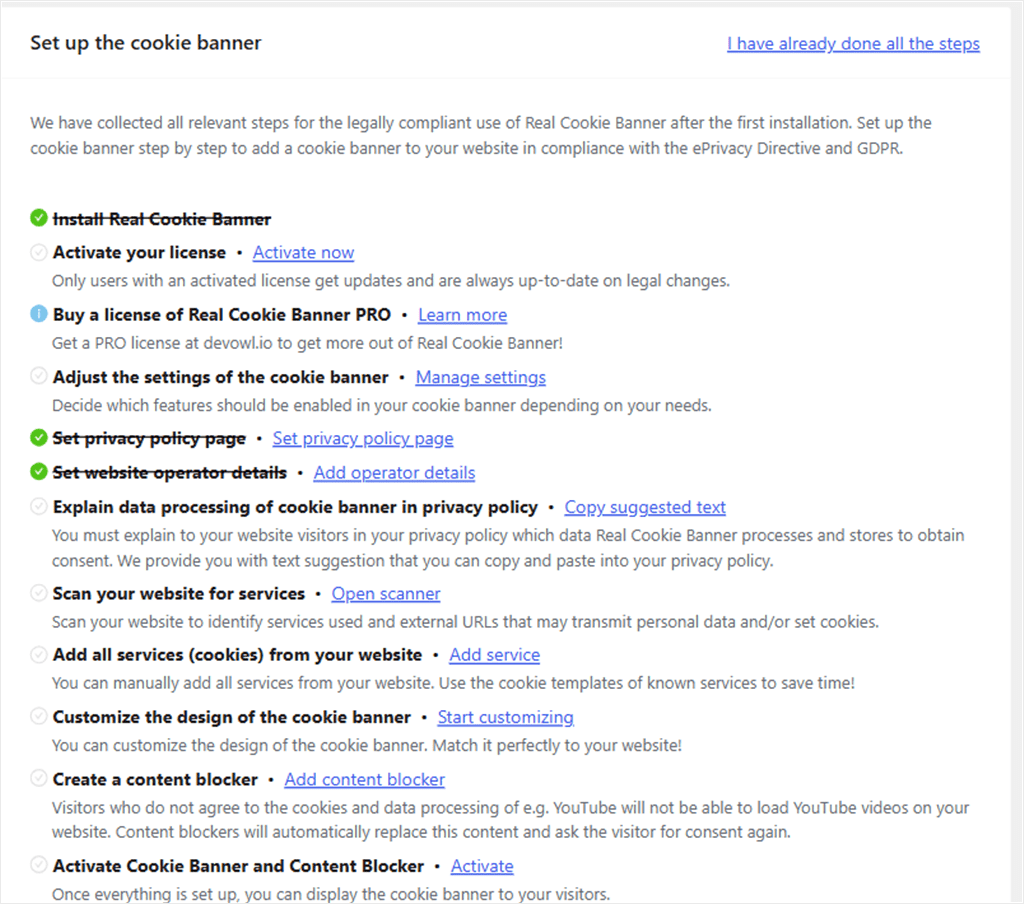
Next comes a setup checklist. When we opened it during testing, the header read 3 / 12 steps completed. It had already filled in our privacy policy page and site details, so three steps were ticked before we started.
Each step explains what it’s for, from setting your privacy policy page to creating content blockers.
The checklist is easier to follow than the long series of Complianz questions, but there are still more steps than with our top two picks.
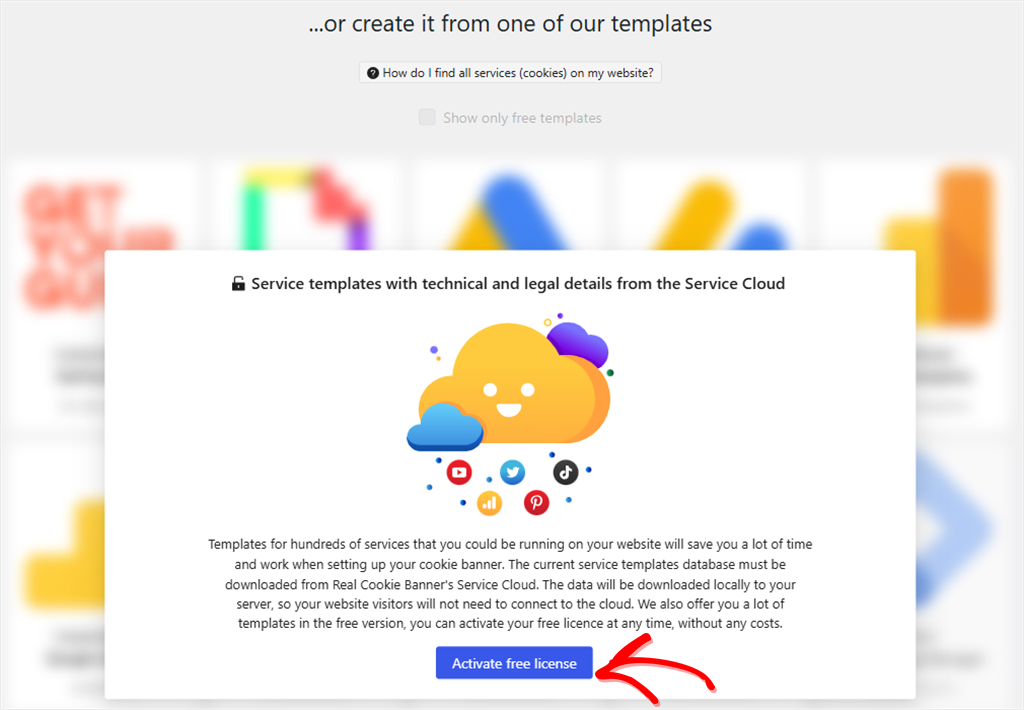
Adding services takes more work. The ready-made service templates stay locked until you activate the free license, and many of them need PRO on top of that.
Without them, you set up more services by hand.
Google Consent Mode and geo-restriction are paid here too, as they are on Complianz.
Where Real Cookie Banner Has an Advantage
Per-visitor consent records are free and kept in your own database, while Complianz keeps them on Premium. On a paid plan, you get 160+ service templates, 200+ design options, and a cookie policy generator.
devowl.io also offers anyone switching from a similar plugin their first year for 1 EUR.
🟢► Pros
- Explains as you go: The checklist tells you why each step matters, not just where it is.
- Free consent records: Stored in your WordPress database, even on the free plan.
- Most complete paid plan: Templates, design options, and a cookie policy generator in every paid license.
- Switcher offer: 1 EUR for the first year if you’re moving from a similar plugin.
- Multilingual on free: Works with WPML, Polylang, TranslatePress, and Weglot without paying.
- Free consent stats: See how visitors respond to your banner, even on the free plan.
🔴► Cons
- More hands-on setup: A license step, a 12-step checklist, and fewer templates without PRO.
- Consent Mode is paid: Same as Complianz, so the free plan doesn’t solve that problem.
Pricing: Free version on WordPress.org. Paid plans run from €59 a year for 1 site to €299 a year for 25 sites, including VAT.
👉 Get started with Real Cookie Banner
4. Borlabs Cookie ⭐⭐⭐⭐
Best for: agencies that want deep control for a low yearly fee and don’t need a free version
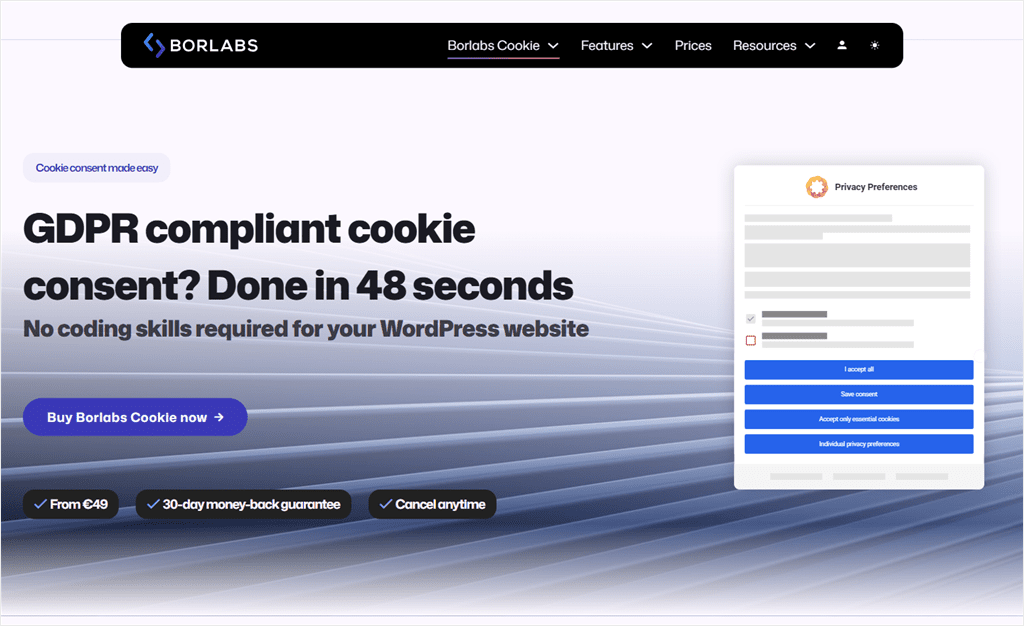
Borlabs Cookie is a premium-only consent plugin that runs on your own server.
It’s #4 because there’s no free version or trial to start with, and it has a lot of settings. We didn’t install it, so this section is based on its published setup guide and reviews.
How Easy Is Borlabs Cookie to Set Up?
Borlabs Cookie starts with a setup assistant that has Quick, Custom, and Guided modes. It says Quick mode takes 48 seconds on average.
A scanner then suggests packages from a library of 370+ services and content blockers.
After that, you have more than 300 settings to work with. That’s a lot of control, but it also means a lot to read and go through.
Borlabs Cookie is self-hosted, and every license includes every feature, Google Consent Mode included.
The catch is the renewal.
According to Borlabs’ own FAQ, features that need its online service, such as the scanner and the service library, stop working when your license expires. The banner itself keeps running.
🟢► Pros
- Every feature in every license: No feature tiers to compare.
- Stays on your server: Visitor data isn’t sent to Borlabs.
- Built for agencies: Client overview, Composer, and WP-CLI support.
- Large service library: 370+ ready-made packages for services and content blockers.
🔴► Cons
- No free version or trial: You pay before you can try it. There’s a 30-day refund.
- Features stop when the license lapses: The scanner and library need an active license.
Pricing: From €49 a year for 1 site up to €499 a year for 99 sites, plus VAT.
👉 Get started with Borlabs Cookie
5. Cookiebot ⭐⭐⭐
Best for: larger sites spread across several domains, happy with a cloud dashboard
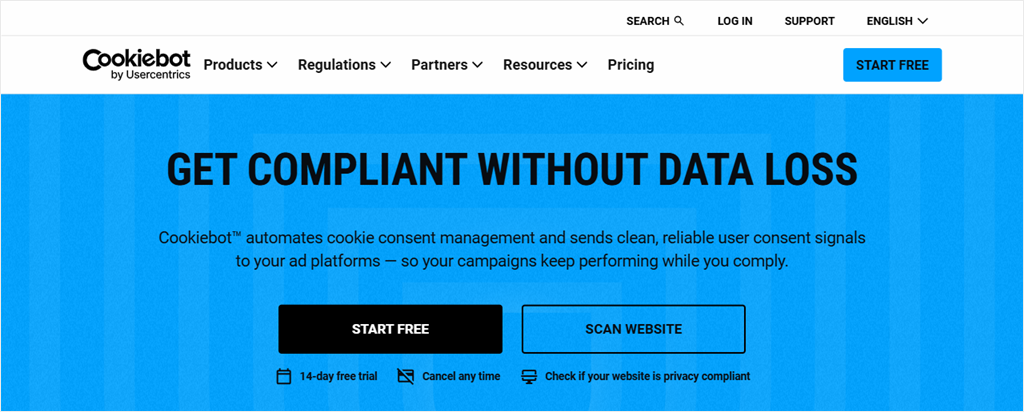
Cookiebot is a cloud consent platform from Usercentrics. It’s #5 because it requires an account before you can connect it to WordPress, and its paid plans depend on page count.
How Easy Is Cookiebot to Set Up?
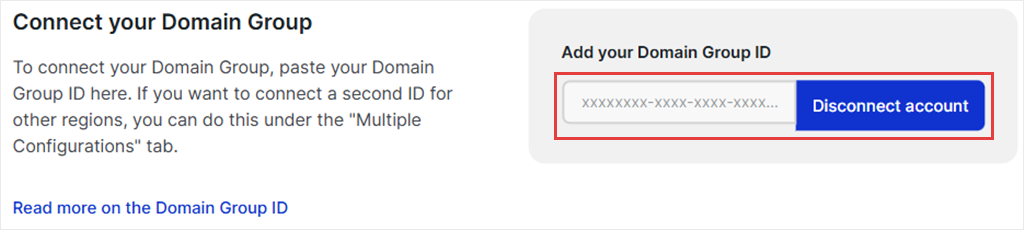
You create a Cookiebot account, copy your Domain Group ID, and paste it into the plugin’s settings.
After that, your banner and scans run from Cookiebot’s cloud.
On Premium, consent can be shared across several domains, which is why it suits larger sites.
The free plan covers 1 domain with up to 50 subpages, and you block scripts by hand. Paid plans add automatic blocking.
Paid plans are also set by your page count. If Cookiebot’s scanner finds more pages than your plan allows, it moves you up to the next plan automatically.
🟢► Pros
- Huge tracker database: 13,000+ known trackers help it label what it finds.
- Cross-domain consent: One choice can carry across your domains on Premium.
- Free Consent Mode support: Available on the free plan for small sites.
- Free plan for small sites: One domain with up to 50 subpages costs nothing.
🔴► Cons
- Plan set by page count: Your bill can go up as your site grows.
- Manual blocking on free: Automatic blocking needs a paid plan.
Pricing: Free for 1 domain up to 50 subpages. Paid plans run from €7 a month per domain (up to 50 subpages) to €90 a month, plus VAT.
Which Complianz Alternative Should You Pick?
| If you need… | Pick |
|---|---|
| The easiest setup, inside WordPress, with free Google Consent Mode | WPConsent |
| One account for WordPress and non-WordPress sites | CookieYes |
| Step-by-step legal guidance inside WordPress | Real Cookie Banner |
| Deep control for an agency, and no need for a free version | Borlabs Cookie |
| Consent shared across a large set of domains, in the cloud | Cookiebot |
| To manage several client sites on one fixed price | WPConsent Plus (5 sites, $99.50) or Pro (25 sites, $199.50) |
| A privacy statement, an imprint, and other legal documents in one plugin | Stay on Complianz Premium |
If legal documents are why you’d stay, paying for Complianz Premium is a fair choice. Premium also fixes the Consent Mode gap and scans your whole site.
But the setup is still just as long.
How to Switch from Complianz to WPConsent
Here’s how to switch to WPConsent while keeping the gap between banners as short as possible. For a closer look, WPConsent vs Complianz compares the two plugins feature by feature.
There’s no import tool, and that is by design.
A fresh scan builds your setup around what your site runs today, so settings for plugins you removed long ago, or rules that were set up wrong, don’t come along.
Before you change anything, open Complianz and note which services it’s blocking. You’ll use that list as a check later.
If you use Records of Consent on Complianz Premium, export those records now too. You’ll find the export under Complianz » Tools » Records of Consent.
WPConsent won’t import them, but keep them for your records.
Next, install WPConsent and run the setup wizard. Scan your site and click Auto-Configure Selected.
On the banner screen, don’t click Save & Complete Setup yet. That’s the button that turns the banner on, so leaving it for now means you won’t run two banners at once.
Instead, head to WPConsent » Settings and open the Cookies tab. Compare the services there with your Complianz list. If one looks missing, check your cookies manually to confirm.
Then use Add A Service to add it by hand.
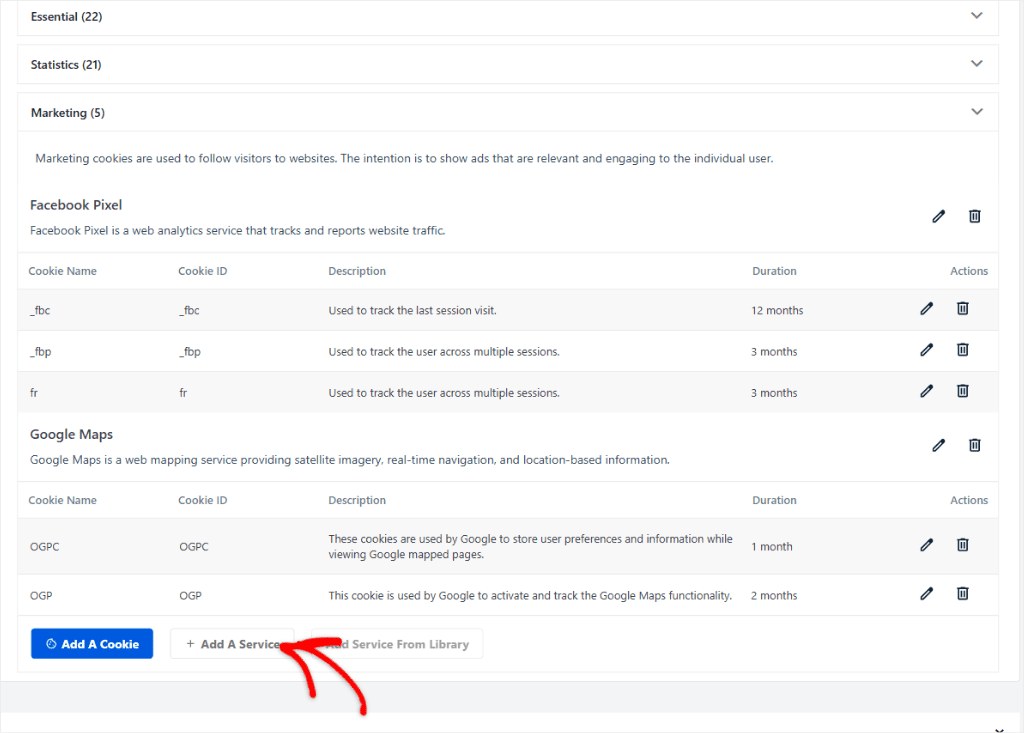
If you need help, check this guide on how to find and add cookies.
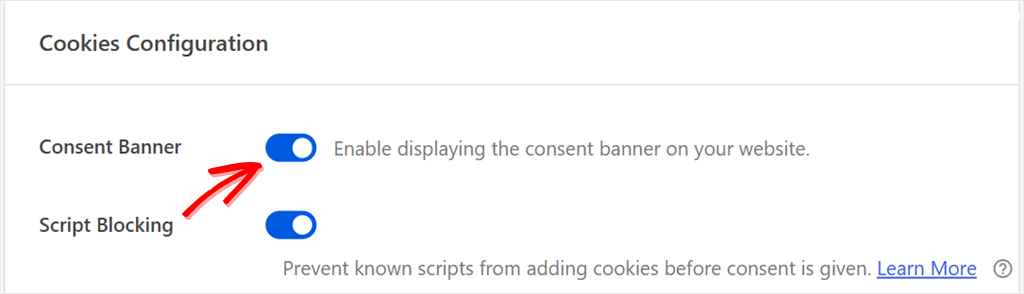
Once that’s done, deactivate Complianz. Then, back in WPConsent » Settings, switch on the Consent Banner toggle and save. Google Consent Mode starts working at the same moment.
If you use a caching plugin, clear its cache.
Then open your site in a private browser window and check that the banner shows, and that your tracking scripts wait until you click accept.
What Happens to Your Complianz Pages and Records?
Pages that Complianz generated, like its cookie policy, depend on the plugin. Once it’s off, replace the cookie policy with the one WPConsent creates, and keep a copy of any privacy statement or imprint you still need.
What happens to your records depends on which version you used:
- Complianz Premium: per-visitor records come from a setting called Records of Consent, and it’s off by default. If you turned it on, your records stay in your WordPress database after you deactivate Complianz. You can only view them while Complianz is active, which is why the export comes first.
- Free Complianz: there are no per-visitor records to keep. The free plugin saves PDF snapshots of your cookie policy instead. They’re files in your uploads folder, and deleting the plugin doesn’t remove them.
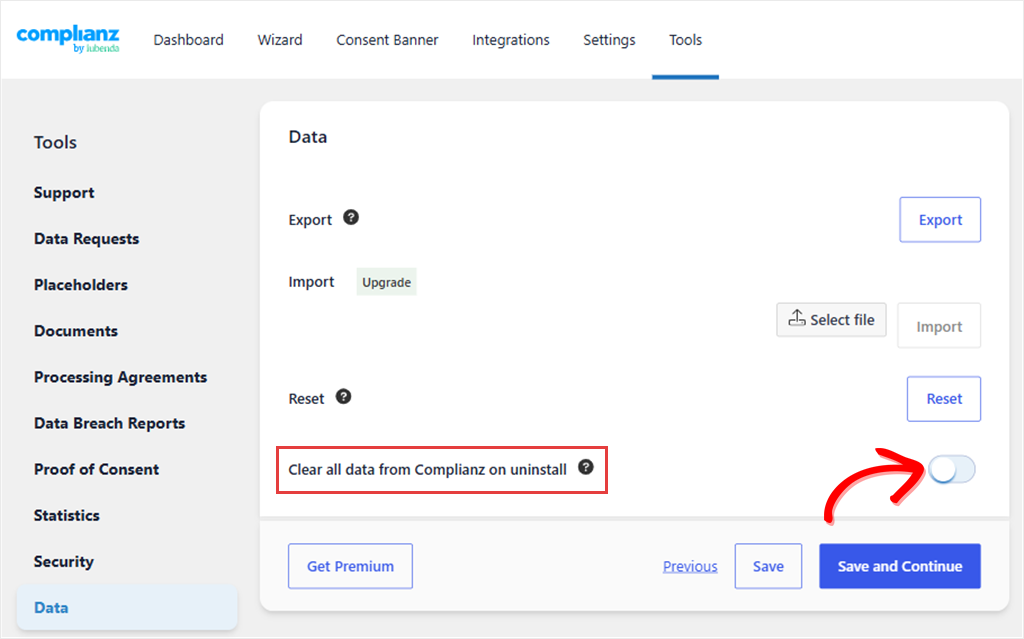
To keep Premium records in your database, deactivate Complianz rather than deleting it with Clear all data from Complianz on uninstall turned on. That option is under Complianz » Tools » Data, and it’s off by default.
After the switch, test the new banner and confirm that visitors can make a fresh consent choice.
We follow the same order in our Cookiebot to WPConsent migration guide, if you’d like a second walkthrough.
FAQs: Complianz Alternatives
How much does Complianz cost per year?
Complianz Premium starts from $59 a year for 1 site, $179 for 5 sites, and $399 for 25 sites. The free plugin is on WordPress.org.
Is Complianz still free?
Yes. The free plugin is still on WordPress.org, and its banner, consent handling, and cookie policy keep working. Since June 2026, the free scan needs an email sign-up. It covers posts and pages, but not store pages or custom post types like products. Google Consent Mode v2 needs Premium.
Is there a free Complianz alternative with Google Consent Mode?
Yes. WPConsent’s free plugin includes Google Consent Mode v2, and it starts working when you finish setup. CookieYes and iubenda also include it on their free plans, but both lean on their cloud services. CookieYes’ free plan stops at 5,000 pageviews a month once you connect it.
Which Complianz alternative is easiest to set up?
When we set each one up on our test site, WPConsent took the fewest steps to a banner that matched the site: a scan, one Auto-Configure click, and a layout choice. CookieYes shows a banner faster, but you connect to its cloud to scan.
Do my Complianz consent records transfer to a new plugin?
No. None of the alternatives here import Complianz records.
If you turned on Records of Consent in Complianz Premium, they stay in your WordPress database after you deactivate it. You can also export them before you switch. Free Complianz doesn’t keep per-visitor records, only snapshots of your cookie policy.
Is iubenda a good Complianz alternative?
It can be, if you’re happy to manage your banner in the cloud. One thing to know first: iubenda and Complianz have the same owner. Complianz joined the iubenda Group, part of team.blue, in 2024. To set it up, you link the plugin to an iubenda account. You build your banner and policies there, and the plugin adds them to your pages and holds back scripts until a visitor agrees. The free plan includes Google Consent Mode v2. Paid plans start at $5.99 a month per site, billed yearly, with extra fees above your plan’s pageview limit.
What is the best Complianz alternative overall?
For most WordPress sites, WPConsent. It offers a fixed price, keeps everything inside WordPress, and has a much shorter setup. If you need a full set of legal documents in one plugin, Complianz Premium is still the better fit.
Switch to WPConsent, the Easiest WordPress-Native Complianz Alternative
You’ve seen how the five alternatives compare and how to preserve your existing consent records before switching.
If setup is what wore you down, start with WPConsent’s free plugin and follow the switching steps above. The scan, one Auto-Configure click, and the banner toggle are most of the work, and Google Consent Mode comes with it.
Your settings stay on your own site, and your price doesn’t change with traffic.
Want Google Consent Mode and a four-screen setup without paying for Premium?
Get WPConsent for free →
Need consent logs, geolocation, or banners in more than one language?
See WPConsent plans →