TL;DR:
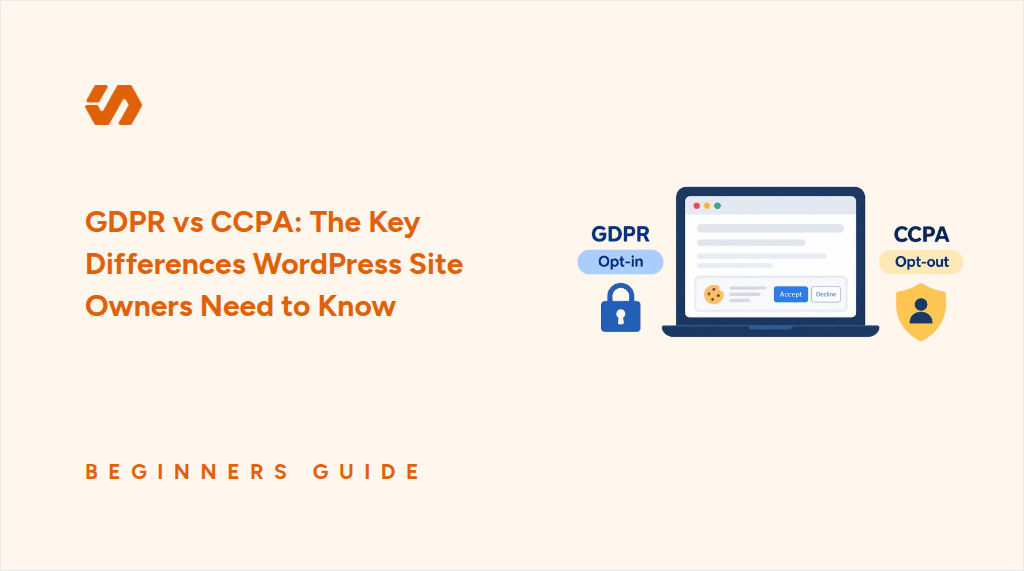
GDPR and CCPA point in opposite directions on consent, not just different strictness levels. GDPR requires opt-in before non-essential tracking loads. CCPA allows tracking by default but requires a working opt-out. Applying GDPR-style opt-in to everyone is legal, but it quietly costs you analytics visibility since US visitors who ignore the banner get counted as a no. CCPA also adds requirements that no consent model covers: honoring Global Privacy Control signals and handling Do Not Sell requests.
Two shoppers reach your WooCommerce checkout. One is in Paris, and the other is in Los Angeles. They both see the same cookie banner.
Is that a problem?
Not legally. But the two laws treat them differently:
- GDPR covers your Paris visitor. Non-essential cookies stay blocked until they agree.
- CCPA covers your Los Angeles visitor. Cookies can load, and they get a way to say no.
Their location determines which privacy rules apply to them.
Show them both the same opt-in banner, and you may give up data you were allowed to collect from your Los Angeles visitor.
Here is what each law asks for, where the popular shortcut breaks down, and how to run both behaviors on one site.
Key Takeaways
- Applying GDPR-style opt-in to everyone is legal. It just counts every quiet US visitor as a refusal.
- Honoring Global Privacy Control is now required in twelve states, not only California.
- Neither law applies to visitors from elsewhere. Other countries have their own rules.
- WPConsent honors GPC on the free plugin. Pro runs EU opt-in and US opt-out on the same site.
This article is detailed, so we’ve broken it into sections. Use the links in the Table of Contents below to navigate.
What GDPR Requires
GDPR requires consent before any non-essential cookie loads. That consent has to be recorded.
Analytics, marketing pixels, and embedded video that track all need to stay blocked until the visitor agrees.
Telling visitors that these tools are in use isn’t enough under GDPR. You need to get their consent before the scripts that use them can run.
There is one narrow exception.
Cookies that are strictly necessary for the site to work, like a shopping cart or a session cookie, do not need consent.
Other cookies may require consent depending on what they do.
For the full walkthrough on setting up GDPR-compliant consent on WordPress, see the complete GDPR compliance guide for WordPress.
Who GDPR Applies To
GDPR applies to businesses in the EU, and to businesses outside the EU that offer goods or services to people in the EU or monitor their behavior.
For example, a US store can fall under GDPR if it sells to customers in the EU or tracks what they do on its site.
That means being based outside Europe does not automatically put your site outside GDPR.
GDPR Penalties
Fines run up to 20 million euros or 4% of worldwide annual turnover for the most serious infringements.
What CCPA Requires
CCPA requires notice and a working opt-out, rather than permission up front.
A covered site can let cookies run by default. Instead, it needs to explain what it collects and give visitors a clear way to opt out of having their personal information sold or shared.
If a visitor opts out, the business has to honor that choice.
Two of those obligations sit outside your banner’s consent model entirely, so a cookie banner alone cannot cover everything CCPA requires.
1. Global Privacy Control (GPC)
Global Privacy Control (GPC) is a signal that a visitor’s browser or privacy extension sends to websites to indicate that they want to opt out of the sale or sharing of their personal information.
Once enabled, the signal is sent automatically, so the visitor does not have to submit an opt-out request on each site.
If your business is covered by CCPA and sells or shares personal information, you have to treat that signal as a valid opt-out. A manual opt-out link on its own is not enough.
GPC Now Applies Beyond California
California introduced GPC honoring first, but it’s no longer the only state that requires it.
Twenty states now have comprehensive privacy laws in effect.
Twelve of them require sites to detect and honor the GPC signal as of January 2026.
And California, Colorado, and Connecticut are currently running a coordinated enforcement sweep on this.
CCPA is still the strictest of the group, and several other states have adopted similar opt-out rights.
2. Do Not Sell
A Do Not Sell request lets a consumer tell a business directly not to sell or share their personal information, rather than relying on a browser signal like GPC.
This applies if your business meets CCPA’s thresholds (covered below) and also sells or shares personal information. Sharing includes passing visitor data to other companies for targeted advertising, even when no money changes hands, which can include advertising pixels like the Meta Pixel.
If both apply, you need at least two ways for people to opt out. One has to be honoring GPC. The other can be a Do Not Sell or Share form linked from your site. If you don’t sell or share personal information, you don’t need either.
Who CCPA Applies To
CCPA does not apply to every site with a US visitor.
It applies to for-profit businesses that do business in California and meet at least one of these:
- More than $26.625 million in annual revenue
- Buying, selling, or sharing the personal information of 100,000 or more consumers or households a year
- Earning 50% or more of their revenue from selling or sharing personal information
Our complete CCPA compliance guide covers the obligations that arrive once a business gets large enough, which go well past cookie consent.
CCPA Penalties
Penalties are smaller per violation than GDPR’s. Each violation counts separately, though, so the totals can add up.
As of 2026, unintentional violations run $2,663 each, and intentional ones, or any involving a minor’s data, run $7,988.
Those amounts are adjusted for inflation every two years.
Put GDPR and CCPA side by side, and they start to look more alike than they really are. That is why some businesses reach for the “just use the stricter one” shortcut.
The Overlap: Why “Just Use the Stricter One” Falls Short
Here is how they overlap. Both laws:
- Require you to tell visitors what you collect and why
- Give people a route to have their data deleted
- Carry penalties that mean it
Using the stricter one falls short for two reasons.
1. It’s not illegal, but you give up useful data.
Running a GDPR-style opt-in for every visitor isn’t a breach of anything in the US, including asking a Californian for consent you didn’t strictly need.
But it means:
- Under opt-out, a visitor who does nothing counts as a yes.
- Under opt-in, that same visitor counts as a no.
Most people ignore a cookie banner, so applying opt-in everywhere means you won’t collect analytics data from visitors who never made a choice.
💡 New in WPConsent: Banner Analytics
Some visitors accept your banner. Some reject it. Plenty just ignore it, and that third group is invisible in your analytics.
Banner Analytics shows you how many, so you know what you’re actually missing. It’s included on every paid plan, and Pro adds date ranges and a breakdown by location. Read the announcement.
2. Some CCPA requirements sit outside cookie consent.
Honoring GPC and handling Do Not Sell requests aren’t consent-model choices, so no banner behavior supplies them. Opt-in for everyone doesn’t cover either requirement.
Here’s where the two laws still differ:
| GDPR | CCPA | |
|---|---|---|
| Consent model | Opt-in before non-essential cookies load | Opt-out: cookies may load, visitor can object |
| Who it covers | EU and EEA visitors, including from non-EU businesses | Covered businesses handling California residents’ data |
| Non-essential cookies | Blocked until the visitor agrees | Generally allowed, with a working opt-out |
| Opt-out signal | Not the mechanism GDPR uses | Must honor GPC if you sell or share, and confirm it was processed |
| Do Not Sell | No direct equivalent | Required if you sell or share personal information |
| Penalties (2026) | Up to 20M euros or 4% of turnover | $2,663 unintentional, $7,988 intentional |
| Your WordPress setup | Block scripts, then ask | Allow scripts, provide a clear way out |
So the question is not which law to follow. It is how to treat each visitor the way their own region expects.
What a Site With Visitors From Both Actually Needs
Back to the checkout, and the two shoppers.
For Paris, Google Analytics and the Meta Pixel stay blocked until that visitor agrees.
For Los Angeles, the same scripts can load, as long as there is a clear way to opt out and the browser’s GPC signal is respected if it arrives.
To put this in perspective, when those two visitors land on your site, one meets a wall (GDPR), while the other meets a door (CCPA).
What About Everyone Else?
These laws follow the visitor, not you.
If a visitor is browsing from a country with no comprehensive privacy law, no specific rule follows them to your site.
Other regions have their own, such as Brazil’s LGPD, Canada’s PIPEDA, and the UK’s post-Brexit version of GDPR.
More countries are also introducing similar privacy rules.
For everyone outside those rules, use a sensible default, then add location-based rules for the regions that matter to your traffic.
Our guide to cookie consent requirements by country goes region by region.
⚠️ One catch
A consent plugin controls cookies, scripts, and the record of what a visitor chose. It does not finish the job on its own. Your privacy policy, the vendors you use, and what your forms do with submitted data all still matter.
How WPConsent Handles Both
WPConsent is one of the best WordPress consent plugins.
It automatically blocks tracking scripts until a visitor agrees, and it can apply a different rule depending on where that visitor is.
Let’s walk you through how to use it to handle CCPA and GDPR at the same time.
Get WPConsent Installed First
WPConsent has a free version from the WordPress repository and a paid WPConsent version.
See our comparison between WPConsent Free and Pro to see what each offers. Once you make your choice, our installation guide walks you through both.
Once installed, here’s how to handle the key GDPR and CCPA requirements we covered above:
Honor GPC signals (free)
WPConsent can automatically detect GPC signals and decline non-essential cookies for visitors who send one. This is included in the free version as well.
Go to WPConsent » Settings and open the Advanced tab. Switch on Respect Global Privacy Controls.

It ships switched off, because not every business has to honor GPC. Under CCPA, only businesses that sell or share personal information do.
Once it is on, visitors arriving with GPC enabled have non-essential cookies declined automatically and never see the banner at all.
You can also set what those visitors are told.
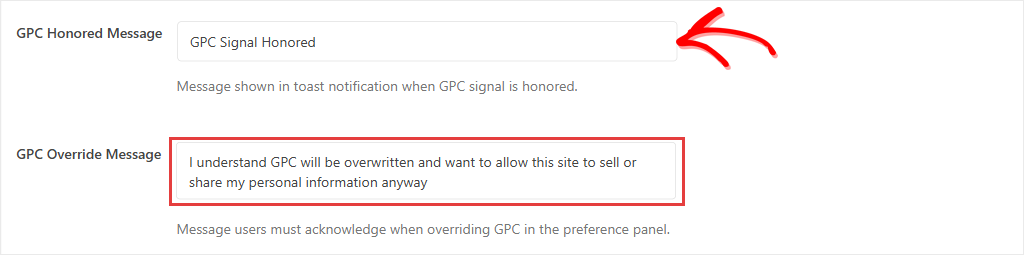
WPConsent shows those visitors a message at the bottom of the page, reading “GPC Signal Honored” by default.
If someone wants to override the signal, they have to acknowledge it first.
Since January 2026, California also requires covered businesses to show consumers that their GPC opt-out was processed.
Once you switch GPC on, WPConsent takes care of that for you.
For a step-by-step walkthrough, check out our guide on how to implement Global Privacy Control support in WordPress.
Run opt-in and opt-out on the same site (Basic Plan and Up)
WPConsent lets you run both opt-in and opt-out consent behavior on the same site at the same time.
Its location rules pair a region with the consent behavior visitors from it should get.
The CCPA and GDPR templates each configure the blocking options to match that region’s approach, so you don’t have to set them up from scratch.
Go to WPConsent » Geolocation.
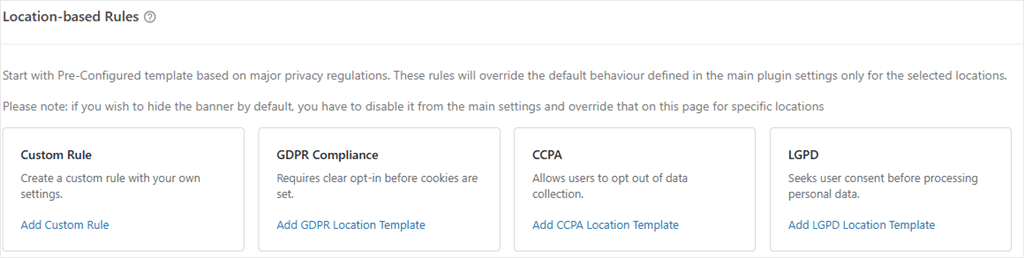
Click Add GDPR Location Template, confirm, then do the same for Add CCPA Location Template.
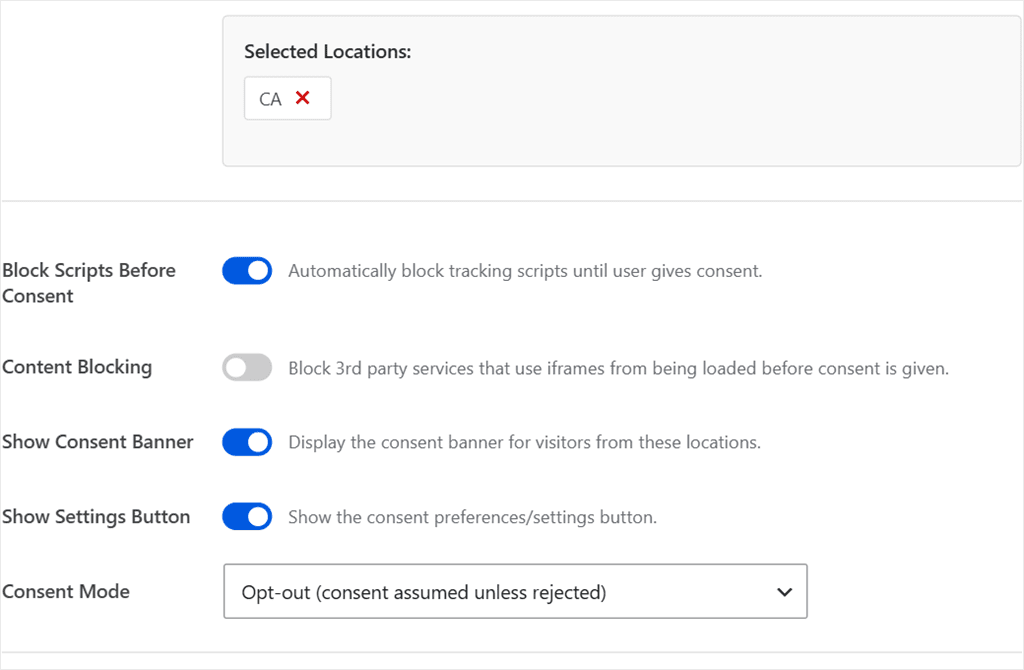
You end up with two rules covering two regions.
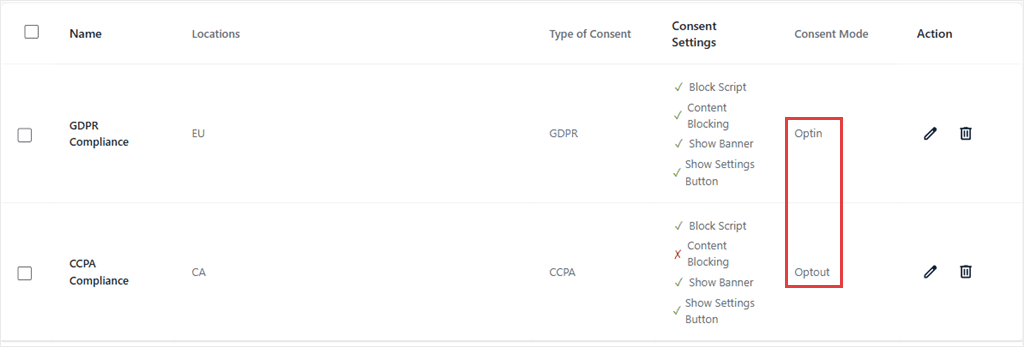
Every rule has edit and delete controls, and there is no limit on how many you add.
Use the Custom Rule tab to cover regions without a template. Visitors outside every rule you have set fall back to your main WPConsent settings.
How WPConsent Geolocation Works
WPConsent detects location through Cloudflare if you use it, or its own geolocation service if you don’t. Either way, this consent plugin handles the location lookup for you.
Blocked embeds like YouTube or Google Maps show a placeholder with a click-to-load button instead of loading the content before consent.
For a detailed tutorial, check out how to set up location-based cookie consent in WordPress.
Take Do Not Sell requests (Plus Plan and up)
If your business meets the CCPA thresholds above and sells or shares personal information, you need somewhere for consumers to actually submit the request.
WPConsent gives you a dedicated Do Not Sell form that visitors can fill out to submit their opt-out request.
Go to WPConsent » Do Not Sell and open the Configuration tab, then click Generate Do Not Sell Page.
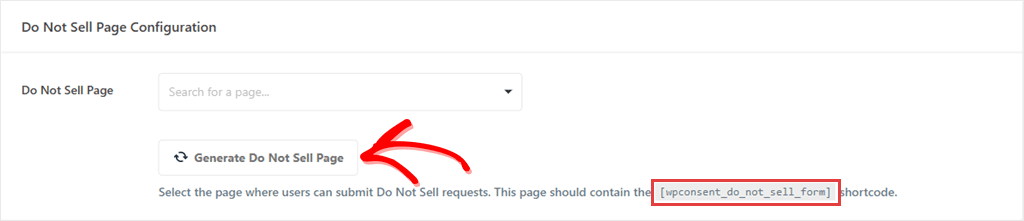
WPConsent builds the page for you, with the [wpconsent_do_not_sell_form] shortcode already in place.
Submitted requests land in the Requests tab, where you can work through them and export them. See this guide to learn how to create a Do Not Sell Page in WordPress.
Check out our WPConsent review to see everything it can do.
FAQs: GDPR vs CCPA. What You Need to Know
Is GDPR stricter than CCPA?
On consent, yes. GDPR asks for agreement before tracking starts, and CCPA does not. That does not make CCPA the easy one. Its Do Not Sell obligations and its GPC requirement have no GDPR equivalent, so a site built only for GDPR can still fall short.
Can one cookie banner handle GDPR and CCPA?
Yes. One opt-in banner for everyone is legal under both laws. It just collects less data from your US visitors than CCPA allows. A banner that applies different rules by location lets you keep that data. Either way, GPC and Do Not Sell requests, where they apply to you, are handled separately from the banner.
What about visitors from countries covered by neither law?
Neither GDPR nor CCPA reaches them, because both follow the visitor rather than the site. Many other countries have their own rules, though, so the practical approach is a sensible default for everyone uncovered, plus a rule for each region that matters to your traffic.
Does GDPR apply to US-based websites?
It can. GDPR is not limited to businesses in Europe. A US site that offers goods or services to people in the EU, or monitors their behavior, can fall under it regardless of where the business is based.
Do I need consent for cookies under CCPA?
Not in the GDPR sense of consent before loading. CCPA asks for notice, a working opt-out, and respect for the Global Privacy Control signal, rather than blocking cookies until someone agrees.
Does CCPA apply to small WordPress sites?
Not automatically. It applies to for-profit businesses that meet a revenue threshold or that buy, sell, or share a large amount of personal information, not to every site that happens to get a US visitor. A small blog is unlikely to be covered. A growing store might be.
What is Global Privacy Control, and do I have to honor it?
It is a signal a visitor’s browser sends to say they are opting out of the sale or sharing of their data. Since January 2026, twelve states require businesses covered by their privacy laws to detect and honor it. Under CCPA, that means businesses that sell or share personal information. If that’s you, a manual opt-out link on its own isn’t enough.
Treat Each Visitor the Way Their Region Expects
Which law is stricter was never the true question.
Your site will get visitors from both places, and they are entitled to different things.
One expects to be asked first. The other expects to be told clearly and given a way out, including through a signal their browser sends on its own.
Handle each visitor according to the rules that apply to them, and you can avoid giving up data you may be allowed to collect.
Honor Global Privacy Control signals and run a proper consent banner.
Get WPConsent free →
Run EU opt-in and US opt-out on the same site, automatically, by location.
Get WPConsent Pro →
Additional Resources
Go deeper on either law, or on the pieces around the banner itself.
- Beginner’s Guide to WordPress and GDPR Compliance: the full walkthrough on consent setup, banners, and blocking
- Ultimate Guide to WordPress and CCPA Compliance: current thresholds and the obligations past cookie consent
- Cookie Consent Requirements by Country: region by region, beyond these two
- Cookie Policy vs Privacy Policy: which document says what, and whether you need both
Disclaimer: This article is provided for informational and educational purposes only and does not constitute legal advice. No tool, WPConsent included, can by itself guarantee compliance with GDPR, CCPA, or any other privacy law. Privacy laws and their enforcement change over time. If you have questions about your site’s specific legal obligations, consult a licensed attorney.